Introduction
WARNING
Read all instructions carefully before installing and using the
Vector system. Improper use could result in serious injury.
See the Important Safety and Product Information guide in the
product box for product warnings and other important
information.
NOTICE
Go to www.garmin.com/vectorowner for the latest information
including bike compatibility, software updates, and video
tutorials.
Thank You
Thank you for your Vector purchase. Vector was designed for
cyclists, by cyclists, to provide an outstanding experience of
owning a precision power measurement system for your bike.
Vector is simple, accurate, and easy to use.
For software updates, video tutorials, and everything you need
to get years of service out of your Vector, go to
www.garmin.com/vectorowner.
Now it's time to put the power under your feet and get out there
and ride.
Getting Started
1
Install the Vector components (page 1).
2
Pair Vector with your Edge
®
(page 2).
3
Go for a ride (page 2).
4
View your history (page 3).
5
Send your history to your computer (page 3).
Tools Needed
• 15 mm pedal wrench
• Bike grease
• 3 mm hex key
• 4 mm hex key
Installing Vector Components
Preparing the Crank Arms
1
Remove the existing pedals.
2
Clean the threads and remove old grease.
Determining Pedal Pod Clearance
NOTICE
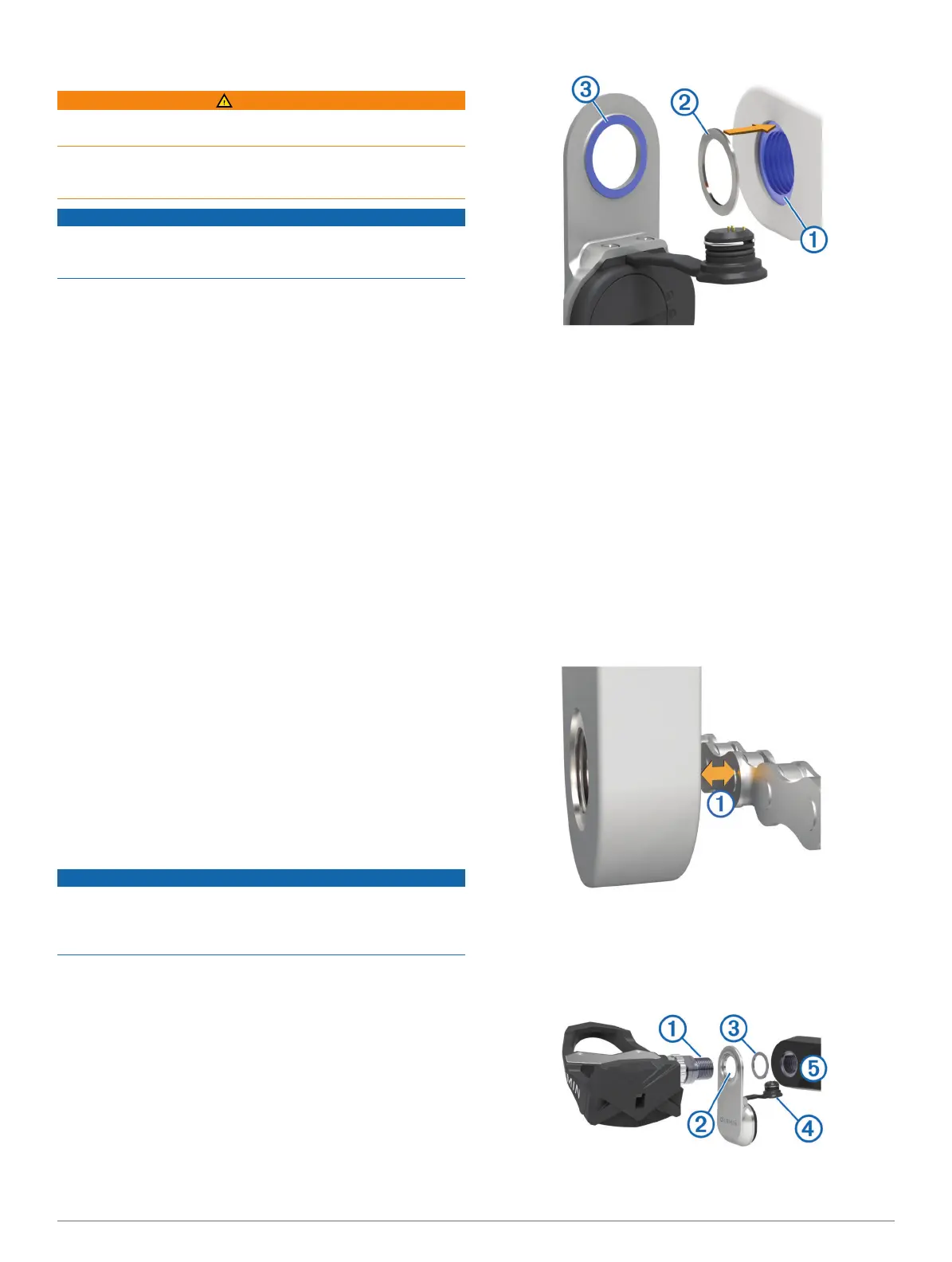
The pedal pod should contact the crank arm only at its mounting
face, because this is the load-bearing connection. If the pedal
pod contacts the crank arm anywhere else, the pedal pod may
fracture when the pedal is tightened.
• If the mounting face
À
surrounding the threaded hole in the
crank arm is recessed, use one or more washers
Á
to fill the
recess.
• Make sure the pedal pod mounting face
Â
contacts the crank
arm only at its mounting face (or the washer used to fill the
recess).
If it touches anywhere else, use another washer to provide
the necessary clearance.
• If the mounting face of the crank arm is protruding, do not
use washers.
Determining the Bicycle Chain Clearance
Before you can install the right pedal, you must determine
bicycle chain clearance.
Move your bike chain to the largest chain ring and the
smallest cassette gear.
The bike chain should be in the outermost position to
determine proper clearance between the pedal pod cable
and the chain.
NOTE: There must be at least 5 mm clearance
À
between
the chain and the crank arm.
Installing the Pedal Pod and Pedal
NOTE: The left and right pedal pods are the same.
1
Install the left pedal first.
2
Apply a thin layer of grease on the pedal spindle
À
and the
pedal pod
Á
where it contacts the pedal spindle.
3
On the pedal spindle, stack the pedal pod and any required
washers
Â
.
Introduction 1






 To Next Page