Do not use a sharp object to clean the device.
Avoid chemical cleaners, solvents, and insect repellents that
can damage plastic components and finishes.
Do not submerge or pressure wash the components.
Do not store the device where prolonged exposure to extreme
temperatures can occur, because it can cause permanent
damage.
Replace components with Garmin parts only. See your Garmin
dealer or the Garmin website.
Removing the Pedal Pod and Pedal
NOTICE
Do not attempt to pry the cable from the spindle.
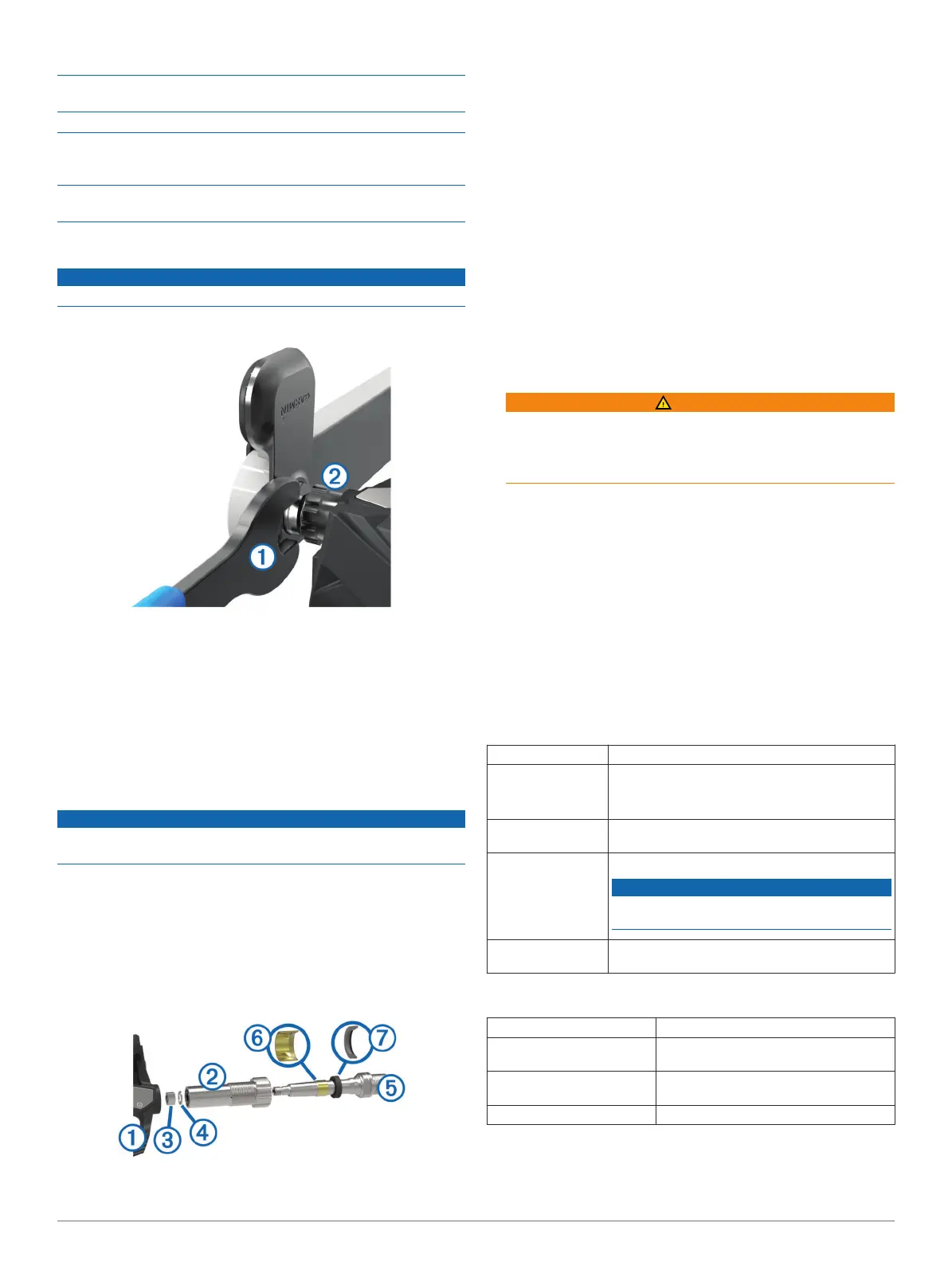
Use the pedal wrench
À
to slowly loosen the pedal
Á
.
NOTE: The right pedal has a left-handed (reverse) thread.
As you unscrew the pedal, the pedal pod cable disengages
from the spindle.
After you move Vector to another bike, you must recalibrate the
system (page 2).
Replacing the Pedals and Cartridges
Before you can start this task, you must obtain a cartridge axle
tool (available from Exustar™), 8 mm hex nut driver, 15 mm
pedal wrench, and bike grease.
NOTICE
Other compatible tools can be used. Use care not to damage
any of the Vector components.
If your pedals are damaged or show significant wear, you can
replace the pedals, cartridges, and related hardware
components.
1
Remove the pedals and pedal pods from your bike (page 4).
2
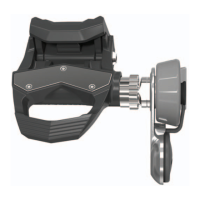
Unscrew the pedal body
À
from the cartridge
Á
using the
cartridge axle tool.
NOTE: The right pedal has a left-handed (reverse) thread.
3
Remove the pedal body.
4
While securely holding the cartridge with a cartridge axle
tool, use the hex nut driver to remove the nut
Â
and washer
Ã
.
5
Separate the cartridge from the spindle
Ä
.
6
Remove the brass spacer ring
Å
and dust seal
Æ
.
7
Remove old grease from the spindle.
8
Slide the new dust seal and brass spacer ring over the
spindle.
The tapered side of the dust seal and brass spacer ring must
face the base of the spindle.
9
Apply a layer of bike grease to the spindle.
10
Insert the spindle into the cartridge.
11
Wipe away any excess grease.
12
Install the new washer and nut on the end of the spindle.
The nut for the right spindle has a left-handed (reverse)
thread.
13
Use the hex nut driver to tighten the nut.
WARNING
Garmin recommends torque of 7 lbf-ft. (10 N-m). Failure to
properly tighten the nut could cause the pedal to fall off
during a ride, which could result in property damage or
serious bodily injury or death.
14
Install the new pedal by screwing it onto the cartridge until
there is no gap.
NOTE: The right pedal has a left-handed (reverse) thread.
15
Replace the pedal pods and pedals according to the
instructions (page 1).
16
Rotate the crank arm to check for clearance and smooth
pedal rotation.
Vector Storage
If you are transporting your bicycle or not using Vector for an
extended period of time, Garmin recommends removing Vector
and storing it in the product box.
Vector Specifications
Battery type User-replaceable CR2032, 3 volts
Battery life Minimum 175 hours of riding time
NOTE: The pedal pod used on the right crank will
drain the battery faster than the left crank.
Operating
temperature range
From -4° to 122°F (from -20° to 50°C)
Water resistance IPX7
NOTICE
Do not submerge or pressure wash the
components.
Radio frequency/
protocol
2.4 GHz ANT+ wireless communications protocol
USB ANT Stick™ Specifications
Power source USB
Operating temperature
range
From 14° to 122°F (from -10° to 50°C)
Radio frequency/protocol 2.4 GHz ANT+ wireless communications
protocol
Transmission range Approximately 16.4 ft. (5 m)
Battery Information
Vector monitors the battery level of both pedal pods and sends
status information to your Edge device. When you receive a low
4 Device Information






 To Next Page