EasyManua.ls Logo

Garrard ZERO 100C - Cartridge Alignment and Connection; Aligning the Cartridge; Connecting Cartridge Leads; Refitting the Carrier

Default Icon
18 pages
Print Icon
To Next Page IconTo Next Page
To Previous Page IconTo Previous Page
Loading...
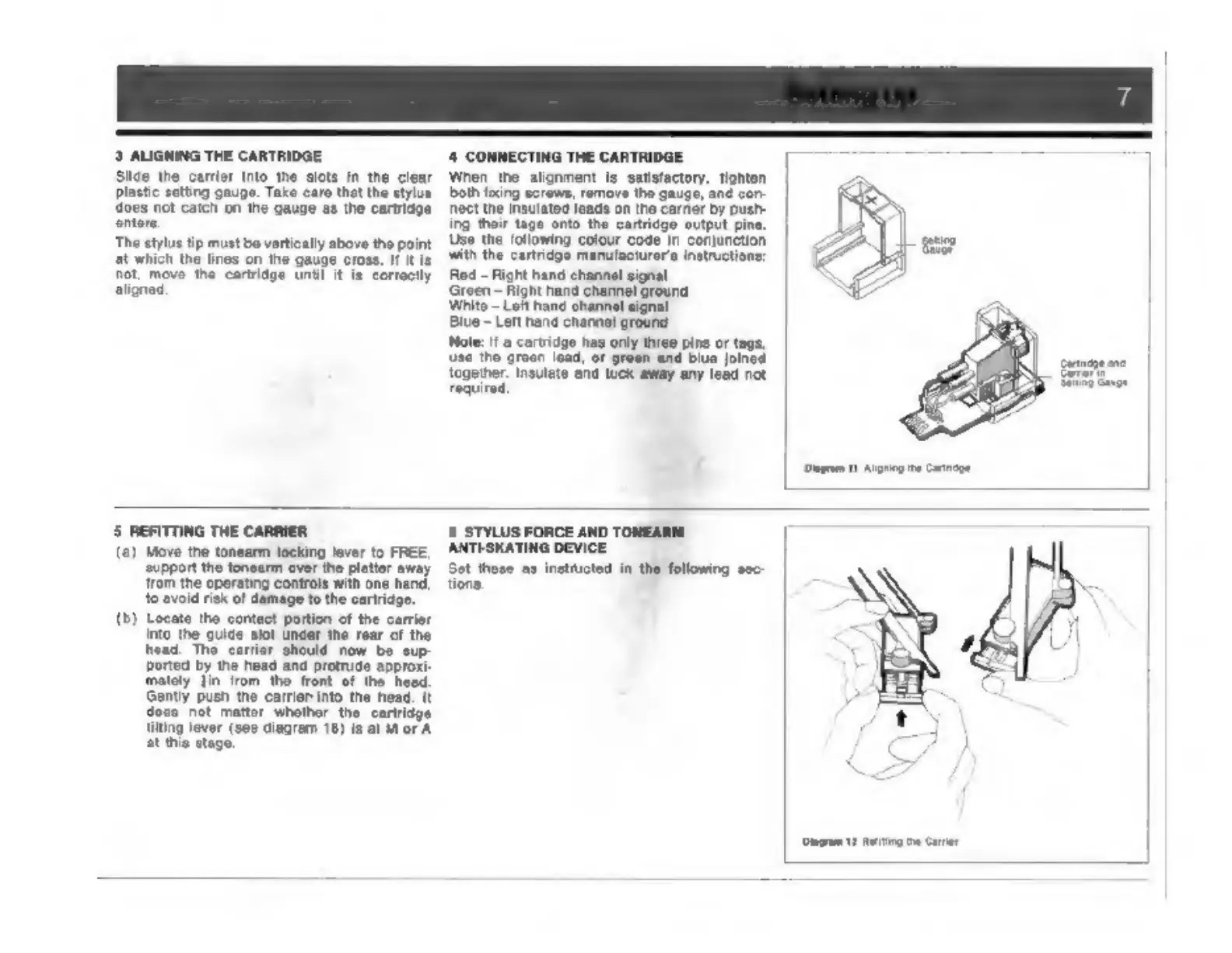
3
ALIGNING
THE
CARTRIDGE
Slide
the
carrier
into
the
slots
in
the
clear
plastic
eetting
gauge.
Take
care
that
the
stylus
{does
not
catch
on
the
gauge
as
the
cartridge
enters
The
stylus
tip
must
be
vertically
above
the
point
lat
which
the
lines
on
the
gauge
cross.
If
it
Is
not,
move
the
cartridge
until
it is
correctly
aligned.
4
CONNECTING
THE
CARTRIDGE
When
the
alignment
is
satisfactory,
tighten
both
foxing
scrows,
remove
tho
gauge,
ané
cor
rect
the
insulated
leads
on
the
earner
by
push
ing
their
tage
onto
the
cartridge
output
pine.
Use
the
following
colour
code
in
conjunction
with
the
cartridgo
manufacturer’
inetructione:
Rod
Right
hand
channel
signal
Green
~
Right
hand
channel
ground
White
Loft
hand
channel
signal
Blue
~
Left
hand
channel
ground
Note:
if
cartridge
has
only
three
pins
or
tags,
use
the
groen
le
together.
Insul
required
‘and
tuck
away
any
lead
not
Dagrom
11
Aig
te
Catcpe
5
REFITTING
THE
CARRIER
(2)
Move
the
tonearm
locking
lever
to
FREE
‘support
the
tonearm
over
the
platter
away
‘rom
the
operating
controls
with
one
hand,
to
avoid
risk
of
damage
to
the
cartridge.
(b)
Locate
the
contact
portion
of
the
carrier
Ported
by
the
head
and
protrude
approxi:
mately
Jin
trom
the
front
of
the
heed.
Gently
push
the
carrier
into
the
head.
It
docs
not
mattor
whother
the
cartridge
tilting
lever
(see
diagram
18)
Is
at
M
or
A
at
this
stage.
6
STYLUS
FORCE
AND
TONEARI
ANTLSKATING
DEVICE
Set
these
as
instiucted
in
the
following
sec-
tions.
Diagram
2
Resting
Carer

Other manuals for Garrard ZERO 100C

Related product manuals