EasyManua.ls Logo

Garrett ACE 250 - User Manual

Garrett ACE 250
18 pages
Print Icon
To Next Page IconTo Next Page
Loading...
Thank You For Choosing
Garrett Metal Detectors!
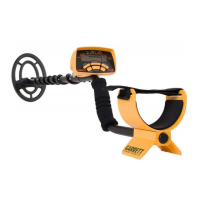
Thank you for choosing Garrett Metal Detectors’ ACE™
series detector. This enhanced metal detector has all the
depth and technology, including Garrett’s exclusive
Target ID technology you need to make your treasure
hunting adventures exciting and very rewarding. All of
our products are backed by 40 years of extensive
research and development that ensures your ACE
detector is the most advanced of its kind in the industry.
The ACE series of detectors include Garrett’s patented
discrimination feature. This technology, found only on
Garrett detectors, features two indicator scales that allow
the user to see the detector’s discrimination setting
(Lower Scale) as well as the analysis of each detected
target (Upper Scale). They also include the highly
acclaimed 6.5x9” PROformance searchcoil. This highly
rugged, epoxy-filled searchcoil covers more ground per
scan and offers greater depth to find those deeply buried
32
Garrett Metal Detectors
Ace 150 • Ace 250


Questions and Answers

  • R
    Rebecca JohnsonAug 14, 2025
    What to do if Garrett ACE 250 Metal Detector does not turn on?
    • D
      David SextonAug 14, 2025
      If your Garrett Metal Detector does not turn on, ensure the batteries are installed correctly. If they are, replace the old batteries with new ones.
  • E
    Emma SmithAug 17, 2025
    Why does my Garrett Metal Detector make erratic sounds or show erratic target ID?
    • C
      catherinehooverAug 17, 2025
      Erratic sounds or Target ID cursor movement in your Garrett Metal Detector can occur due to excessive metal indoors. Make sure you are not using the detector indoors where excessive amounts of metal are found. Also, ensure your search coil is securely connected and the coil cable is tightly wound around the stem. Reducing your sensitivity setting may also help. Check if you are close to other metal detectors or metal structures such as electrical power lines, wire fences, or benches.
  • A
    Alexandra ThompsonAug 21, 2025
    Why am I not finding specific targets with my Garrett Metal Detector?
    • L
      Linda MitchellAug 21, 2025
      If you are not finding specific targets with your Garrett Metal Detector, ensure you are using the correct mode for the type of hunting you are doing. If hunting for coins, ensure you are in the COINS mode. Alternatively, use the All-Metal mode to detect all metal targets and confirm if desired targets are present.
  • A
    alyssa38Aug 25, 2025
    What to do if my Garrett ACE 250 has intermittent signals?
    • B
      Blake RodriguezAug 25, 2025
      If your Garrett Metal Detector is producing intermittent signals, it could be due to a deeply buried target or a difficult angle. Try increasing the sensitivity on your detector and scan from different directions until the signal becomes more definite. It may also be the case of multiple targets. Switch to the All-Metal Mode or press PINPOINT to precisely locate all targets.
  • P
    pcarterAug 27, 2025
    How to fix a Garrett Metal Detector with no power?
    • M
      Michael SmithAug 27, 2025
      If your Garrett Metal Detector has no power, ensure batteries are installed in the correct position. If that doesn't work, replace all old batteries with new ones.
  • C
    Christopher DillonAug 30, 2025
    Why does my Garrett Metal Detector Target ID cursor move erratically?
    • E
      Elaine PhelpsAug 31, 2025
      Erratic sounds or Target ID cursor movements on your Garrett Metal Detector can occur for several reasons. Ensure the search head is well-connected and the cable is tightly wound around the tube. If you're indoors, be aware of excessive metal in floors and walls. Reduce the sensitivity setting. Also, check if you're near other metal detectors, power lines, wire fences, or benches.
  • H
    hbakerSep 3, 2025
    What to do if the Garrett ACE 250 Target ID cursor bounces?
    • M
      Mark SmithSep 3, 2025
      If your Garrett Metal Detector's Target ID cursor bounces erratically, it's likely the detected object is trash. It can also happen if a good target, like a coin, isn't parallel to the coil or if there's junk near the good target. Try scanning from different directions until the Target ID cursor stabilizes.
  • E
    Erica SchultzSep 6, 2025
    Why is my Garrett ACE 250 giving intermittent signals?
    • J
      Jesus CoxSep 6, 2025
      Intermittent signals from your Garrett Metal Detector can occur if the target is deeply buried or at a difficult angle. Increase the detector's sensitivity and scan from different directions to get a clearer signal. For multiple targets, switch to All-Metal mode or use PINPOINT to locate all targets precisely. In trash-filled areas, consider using the Super Sniper™ search head.
  • B
    Brittney MorganSep 9, 2025
    How to find specific objects with Garrett ACE 250 Metal Detector?
    • T
      Thomas KaneSep 9, 2025
      To find specific objects with your Garrett Metal Detector, ensure you are using the correct mode for your search. If searching for coins, use the COINS mode to eliminate unwanted targets. Alternatively, use the All-Metal mode to detect all metal objects and confirm the presence of your desired targets.

Garrett ACE 250 Specifications

General IconGeneral
Battery typeAA
Battery technologyAlkaline
Battery low indicationYes
Number of batteries supported4
Type-
Control typeButtons
Frequency band6.5 kHz
Number of programs5
Search depth (max)0.6 m
Suitable for materialsGold, Metal, Silver
Search depth adjustmentNo
Display typeLCD
Weight and Dimensions IconWeight and Dimensions
Depth1290 mm
Weight1200 g

Related product manuals