EasyManua.ls Logo

Garrett ACE 150 - User Manual

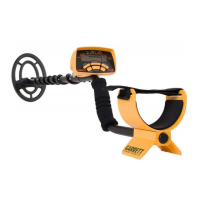
Garrett ACE 150
50 pages
Print Icon
To Next Page IconTo Next Page
Loading...
Owners
Manual

Questions and Answers

  • S
    Shane RamosJul 26, 2025
    What to do if Garrett ACE 150 Metal Detector does not turn on?
    • P
      parkernguyenJul 26, 2025
      If your Garrett Metal Detector does not turn on, ensure the batteries are installed correctly. If they are, replace the old batteries with new ones.
  • T
    Taylor ButlerAug 1, 2025
    Why does my Garrett ACE 150 Target ID cursor move erratically?
    • P
      pmeltonAug 1, 2025
      Erratic sounds or Target ID cursor movements on your Garrett Metal Detector can occur for several reasons. Ensure the search head is well-connected and the cable is tightly wound around the tube. If you're indoors, be aware of excessive metal in floors and walls. Reduce the sensitivity setting. Also, check if you're near other metal detectors, power lines, wire fences, or benches.
  • J
    Jennifer HallAug 7, 2025
    What to do if the Garrett Metal Detector Target ID cursor bounces?
    • E
      emily94Aug 7, 2025
      If your Garrett Metal Detector's Target ID cursor bounces erratically, it's likely the detected object is trash. It can also happen if a good target, like a coin, isn't parallel to the coil or if there's junk near the good target. Try scanning from different directions until the Target ID cursor stabilizes.
  • H
    harrisgabrielAug 13, 2025
    Why is my Garrett ACE 150 Metal Detector giving intermittent signals?
    • B
      billestradaAug 14, 2025
      Intermittent signals from your Garrett Metal Detector can occur if the target is deeply buried or at a difficult angle. Increase the detector's sensitivity and scan from different directions to get a clearer signal. For multiple targets, switch to All-Metal mode or use PINPOINT to locate all targets precisely. In trash-filled areas, consider using the Super Sniper™ search head.
  • T
    Tammy CrawfordAug 19, 2025
    How to find specific objects with Garrett ACE 150 Metal Detector?
    • S
      Sarah BrownSep 12, 2025
      To find specific objects with your Garrett Metal Detector, ensure you are using the correct mode for your search. If searching for coins, use the COINS mode to eliminate unwanted targets. Alternatively, use the All-Metal mode to detect all metal objects and confirm the presence of your desired targets.

Summary

ACE Parts

ACE Assembly

ACE 150 Features

ACE 150 Controls

ACE 250 Key Features

ACE 250 Controls

Hunting With Your ACE Detector

Digging a Target

Troubleshooting Guide

Code of Ethics

Caution!

Bench Tests

Caring For Your ACE Detector

ACE Warranty & Service

ACE Accessories

ACETM Tote Sport Bag

Rugged, durable nylon mesh bag for storing detectors and accessories.

ACETM Sport Phones

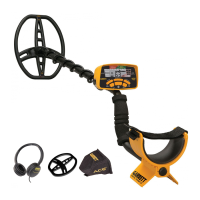
Sleek, lightweight sport headphones with 1/4" adapter for clear audio.

ACETM Baseball Cap (Embroidered)

100% cotton cap with embroidered Garrett logos and adjustable strap.

4.5 ACE Super Sniper Searchcoil

For small, shallow targets in trashy or tight places.

9 x12 PROformance Searchcoil

Increases scan width and depth for large areas.

ACE Environmental Cover-Up

Protects detector from rain and dust without blocking view.

Garrett TreasureSound Headphones

Lightweight headphones with stereo sound and durable construction.

RAM BOOKS ORDER FORM

Garrett ACE 150 Specifications

General IconGeneral
Frequency6.5 kHz
Audio Tone ID Levels3
Battery Life20 to 40 hours
WaterproofSearch coil only
Length42" to 51" (1.06m - 1.29m) Adjustable
Total Weight2.7 lbs (1.2 kg)
Batteries4 AA
Search Modes3
Warranty2 years, limited

Related product manuals