EasyManua.ls Logo

Garrett GTP 1350 - User Manual

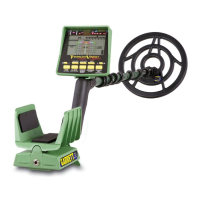
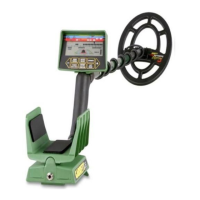
Garrett GTP 1350
31 pages
Print Icon
To Next Page IconTo Next Page
Loading...
Question and Answer IconNeed help?

Do you have a question about the Garrett GTP 1350 and is the answer not in the manual?

Summary

Garrett GTP 1350 Components List

Assembling the Garrett GTP 1350 Metal Detector

Step 1: Attach Lower Stem to Searchcoil

Details attaching the lower stem to the searchcoil using washers and a threaded bolt with knobs.

Step 2: Connect Control Housing and Stem

Explains how to install the upper stem to the lower stem and connect it to the control housing.

Understanding Garrett GTP 1350 Touchpad Controls

POWER Touchpad Operation

Explains how to turn the detector ON/OFF and reset to factory settings using the POWER touchpad.

MENU; SCROLL Touchpad Functionality

Details using the MENU/SCROLL touchpad to navigate and adjust detector settings.

MODE (Discrimination) Selection

Describes how to select discrimination modes (Coins, Jewelry, Relics, etc.) using the +/- touchpads.

Garrett GTP 1350 Discrimination Modes

Adjusting Sensitivity on the GTP 1350

Setting the Audio Threshold Level

Operate and Accept;Reject Touchpad Functions

Using Accept; Reject for Notch Discrimination

Details modifying the Notch Discrimination pattern by creating or deleting notches.

Pinpointing and Profiling Targets

Pinpointing Target Location and Depth

Guides on using the PINPOINT touchpad to find exact location and coin-depth of a target.

Understanding Target Size with Profiling

Explains how the PROFILING feature indicates target size (Small, Medium, Large).

Understanding the GTP 1350 LCD Display

Basic Operating Instructions for GTP 1350

Position Searchcoil and Turn On

Instructs to position the searchcoil and press POWER to turn the detector ON.

Scanning Technique and Speed

Guides on moving the searchcoil side to side at a constant height and speed.

Scanning and Analyzing Targets with GTP 1350

Avoiding Searchcoil Tilt and Maintaining Height

Advises against raising or tilting the searchcoil to maintain optimal detection performance.

Target Location and Refinement

Instructs to make repeated scans to determine target location.

Detailed Pinpointing and Profiling Guide

Pinpointing Target Location

Explains placing the searchcoil near the target and scanning in an 'X' pattern for the loudest sound.

Target Size Interpretation (Profiling)

Details how the PROFILING feature indicates target size (Small, Medium, Large).

Ensuring Accurate Target Size Profiling

Achieving Accurate Size Information

Guides on sweeping side-to-side with a consistent 14-inch width for accurate size profiling.

Measuring Coin Depth Accurately

Identifying and Handling Junk Targets

Best Practices for Field Operation

Methodical Scanning Approach

Emphasizes methodical scanning, overlapping sweeps, and wearing headphones.

Bench Testing for Discrimination Settings

Understanding GTP 1350 Battery Requirements

Battery Installation and Polarity

Emphasizes correct battery installation and polarity to prevent electronic damage.

Managing GTP 1350 Batteries

Replacing or Removing Batteries

Provides step-by-step instructions for replacing or removing batteries.

General Maintenance of Your Metal Detector

Cleaning the Detector and Coil

Guides on cleaning the detector housing and submersible searchcoil.

Protecting Against Water and Sand

Warns against submerging the control housing and protecting from water and sand.

Service and Repair Information

Preparing Your Detector for Service

Packing and Shipping Instructions

Provides instructions on how to pack and ship the detector safely for service.

Safety Warnings for Metal Detecting

Avoiding Underground Hazards

Warns about potential hazards like power lines, explosives, and pipelines when digging.

Digging Safely

Advises using reasonable caution when digging, especially in uncertain underground conditions.

Garrett GTP 1350 Technical Specifications

GTP 1350 Performance Specifications

Summary

Garrett GTP 1350 Components List

Assembling the Garrett GTP 1350 Metal Detector

Step 1: Attach Lower Stem to Searchcoil

Details attaching the lower stem to the searchcoil using washers and a threaded bolt with knobs.

Step 2: Connect Control Housing and Stem

Explains how to install the upper stem to the lower stem and connect it to the control housing.

Understanding Garrett GTP 1350 Touchpad Controls

POWER Touchpad Operation

Explains how to turn the detector ON/OFF and reset to factory settings using the POWER touchpad.

MENU; SCROLL Touchpad Functionality

Details using the MENU/SCROLL touchpad to navigate and adjust detector settings.

MODE (Discrimination) Selection

Describes how to select discrimination modes (Coins, Jewelry, Relics, etc.) using the +/- touchpads.

Garrett GTP 1350 Discrimination Modes

Adjusting Sensitivity on the GTP 1350

Setting the Audio Threshold Level

Operate and Accept;Reject Touchpad Functions

Using Accept; Reject for Notch Discrimination

Details modifying the Notch Discrimination pattern by creating or deleting notches.

Pinpointing and Profiling Targets

Pinpointing Target Location and Depth

Guides on using the PINPOINT touchpad to find exact location and coin-depth of a target.

Understanding Target Size with Profiling

Explains how the PROFILING feature indicates target size (Small, Medium, Large).

Understanding the GTP 1350 LCD Display

Basic Operating Instructions for GTP 1350

Position Searchcoil and Turn On

Instructs to position the searchcoil and press POWER to turn the detector ON.

Scanning Technique and Speed

Guides on moving the searchcoil side to side at a constant height and speed.

Scanning and Analyzing Targets with GTP 1350

Avoiding Searchcoil Tilt and Maintaining Height

Advises against raising or tilting the searchcoil to maintain optimal detection performance.

Target Location and Refinement

Instructs to make repeated scans to determine target location.

Detailed Pinpointing and Profiling Guide

Pinpointing Target Location

Explains placing the searchcoil near the target and scanning in an 'X' pattern for the loudest sound.

Target Size Interpretation (Profiling)

Details how the PROFILING feature indicates target size (Small, Medium, Large).

Ensuring Accurate Target Size Profiling

Achieving Accurate Size Information

Guides on sweeping side-to-side with a consistent 14-inch width for accurate size profiling.

Measuring Coin Depth Accurately

Identifying and Handling Junk Targets

Best Practices for Field Operation

Methodical Scanning Approach

Emphasizes methodical scanning, overlapping sweeps, and wearing headphones.

Bench Testing for Discrimination Settings

Understanding GTP 1350 Battery Requirements

Battery Installation and Polarity

Emphasizes correct battery installation and polarity to prevent electronic damage.

Managing GTP 1350 Batteries

Replacing or Removing Batteries

Provides step-by-step instructions for replacing or removing batteries.

General Maintenance of Your Metal Detector

Cleaning the Detector and Coil

Guides on cleaning the detector housing and submersible searchcoil.

Protecting Against Water and Sand

Warns against submerging the control housing and protecting from water and sand.

Service and Repair Information

Preparing Your Detector for Service

Packing and Shipping Instructions

Provides instructions on how to pack and ship the detector safely for service.

Safety Warnings for Metal Detecting

Avoiding Underground Hazards

Warns about potential hazards like power lines, explosives, and pipelines when digging.

Digging Safely

Advises using reasonable caution when digging, especially in uncertain underground conditions.

Garrett GTP 1350 Technical Specifications

GTP 1350 Performance Specifications

Garrett GTP 1350 Specifications

General IconGeneral
Frequency6.6 kHz
Operating Frequency6.6 kHz
DiscriminationYes
SensitivityAdjustable
Warranty2 years
WaterproofSearch coil only
Audio ToneAdjustable
DisplayLCD
LengthAdjustable
Search CoilPROformance coil
Battery Type9V

Related product manuals