EasyManua.ls Logo

Garrett AND GTAX 550 - User Manual

Garrett AND GTAX 550
7 pages
Print Icon
To Next Page IconTo Next Page
Loading...
OPERATING INSTRUCTIONS
ULTRA GTA 500, GTAx 500, AND GTAx 550
DETECTORS
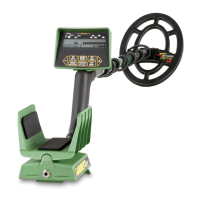
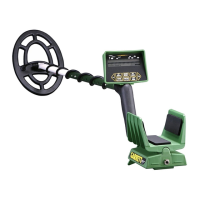
The control panels of these detectors have seven (7) touchpads which control all the operating
functions of the detector. Beneath the Arm Cuff are the Battery Pack and the headphone jack.
TOUCHPAD CONTROL FUNCTIONS:
Power: Turns the detector on, off, or resets the detector to the factory settings.
Press once to turn the detector on.
As the detector starts the battery condition is checked audibly and displayed on the LCD
Display. Also, during the detector's start-up the detector adjusts automatically for the
elimination of ground minerals, and the audio threshold is set to a point that is just silent. The
last used pattern of discrimination is re-established and displayed on the LCD face.
Set Depth: (Also referred to as sensitivity). Permits the regulation of depth/sensitivity using the
+ and - touchpads.
Set Audio: Permits the regulation of the Audio Threshold using the + and - touchpads.
Set Disc: (Discrimination): Permits the regulation and/or adjustment of the discrimination
pattern by turning on and off target cursors on the lower LCD bar which shows the items to be
rejected or accepted as targets.
Pinpoint: Activates the Pinpointing function and causes the depth of coin-sized items to be
shown on the Lower Scale.
Last Mode: Switches operation between operating modes A and B.
+ and - Arrows: Used to move the Target ID cursor when setting the discrimination notches.
These arrows are also used when adjusting the Depth/Sensitivity, and Audio Threshold levels.
Special Note:
If you are ever unsure about the settings of your detector, simply
press and hold the Power
touchpad for approximately 10 seconds. The detector will emit an audio signal and the factory
default settings will be restored.
Graphic Display Information:
Above the LCD Display is a guide of targets for use with the Target Cursor to assist in the
identification of detected items.
Note: All metal items will be indicated on the display but only
those that correspond with segments which are turned on will give an audio response.
Question and Answer IconNeed help?

Do you have a question about the Garrett AND GTAX 550 and is the answer not in the manual?

Summary

Touchpad Control Functions

Power Touchpad

Turns the detector on, off, or resets to factory settings.

Set Depth and Audio Adjustment

Regulates depth/sensitivity and audio threshold using the +/- touchpads.

Discrimination and Mode Selection

Adjusts discrimination patterns and switches between operating modes.

Pinpoint and Cursor Control

Activates pinpointing function and controls target ID cursor movement.

Factory Reset Procedure

Reset to Factory Defaults

Resets detector to factory defaults by holding the Power touchpad for approximately 10 seconds.

Graphic Display Information

Target Identification Guide

Guide of targets for use with the Target Cursor to assist in identification.

LCD Display Scales

Upper Scale

Indicates target found, Depth/Audio mode settings, and max Pinpoint signal.

Lower Scale

Indicates discrimination segments and depth of coin-sized targets when pinpointing.

Assembly Instructions

Stem and Searchcoil Assembly

Steps for assembling the lower stem, searchcoil, and upper stem to the housing.

Cable Connection

Instructions for connecting and securing the searchcoil cable to the housing.

Operating Instructions

Initial Setup and Search

Lower searchcoil, press POWER, and wait for audio threshold establishment.

Scanning Technique

Scan searchcoil level to ground at 1-2 inches height, 1-2 feet per second.

Pinpointing Technique

Precise Pinpointing

Hover searchcoil over target; greatest deflection on Upper Scale indicates center.

Depth Reading Method

Slide coil while watching LCD; touching segments indicate target beneath coil center.

Junk Targets and Object Identification

Handling Junk Targets

Check graphic display for unclear signals; trash targets may show multiple cursors.

Large Object Signals

Large objects may give good target signals due to size, conductivity, or proximity.

Operating Adjustments

Mode Selection (A vs. B)

Default Mode B finds coins, Mode A finds all metals. Switch using Last Mode touchpad.

Discrimination Pattern Adjustment

Customize discrimination by moving cursor with arrows and pressing Set Disc.

Depth;Sensitivity and Audio Adjustments

Depth;Sensitivity Setting

Adjust depth/sensitivity (approx. 75% default) to reduce static or find deep items.

Audio Threshold Level

Adjust audio level using +/- touchpads until the desired threshold is attained.

Batteries

Battery Requirements

Requires eight (8) AA batteries in two holders; observe polarity for correct installation.

Battery Test and Replacement

Batteries are tested on startup; replace when only one bar remains on the scale.

Maintenance and Care

General Handling Precautions

Handle with care, avoid temperature extremes, and keep clean from dust/sand.

Searchcoil Submersion

Searchcoil is submersible, but control housing is not; protect from moisture.

Long-Term Storage

Remove batteries when storing for longer than one month.

Repair Service

Troubleshooting Steps

Check batteries, switches, connectors, and consult dealer before returning for service.

Returning for Factory Service

Include a detailed note with contact info; pack securely in original carton.

Metal Detector Operator Code of Ethics

Respect for Property and Law

Respect private/public property, historical sites, obey laws, and fill holes.

Environmental Responsibility

Do not litter, leave items, carry out all trash and dug targets.

Good Manners and Public Image

Observe Golden Rule, use good outdoor manners to enhance the field's public image.

Safety Warnings

Hazardous Underground Items

Avoid striking underground power lines, explosives, pipes, or flammable gas/liquid.

Digging Precautions

Use caution when digging towards targets, especially in uncertain underground conditions.

Garrett AND GTAX 550 Specifications

General IconGeneral
TypeMetal Detector
BrandGarrett
ModelGTAX 550
Target IDYes
DiscriminationYes
Adjustable SensitivityYes
Battery4 x AA
Audio Tones3
Ground BalancePreset

Related product manuals