EasyManua.ls Logo

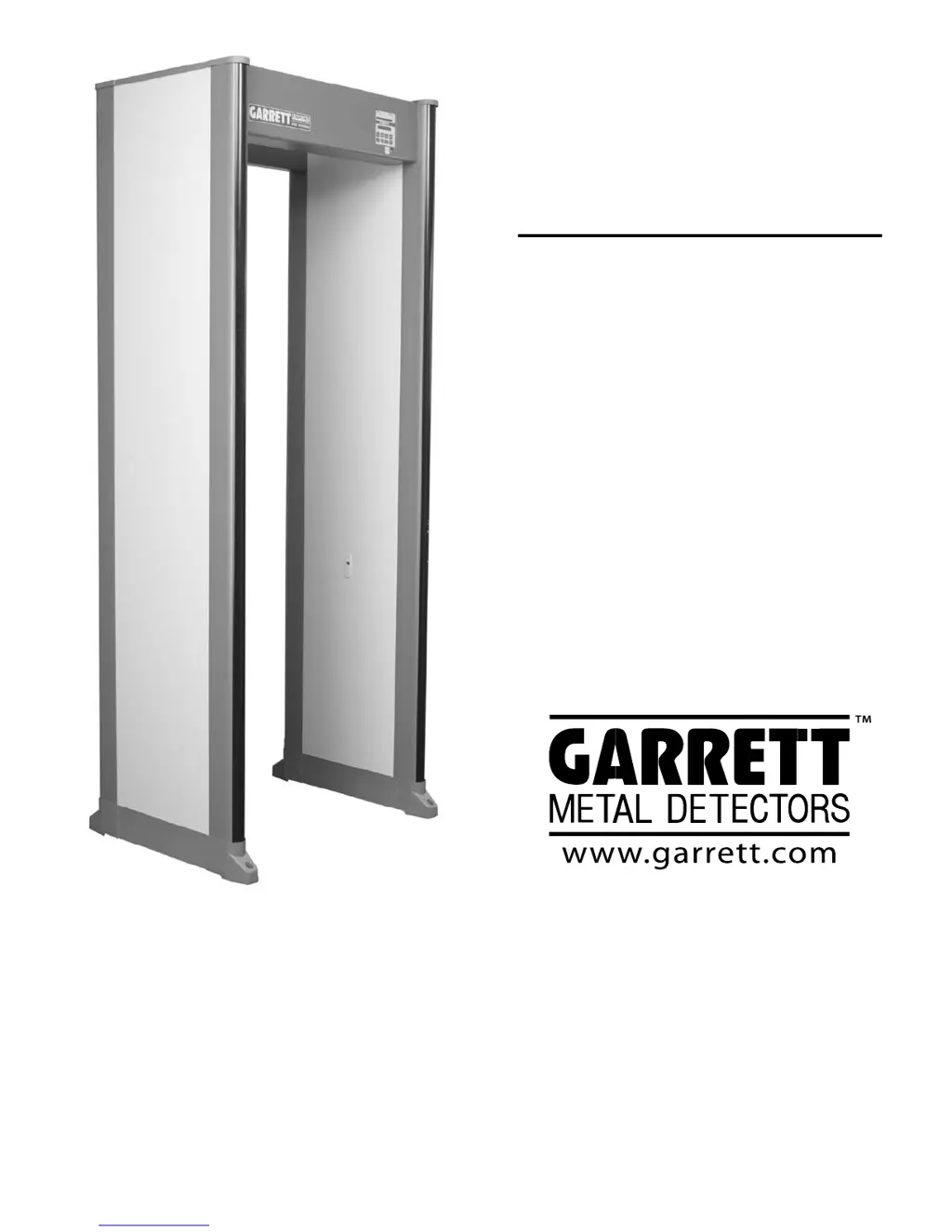
Garrett PD 6500i - User Manual

Garrett PD 6500i
56 pages
Print Icon
To Next Page IconTo Next Page
Loading...
USER MANUAL
PD 6500i
MODEL 11684xx
OUTSIDE USA
International Division
Garrett Metal Detectors
1881 West State Street
Garland, Texas 75042-6797 USA
Phone: 972-494-6151
Fax: 972-494-1881
Email: international@garrett.com
Website: www.garrett.com
USA
Security Division
Garrett Metal Detectors
1881 West State Street
Garland, Texas 75042-6797 USA
Phone: 972-494-6151
Fax: 972-494-1881
Email: security@garrett.com
Website: www.garrett.com

Questions and Answers

Summary

Manufacturer Safety Cautions

Electrical and Environmental Specifications

Details electrical specs, humidity, temperature, and altitude.

Anchoring and Battery Safety Guidelines

Covers unit anchoring requirements and safe battery handling procedures.

Explanation of Safety Symbols

Clarifies the meaning and purpose of various safety symbols.

Medical Safety and Screening Procedures

Medical Device Interactions and Precautions

Discusses potential effects on medical implants and advice for users.

Checkpoint Security Plan Considerations

Outlines traffic flow, alternative screening, and personnel training.

General Description of the PD 6500 i

Technical Specifications and Dimensions

Details physical dimensions and operating conditions.

Regulatory Information and Compliance

Lists electrical safety, magnetic field, EMC, physical, and product performance standards.

Controls, Displays, and Alarms

Visual Indicators and Touchpad Controls

Describes visual indicators like LEDs and LCD, plus touchpad overview.

Audio Alarm System and Pinpoint Lights

Explains target, warble, and tamper alarms, and pinpoint lights.

Detailed Touchpad Functions

Provides detailed descriptions of each touchpad function.

Installation Procedures

Site Selection and Requirements

Details factors for choosing a location for the detector.

Unit Assembly Overview

Introduces unit assembly and component verification.

Electrical Power Requirements

Discusses power needs, connections, and phase synchronization.

Physical Site Preparation and Configuration

Covers site surface, obstructions, weather, and checkpoint layout.

Unit Assembly and Setup

Interference Considerations During Setup

Discusses factors that can cause interference with detector operation.

Assembly Contents and Initial Steps

Lists included parts and outlines the first steps of assembly.

Connecting Panel Cables

Details the process of connecting cables between detection unit and panels.

Power Connection and Final Assembly

Covers AC power connection and attaching the crosspiece.

Multiple Unit Installation and Synchronization

Power Cord Wiring Description

Describes power cord wiring for US and International models.

Crosstalk Prevention in Multi-Unit Setups

Explains methods to avoid interference between multiple detectors.

Case 1: Same Phase Synchronization Procedure

Details the procedure for synchronizing units on the same AC phase.

Case 2: Different Phases or Battery Backup Synchronization

Details synchronization for units on different phases or battery backup.

Case 3: Mixed Detector Brand Synchronization

Procedure for synchronizing PD 6500is with other Garrett models.

Case 4: Non-Garrett Detector Integration

Procedure for operating PD 6500i with non-Garrett detectors.

Controls and Adjustments

Stabilizing and Final Installation Checks

Covers securing the unit and performing final installation checks.

User Access Levels and Menu Navigation

Explains user access levels and how to navigate the settings menus.

Power On;Off and LCD Message Definitions

Describes powering the unit on/off and the meaning of LCD messages.

Self-Test and Detector Settings Overview

Details the self-test feature and general detector settings.

Volume, Minimum Volume, and Counter Settings

Covers settings for volume control, minimum volume, and traffic counting.

Alarm Counts and Random Alarm Percentage

Explains Real Alarms Count, Real Alarm %, and Random Alarm %.

Alarm Time, IR Analysis, and Count Direction

Covers alarm duration, IR analysis, and traffic counting direction.

Language and RX Balance Settings

Details language selection and RX balance evaluation.

Synchronization and Channel Settings

Explains sync modes and channel selection for multi-unit operation.

Program and Base Sensitivity Selection

Covers choosing programs and setting base sensitivity levels.

Using Alarm Level for Sensitivity and Interference Evaluation

Details using Alarm Level for setup and noise evaluation.

Zone Sensitivity Boost Adjustments

Explains how to adjust sensitivity for individual detection zones.

Relay Options and Operator Enable Settings

Covers relay configuration and operator control settings.

Supervisor and Administrator Code Management

Explains how to change supervisor and administrator access codes.

Bar Graph and Detection Speed Settings

Describes bar graph modes and detection speed settings.

M Filter and Frequency Adjustment for Noise

Details M Filter and frequency settings for noise reduction.

Line Sync and Transmit Configuration

Explains line sync operation and transmitter settings.

Factory Default Settings Overview

Lists the default configuration settings for the PD 6500i.

Administrator Code Reset Procedure

Details the mechanical method for resetting the administrator access code.

Program and Sensitivity Settings

Program Selection Guidance

Discusses choosing the appropriate program for specific applications.

Selecting Sensitivity and Zone Boost Settings

Describes the process for setting base sensitivity and zone boost.

Operation and Operator Responsibilities

Operational Testing Procedures

Covers using test pieces for calibration and regular verification.

Operators Key Responsibilities and Checks

Outlines the operator's duties and essential equipment checks.

Responding to Alarms and Using Pinpoint Lights

Guides operators on handling alarms and utilizing pinpoint lights for scanning.

Maintenance and Troubleshooting

Troubleshooting Overview and Setup Guide

Lists sections for troubleshooting and returning the unit to factory defaults.

Locating Continuous Noise Sources

Describes methods for identifying and resolving constant electrical or mechanical interference.

Locating Periodic Spiking Noise Sources

Explains how to identify and resolve intermittent interference.

Error Code Diagnostics and Failure Remedies

Provides a table of critical and non-critical failures with possible solutions.

Error Code Diagnostics (Continued)

Continues the table of error codes, their causes, and remedies.

Repair Procedures and Module Access

Discusses general repair, controller module, and power module access.

Replacement Parts List and Identification

Lists available replacement parts with part numbers and quantities.

Warranty Information and Limitations

Details the limited parts and labor warranty and its exclusions.

Relay Options and External Controls

AC Control and Connection Procedures

Describes how to control external AC devices using the relay outputs.

DC Control and Connection Options

Details various methods for controlling external DC devices.

Available Accessories

Battery Backup Module Installation Guide

Covers the field installation of the battery backup module.

Power Cord Jumper for Unit Connectivity

Describes the power cord jumper for connecting multiple units.

Desktop Remote Control Features and Installation

Explains the features and installation of the remote control unit.

MagnaDolly Wheel Transporter Options

Discusses permanent and removable MagnaDolly transporter versions.

MagnaDolly Installation Procedures

Covers the installation process for both MagnaDolly transporter versions.

Adhesive Floor Mounts for Unit Securing

Describes adhesive floor mounts for fixing unit location and preventing tipping.

Stabilizer Bars for Tipping Prevention

Explains the use of stabilizer bars to prevent the unit from tipping over.

CMA Module for Network Connectivity

Details the CMA module for remote control, monitoring, and diagnostics.

Operational and Flat Test Pieces

Describes test pieces for calibrating and verifying detector performance.

Summary

Manufacturer Safety Cautions

Electrical and Environmental Specifications

Details electrical specs, humidity, temperature, and altitude.

Anchoring and Battery Safety Guidelines

Covers unit anchoring requirements and safe battery handling procedures.

Explanation of Safety Symbols

Clarifies the meaning and purpose of various safety symbols.

Medical Safety and Screening Procedures

Medical Device Interactions and Precautions

Discusses potential effects on medical implants and advice for users.

Checkpoint Security Plan Considerations

Outlines traffic flow, alternative screening, and personnel training.

General Description of the PD 6500 i

Technical Specifications and Dimensions

Details physical dimensions and operating conditions.

Regulatory Information and Compliance

Lists electrical safety, magnetic field, EMC, physical, and product performance standards.

Controls, Displays, and Alarms

Visual Indicators and Touchpad Controls

Describes visual indicators like LEDs and LCD, plus touchpad overview.

Audio Alarm System and Pinpoint Lights

Explains target, warble, and tamper alarms, and pinpoint lights.

Detailed Touchpad Functions

Provides detailed descriptions of each touchpad function.

Installation Procedures

Site Selection and Requirements

Details factors for choosing a location for the detector.

Unit Assembly Overview

Introduces unit assembly and component verification.

Electrical Power Requirements

Discusses power needs, connections, and phase synchronization.

Physical Site Preparation and Configuration

Covers site surface, obstructions, weather, and checkpoint layout.

Unit Assembly and Setup

Interference Considerations During Setup

Discusses factors that can cause interference with detector operation.

Assembly Contents and Initial Steps

Lists included parts and outlines the first steps of assembly.

Connecting Panel Cables

Details the process of connecting cables between detection unit and panels.

Power Connection and Final Assembly

Covers AC power connection and attaching the crosspiece.

Multiple Unit Installation and Synchronization

Power Cord Wiring Description

Describes power cord wiring for US and International models.

Crosstalk Prevention in Multi-Unit Setups

Explains methods to avoid interference between multiple detectors.

Case 1: Same Phase Synchronization Procedure

Details the procedure for synchronizing units on the same AC phase.

Case 2: Different Phases or Battery Backup Synchronization

Details synchronization for units on different phases or battery backup.

Case 3: Mixed Detector Brand Synchronization

Procedure for synchronizing PD 6500is with other Garrett models.

Case 4: Non-Garrett Detector Integration

Procedure for operating PD 6500i with non-Garrett detectors.

Controls and Adjustments

Stabilizing and Final Installation Checks

Covers securing the unit and performing final installation checks.

User Access Levels and Menu Navigation

Explains user access levels and how to navigate the settings menus.

Power On;Off and LCD Message Definitions

Describes powering the unit on/off and the meaning of LCD messages.

Self-Test and Detector Settings Overview

Details the self-test feature and general detector settings.

Volume, Minimum Volume, and Counter Settings

Covers settings for volume control, minimum volume, and traffic counting.

Alarm Counts and Random Alarm Percentage

Explains Real Alarms Count, Real Alarm %, and Random Alarm %.

Alarm Time, IR Analysis, and Count Direction

Covers alarm duration, IR analysis, and traffic counting direction.

Language and RX Balance Settings

Details language selection and RX balance evaluation.

Synchronization and Channel Settings

Explains sync modes and channel selection for multi-unit operation.

Program and Base Sensitivity Selection

Covers choosing programs and setting base sensitivity levels.

Using Alarm Level for Sensitivity and Interference Evaluation

Details using Alarm Level for setup and noise evaluation.

Zone Sensitivity Boost Adjustments

Explains how to adjust sensitivity for individual detection zones.

Relay Options and Operator Enable Settings

Covers relay configuration and operator control settings.

Supervisor and Administrator Code Management

Explains how to change supervisor and administrator access codes.

Bar Graph and Detection Speed Settings

Describes bar graph modes and detection speed settings.

M Filter and Frequency Adjustment for Noise

Details M Filter and frequency settings for noise reduction.

Line Sync and Transmit Configuration

Explains line sync operation and transmitter settings.

Factory Default Settings Overview

Lists the default configuration settings for the PD 6500i.

Administrator Code Reset Procedure

Details the mechanical method for resetting the administrator access code.

Program and Sensitivity Settings

Program Selection Guidance

Discusses choosing the appropriate program for specific applications.

Selecting Sensitivity and Zone Boost Settings

Describes the process for setting base sensitivity and zone boost.

Operation and Operator Responsibilities

Operational Testing Procedures

Covers using test pieces for calibration and regular verification.

Operators Key Responsibilities and Checks

Outlines the operator's duties and essential equipment checks.

Responding to Alarms and Using Pinpoint Lights

Guides operators on handling alarms and utilizing pinpoint lights for scanning.

Maintenance and Troubleshooting

Troubleshooting Overview and Setup Guide

Lists sections for troubleshooting and returning the unit to factory defaults.

Locating Continuous Noise Sources

Describes methods for identifying and resolving constant electrical or mechanical interference.

Locating Periodic Spiking Noise Sources

Explains how to identify and resolve intermittent interference.

Error Code Diagnostics and Failure Remedies

Provides a table of critical and non-critical failures with possible solutions.

Error Code Diagnostics (Continued)

Continues the table of error codes, their causes, and remedies.

Repair Procedures and Module Access

Discusses general repair, controller module, and power module access.

Replacement Parts List and Identification

Lists available replacement parts with part numbers and quantities.

Warranty Information and Limitations

Details the limited parts and labor warranty and its exclusions.

Relay Options and External Controls

AC Control and Connection Procedures

Describes how to control external AC devices using the relay outputs.

DC Control and Connection Options

Details various methods for controlling external DC devices.

Available Accessories

Battery Backup Module Installation Guide

Covers the field installation of the battery backup module.

Power Cord Jumper for Unit Connectivity

Describes the power cord jumper for connecting multiple units.

Desktop Remote Control Features and Installation

Explains the features and installation of the remote control unit.

MagnaDolly Wheel Transporter Options

Discusses permanent and removable MagnaDolly transporter versions.

MagnaDolly Installation Procedures

Covers the installation process for both MagnaDolly transporter versions.

Adhesive Floor Mounts for Unit Securing

Describes adhesive floor mounts for fixing unit location and preventing tipping.

Stabilizer Bars for Tipping Prevention

Explains the use of stabilizer bars to prevent the unit from tipping over.

CMA Module for Network Connectivity

Details the CMA module for remote control, monitoring, and diagnostics.

Operational and Flat Test Pieces

Describes test pieces for calibrating and verifying detector performance.

Garrett PD 6500i Specifications

General IconGeneral
Power Consumption5 Watts
Operating Temperature-4°F to 158°F (-20°C to 70°C)
Target PinpointingYes
Sensitivity Levels200
Power100 to 240 VAC, 50 or 60 Hertz, 5 watts
Dimensions58 cm
HumidityTo 95%, non-condensing
WeatherabilityMeets IP55 standards

Related product manuals