4
Garrett Metal Detectors
COMPONENTS AND FUNCTIONS
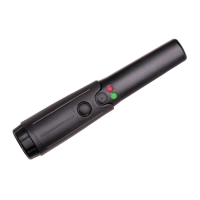
Power Button
Easy push button power switch turns the power of
the detector ON and OFF.
Light Alerts
• Red LED light illuminates when metallic target
has been detected.
• Green LED light remains illuminated while the
detector is ON and will change to AMBER when
the battery needs to be replaced. (Approximately
1 to 2 hours of use remain once the AMBER
light appears. No performance degradation takes
place until the battery is fully depleted; when this
occurs, operation becomes erratic.)
LED flashlight
When the THD is ON, the LED flashlight button
may be pressed and held to activate the bright
LED flashlight at the tip of the unit. The LED
flashlight turns off when the flashlight button is
released.












 To Next Page