
 Need help?
Do you have a question about the Garrett Z-Lynk Wireless System and is the answer not in the manual?
Details on which metal detectors and headphones the Z-Lynk system can be paired with.
Information regarding FCC and Industry Canada compliance for the Z-Lynk Wireless System.
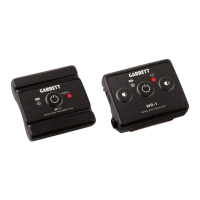
Steps for physically connecting the WT-1 transmitter and WR-1 receiver to your metal detector and headphones.
Procedure for switching the Z-Lynk modules on and off.
How to adjust audio volume using the WR-1 receiver controls.
Steps to pair the WT-1 transmitter with the WR-1 receiver.
Instructions for recharging the Z-Lynk modules using USB cables.
Explanation of the LED lights on the Z-Lynk modules for status indication.
Safety notes and warnings regarding the use and environmental resistance of Z-Lynk modules.
Technical details including model number, audio delay, battery life, and operating temperature.
 General
| Brand | Garrett |
|---|---|
| Model | Z-Lynk Wireless System |
| Category | Metal Detector |
| Language | English |









 To Next Page