FHSD700C Series Product Guide
GE Security
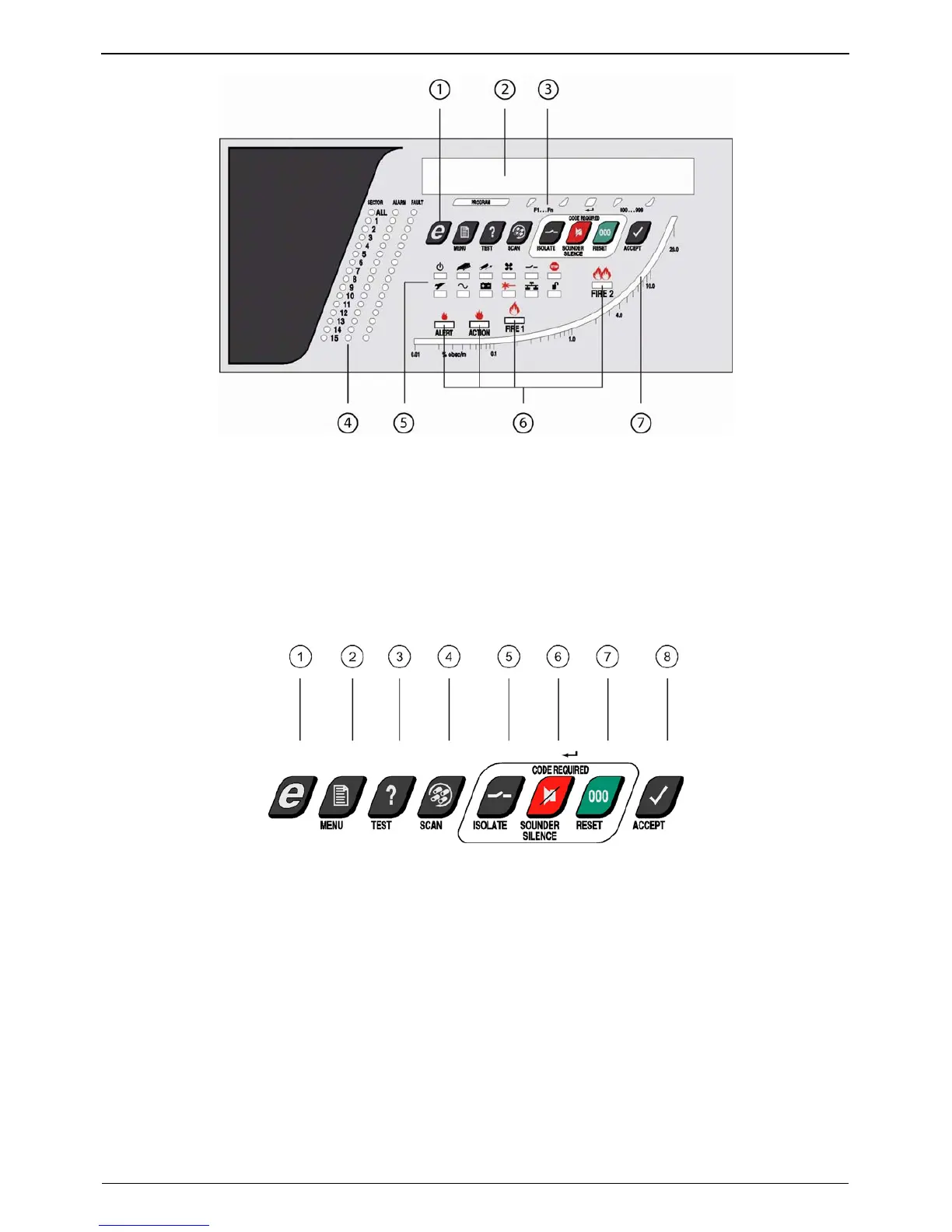
1. Control and Configuration Buttons
2. Status Display
3. Alternate Button Function Indicators
4. Sector, Alarm and Fault Indicators
5. Display LEDs
6. Alert, Action, Fire1 and Fire2 Indicators
7. Logarithmic smoke density bargraph
Figure 2-1: FHSD700C Series Display Panel
The following describe the display panel for the FHSD700C detector.
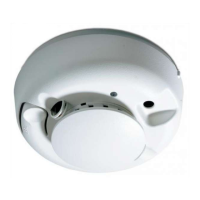
1. Control and Configuration Buttons
All local user-interface options are done using these buttons.
1. Not used for FHSD700C detectors
2. Menu key
3. Test key
4. Scan / parameter scroll down key
5. Isolate / parameter scroll up key
6. Sounder silence / enter key
7. Reset / value scroll down key
8. Accept / value scroll up key
Figure 2-2: Control and configuration keys
2. Status display
Will normally show the smoke density value. Also used for all Setup and Configure procedures.
3. Alternate button function indicators
When the unit is in a mode accessed by the Main Menu, the five right-most buttons can change to Scroll
and Enter functions.
4. Sector, Alarm and Fault Indicators
Individual Sample, Alarm, and Fault indicators for each sector. The All alarm is the Trace indicator.
4
www.gesecurity.net



 To Next Page