49-60698-4 19
INSTALLATION INSTRUCTIONS
Installation Instructions
INSTALLING THE WATER LINE (Continued)
9
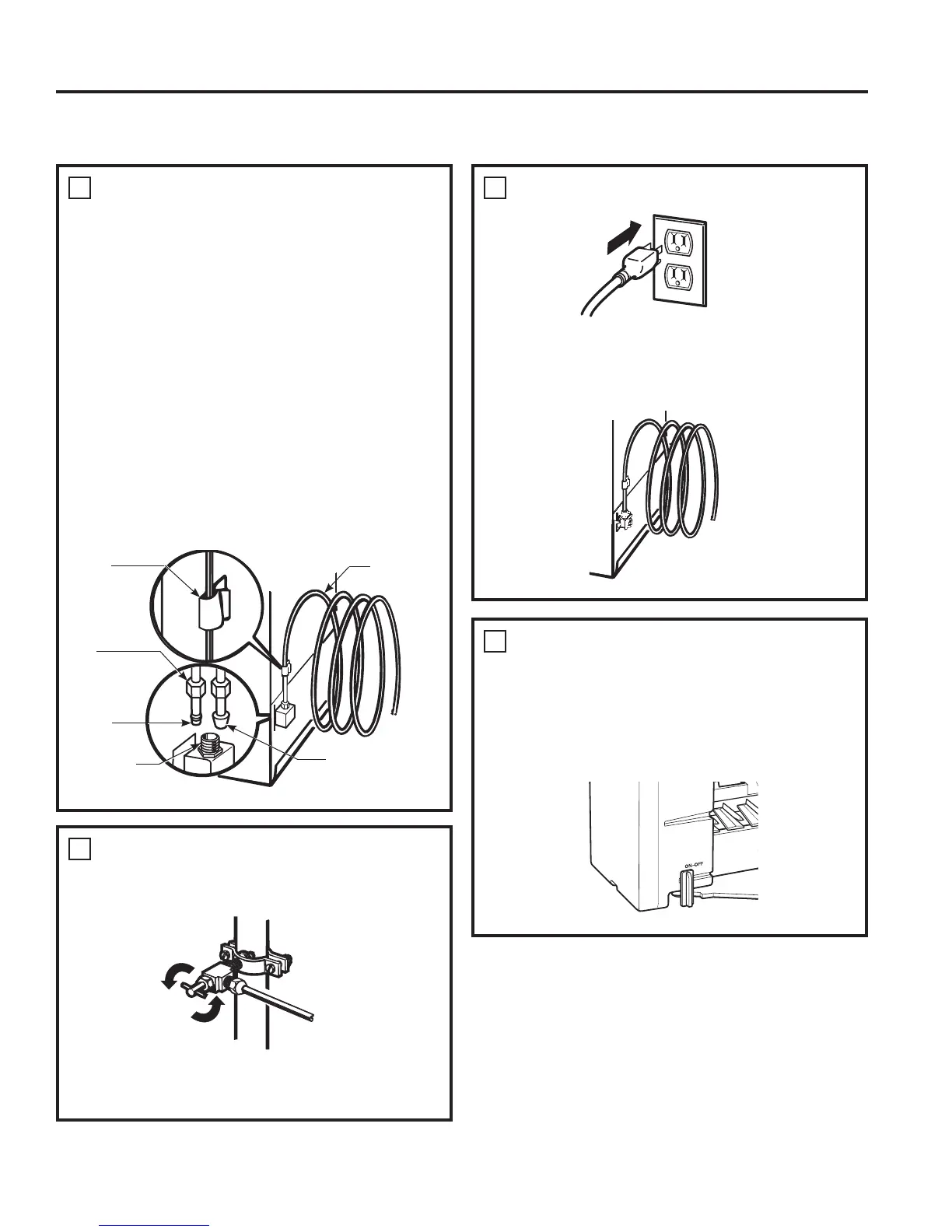
CONNECT THE TUBING TO THE
REFRIGERATOR &RQWLQXHG
3ODFHWKHFRPSUHVVLRQQXWDQGIHUUXOHVOHHYH
onto the end of the tubing as shown. On
6PDUW&RQQHFW5HIULJHUDWRU7XELQJNLWWKHQXWV
are already assembled to the tubing.
,QVHUWWKHHQGRIWKHWXELQJLQWRWKHZDWHUYDOYH
connection as far as possible. While holding the
tubing, tighten the fitting.
For plastic tubing from a SmartConnect
5HIULJHUDWRU7XELQJNLWLQVHUWWKHPROGHGHQGRI
the tubing into the refrigerator connection and
tighten compression nut until it is hand tight,
then tighten one additional turn with a wrench.
Overtightening may cause leaks.
Fasten the tubing into the clamp provided to
hold it in a vertical position. You may need to pry
open the clamp.
Tubing
Clamp
Compression
Nut
SmartConnect
™
Tubing
5HIULJHUDWRU
Connection
7XELQJ
Ferrule
VOHHYH
10
TURN THE WATER ON AT THE
SHUTOFF VALVE
Tighten any connections that leak.
5HDWWDFKWKHFRPSUHVVRUFRPSDUWPHQWDFFHVV
cover.
11
PLUG IN THE REFRIGERATOR
Arrange the coil of tubing so that it does not
vibrate against the back of the refrigerator or
against the wall. Push the refrigerator back to
the wall.
12
START THE ICEMAKER
Set the icemaker power switch to the ON
position. The icemaker will not begin to operate
until it reaches its operating temperature of 15°F
±&RUEHORZ,WZLOOWKHQEHJLQRSHUDWLRQ
automatically if the icemaker power switch is in
the ON position.


 To Next Page