
 To Next Page
D
Denise JohnsonAug 31, 2025
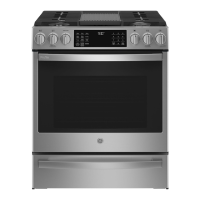
Why does my GE Profile PGB945SEF2SS Ranges have a strong odor?
- DdbaileyAug 31, 2025
This is usually temporary and will disappear after several uses or after running a self-clean cycle.

Why does my GE Profile PGB945SEF2SS Ranges have a strong odor?
This is usually temporary and will disappear after several uses or after running a self-clean cycle.
Why aren't my GE Profile PGB945SEF2SS Ranges top burners lighting evenly?
If the plug on the range is not completely inserted in the electrical outlet, the top burners may not light or burn evenly. Ensure the electrical plug is properly plugged into a live, grounded outlet. Additionally, burner slits on the side of the burner may be clogged. Remove the burners and clean them, checking the electrode area for burned-on food or grease. Improper burner assembly can also cause this issue. Make sure the burner parts are installed correctly; refer to the Care and cleaning of the range section.
Why is my GE Ranges smoking when broiling?
If food is too close to the burner element during broiling, it can cause excessive smoking. Lower the rack position of the food.
Why is my GE Profile PGB945SEF2SS Ranges smoking during the clean cycle?
If you experience excessive smoking during the clean cycle, it's likely due to excessive soil or grease. Press the Cancel/Off pad, open windows to ventilate the room, and wait until the LOCKED light turns off. Then, wipe up the excess soil before resetting the clean cycle.
Why is there a burning smell coming from my new GE Profile PGB945SEF2SS Ranges?
This is normal for a new oven and will disappear over time. To speed up the process, you can set a self-clean cycle for a minimum of 2 hours. See the Cleaning the Oven section for instructions.
Why is the locked light on my GE Ranges when I want to cook?
If the oven door is locked because the temperature inside the oven has not dropped below the locking temperature, the locked light will remain on. Press the Cancel/Off pad and allow the oven to cool completely.
Why is my GE Profile PGB945SEF2SS oven not working?
If the oven doesn't work or appears not to work, a fuse in your home may be blown, or the circuit breaker tripped. Replace the fuse or reset the circuit breaker. Ensure that the oven controls are properly set. See the Using the Oven section. Also, verify that the oven is not in Sabbath Mode. See the Special Features section.
What to do if 'DOOR' flashes on the display of my GE Profile PGB945SEF2SS?
If the self-clean cycle has been selected but the door isn't closed properly, the display will show flashing “DOOR”. Ensure the oven door is fully closed.

 General