Testing the WIU-2 15
Testing the WIU-2
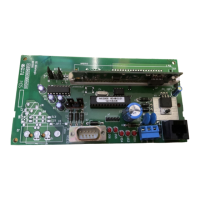
1. Verify the reader (J1) and controller (J2) connections are
properly wired.
2. Verify that jumpers J3, J5, and J6 are set properly.
3. If a communications error occurs, when connected to a
supervised HID reader, verify that jumper J6 has been
removed.
4. If an incorrect badge ID (BID) displays on the host,
check for crossed lines between the WIU-2 and the
reader.
See Figure 4, “WIU-2 to M5 8RP Interface,” on page 13.
or Figure 5, “WIU-2 to M2000PX or M2000PXN
Interface,” on page 14., as appropriate.
5. Do not jumper or short DO/LED (located on J2-pin3) to
the Pin light (located on connector J1-pin7). For proper
LED and pin light operation, wire as shown in Figure 4
and Figure 5 using diode provided.


 To Next Page