EN
Operation
Troubleshooting
The operator can perform the following measures to rectify malfunctions:
• cleaning the tap aerator
• cleaning the basket filter
• replacing the batteries
• setting the detection distance of the IR sensor
These measures are described in the operation manual 968.598.00.0.
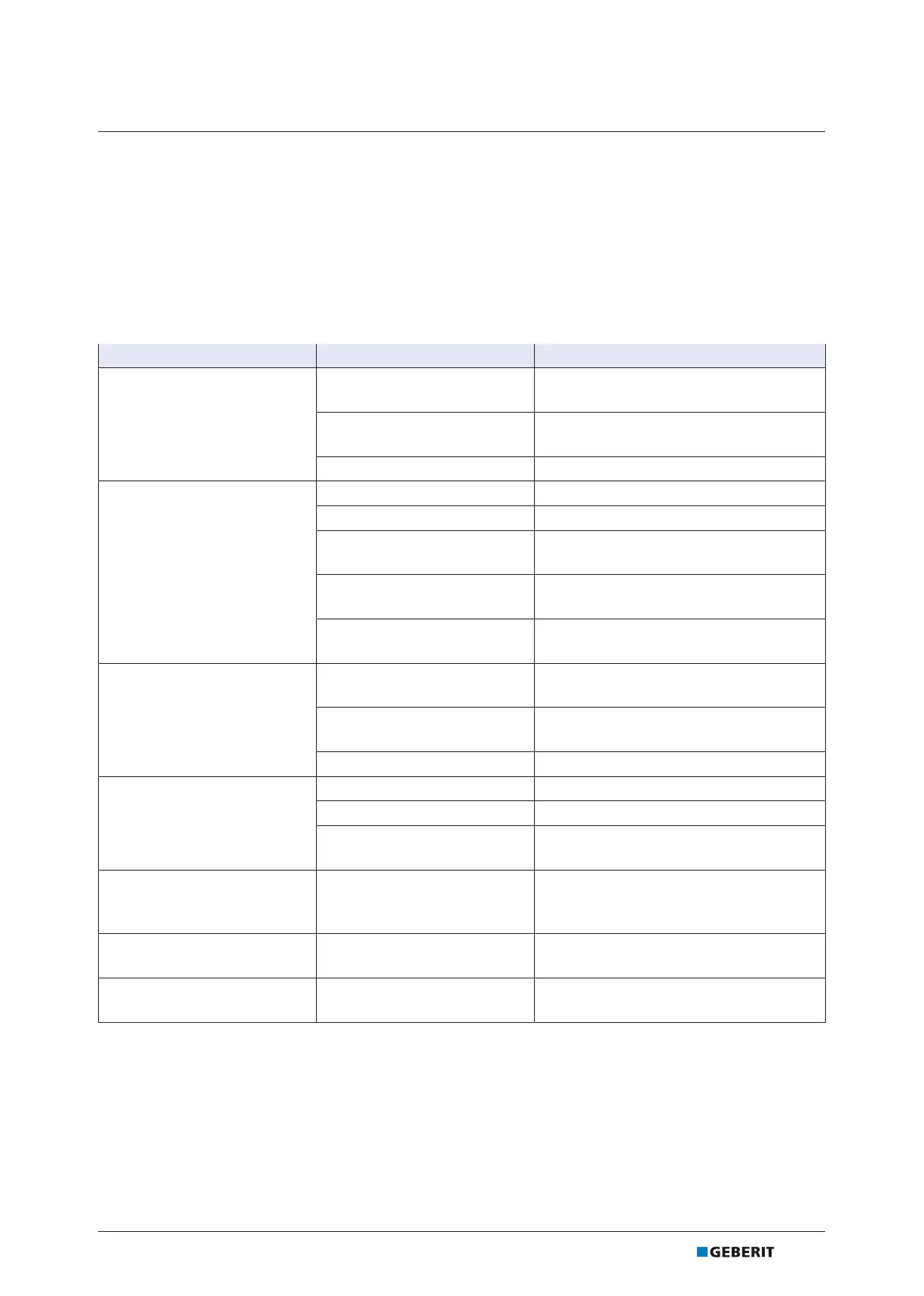
Malfunction Cause Rectification
Water jet too weak.
Tap aerator dirty
▶ Clean the tap aerator. → See operation
manual 968.598.00.0.
Basket filter clogged
▶ Clean the basket filter. → See
operation manual 968.598.00.0.
Pipe pressure too low ▶ Test pipe pressure (1–8.5bar).
Flush does not actuate.
Pipe pressure too low ▶ Test pipe pressure (1–8.5bar).
Network failure ▶ Check the power supply.
Battery dead
▶ Replace the battery. → See operation
manual 968.598.00.0.
Solenoid valve defective
▶ Replace the solenoid valve. → See
"Replace the solenoid valve", page21
.
IR sensor defective
▶ Replace IR sensor. → See "Replacing
the IR sensor", page26.
Water runs continuously.
Solenoid valve defective
▶ Replace the solenoid valve. → See
"Replace the solenoid valve", page21
.
IR sensor defective
▶ Replace IR sensor. → See "Replacing
the IR sensor", page26.
Pipe pressure too high ▶ Test pipe pressure (1–8.5bar).
Unwanted flow of water, either
too soon or delayed.
IR window is dirty or wet ▶ Clean or dry the IR window.
IR window scratched ▶ Contact a skilled person.
Detection distance of the IR
sensor not set correctly
▶ Set detection distance. → See
operation manual 968.598.00.0.
Water drips from the tap
housing.
Solenoid valve does not close
properly
▶ Clean or replace the solenoid valve. →
See "Replace the solenoid valve",
page21.
Red LED flashes during flush
actuation.
Battery almost dead
▶ Replace the battery. → See operation
manual 968.598.00.0.
LED lights up, flush does not
actuate.
Battery dead
▶ Replace the battery. → See operation
manual 968.598.00.0.
8281176331-1 © 03-2021
970.429.00.0(00)
19


 To Next Page