12
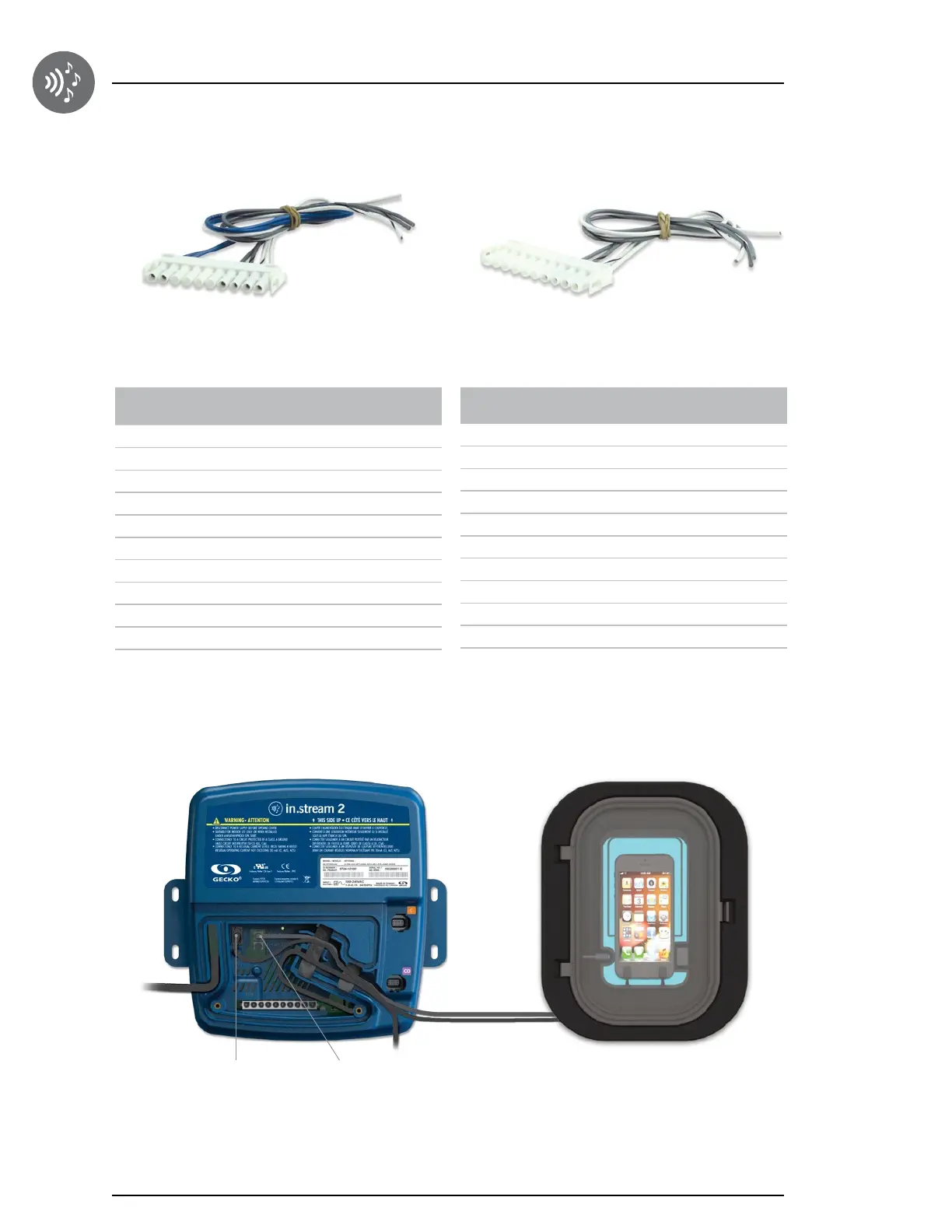
Connector
pins
Identification Wire Color
1 Front Left speaker (+) White
2 Front Left speaker (-) White-Black
3 Front Right speaker (-) Gray-Black
4 Front Right speaker (+) Gray
5 NC NC
6 NC NC
7 NC NC
8 NC NC
9 Subwoofer (+) Blue
10 Subwoofer (-) Blue-Black
10-pin 10-pin
Part number: 9920-401433 Part number: 9920-401434
Connector
pins
Identification
Wire Color
1 Front Left speaker (+) White
2 Front Left speaker (-) White-Black
3 Front Right speaker (-) Gray-Black
4 Front Right speaker (+) Gray
5 NC NC
6 NC NC
7 NC NC
8 NC NC
9 NC NC
10 NC NC
Connecting the docking station in.p4 to the in.stream 2
Connections
The in.p4 docking station features a USB and an 1/8" (3,5 mm) audio input mini jack connector.
To connect the docking station into the in.stream 2, simply insert the USB cable into the USB receptacle and the 1/8"
(3,5 mm) mini jack into the AUX receptacle as illustrated.
Route both cables through the molded strain relief channel as illustrated.
USB connector Auxiliary


 To Next Page