L
NAPCO Security Systems
X
GEM-P3200 Programming Instructions
WI818D 8/00
!
Page 55
[Default = blank (•) blank (•) from address 2500-2547]
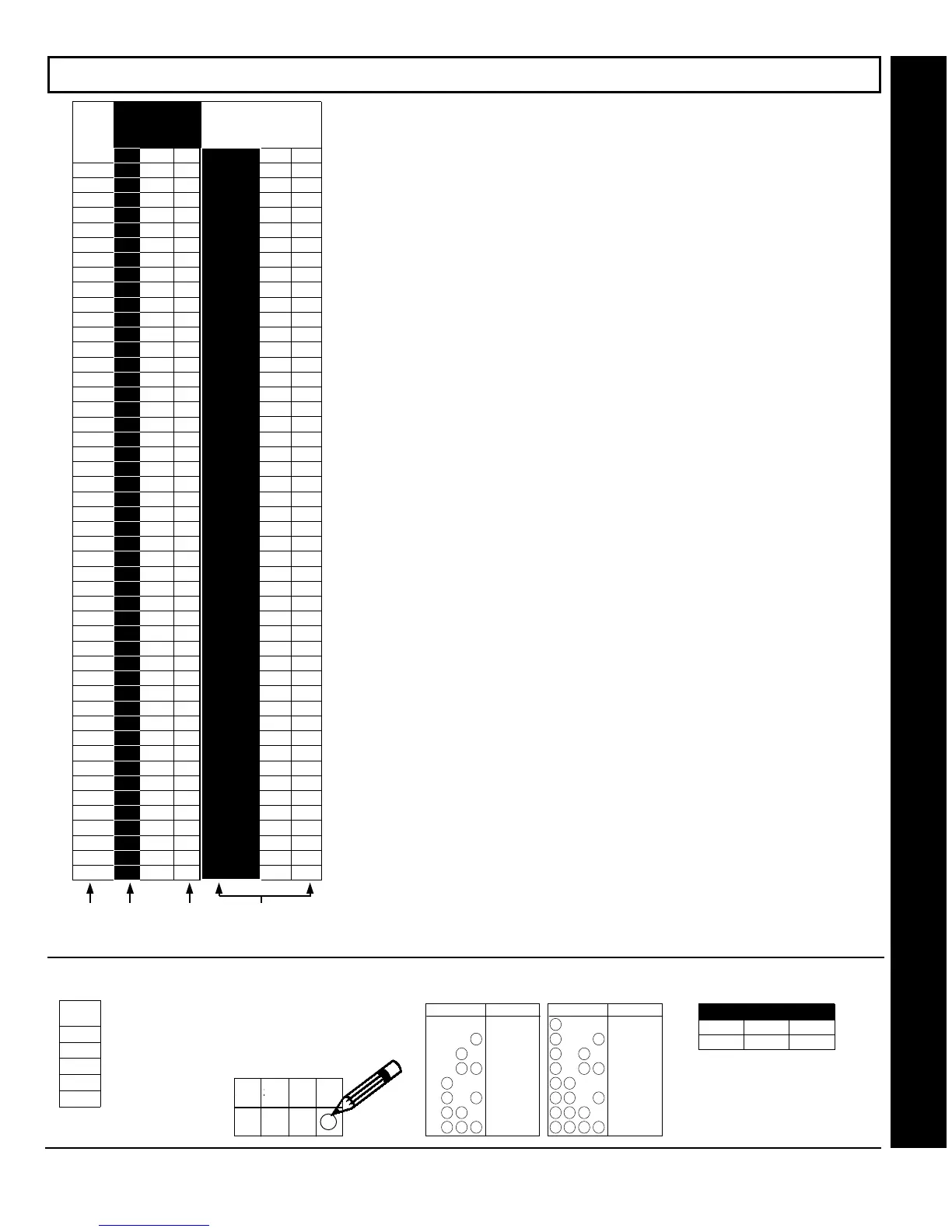
USER AREA OPTIONS (ADDRESS 2500-2547)
⇐
!
1. Select the desired
user number.
USER
NO.
1
2
3
4
5
!
2. Enable desired areas
for each user by drawing a
circle " around its
corresponding binary data
value.
NOTE:
No circle = feature disabled.
4821
Draw Circle
ZN04 ZN03 ZN02 ZN01
!
3.
Search table
below
for data entry.
!
4.
Enter data
in address
locations (left and right digits).
ADDRESS LOCATION
LADDRR
blank (•) 2500 1
4821
DIGIT VALUE DATA ENTRY
Blank (
.
)
4821
1
4821
2
8124
3
4821
4
5
4821
4821
6
4821
7
421
DIGIT VALUE DATA ENTRY
8
421
9
421
0
124
B
4 21
C
D
4 21
4 2 1
E
4 2 1
F
8
8
8
8
8
8
8
8
A4 A3 A2 A1
User Area Options
USER
NO.
1
2
3
4
5
6
7
8
9
10
11
12
13
14
15
16
17
18
19
20
21
22
23
24
25
26
27
28
29
30
31
32
33
34
35
36
37
38
39
40
41
42
43
44
45
46
47
48
ADDRESS
2500-2547
L ADDR R
(•) 2500
(•) 2501
(•) 2502
(•) 2503
(•) 2504
(•) 2505
(•) 2506
(•) 2507
(•) 2508
(•) 2509
(•) 2510
(•) 2511
(•) 2512
(•) 2513
(•) 2514
(•) 2515
(•) 2516
(•) 2517
(•) 2518
(•) 2519
(•) 2520
(•) 2521
(•) 2522
(•) 2523
(•) 2524
(•) 2525
(•) 2526
(•) 2527
(•) 2528
(•) 2529
(•) 2530
(•) 2531
(•) 2532
(•) 2533
(•) 2534
(•) 2535
(•) 2536
(•) 2537
(•) 2538
(•) 2539
(•) 2540
(•) 2541
(•) 2542
(•) 2543
(•) 2544
(•) 2545
(•) 2546
(•) 2547
AREAS 1-4
RIGHT DATA VALUES
(CIRCLE
"
)
A4 A3
A2 A1
84
21
84
21
84
21
84
21
84
21
84
21
84
21
84
21
84
21
84
21
84
21
84
21
84
21
84
21
84
21
84
21
84
21
84
21
84
21
84
21
84
21
84
21
84
21
84
21
84
21
84
21
84
21
84
21
84
21
84
21
84
21
84
21
84
21
84
21
84
21
84
21
84
21
84
21
84
21
84
21
84
21
84
21
84
21
84
21
84
21
84
21
84
21
84
21
!
1
!
4
!
4
!
2


 To Next Page