Search and download
the “GEN3 Verve” app
on the Apple or
Google Play store.
SCOOTER INTERFACE & APP OPERATION
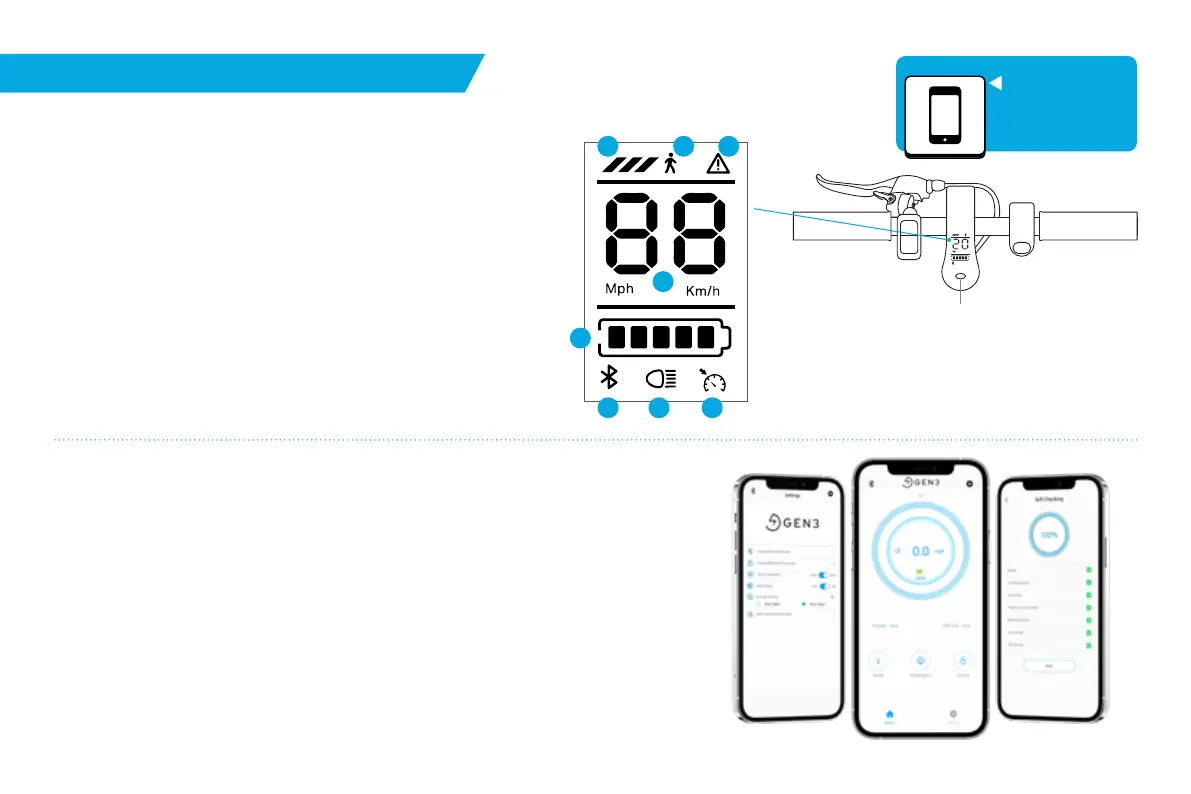
GEN3 Verve Scooter Interface
The Verve and Verve Pro models are equipped with an LED
display which highlight your:
1. Boost Levels 1, 2, 3
2. Walk Assist Mode
3. Fault indicator with In-App Troubleshooting
4. Speedometer
5. Battery Level
6. Bluetooth® connection to the Gen3 Verve App
7. Headlight & Taillight
8. Cruise Control
GEN3 Verve App
The Verve and Verve Pro models have Bluetooth® chipsets allowing them to
connect to the GEN3 Verve App on iOS and Android giving access to:
•
Current Speed
•
Toggle Between mph and km/h
•
Lock and Unlock the Scooter
•
Boost Level
•
Odometer
1
2 3
4
5
6 7 8
Power Button
Long Press:
Power On/Off
Short Press:
Cycles through boost
levels 1, 2, 3, and walk assist
Double Press:
Headlight & Tailight On/Off
•
Headlight & Taillight
•
Trip Distance
•
Self-diagnostics with Curated
Troubleshooting Steps Displayed In-App
9


 To Next Page