Need help?
Do you have a question about the Genelec SAM 8340A and is the answer not in the manual?
Guide to setting up Genelec 8340A monitors using GLM software and control network for advanced features.
Instructions for basic setup of the 8340A monitor using its onboard controls when GLM is not utilized.
Detailed description of Bass Roll-Off, Desktop LF, and Bass/Treble Tilt controls for independent operation.
Understanding LED indicators, ISS power saving, and digital input selection for the 8340A monitor.
Best practices for mounting, positioning, and aligning the 8340A monitors for superior acoustic performance.
Guidance on integrating subwoofers and essential maintenance procedures for the 8340A monitor.
Critical safety information, operational precautions, and warnings for the 8340A monitor, including hearing protection.
Product guarantee, FCC compliance, technical specifications, and directivity characteristics of the 8340A.
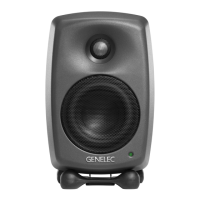
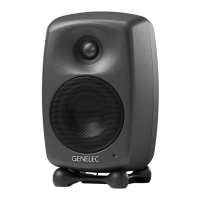
The Genelec 8340A is a Smart Active Monitor (SAM) system designed for professional audio monitoring tasks that demand high precision and reliability. It can be used as a standalone monitor or integrated into a larger system with the Genelec Loudspeaker Manager (GLM) software and control network, which unlocks its full potential for versatile acoustic settings and features.
The 8340A is engineered to integrate seamlessly into various professional environments, supporting both standard analog line-level audio and AES/EBU formatted digital audio signals. Its design incorporates Genelec's Minimum Diffraction Enclosure (MDE) and advanced Directivity Control Waveguide (DCW) technologies, which contribute to excellent frequency balance even in challenging acoustic environments.
A key feature of the 8340A is its energy-saving Intelligent Signal Sensing (ISS) function. When activated, ISS automatically puts the monitor into a deep sleep state, consuming less than one Watt of power. Upon detecting an input signal, the monitor automatically wakes up to full operation. The time until ISS power save activates can be configured using the GLM software, ensuring the monitoring system is always ready for use.
The 8340A offers flexible setup options. For standalone use, basic acoustical calibrations and input selection can be managed directly on the monitor's back panel using DIP switches and rotary controls. The monitor supports a wide range of mains voltages (100-240 VAC, 50-60 Hz), allowing it to be used globally.
The ANALOG IN connector accepts analog audio signals, with a maximum input level of +25 dBu. For digital audio, the AES/EBU female XLR connector automatically selects digital input when a valid signal is present. The monitor supports two channels in a single AES/EBU cable. A DIGITAL OUT male XLR connector provides an unaltered copy of the digital signal, enabling daisy-chaining of up to four monitors. The CONTROL NETWORK RJ-45 connectors are used for the proprietary GLM network and are not compatible with Ethernet LAN.
When used with the GLM software, the 8340A's capabilities are significantly expanded. The GLM system provides automated acoustic equalization and alignment for various reproduction systems, from simple stereo setups to complex 3D immersive audio configurations, including subwoofers. GLM allows for fast and accurate setup, with settings controllable via a computer or permanently stored in the monitors for use without a computer. The GLM Adapter device connects the monitors to a computer via USB, and a Genelec measurement microphone (part of the GLM User Kit) is used for acoustic measurements.
The monitor's back panel features several controls for standalone acoustic calibration:
The front panel light provides visual indications of the monitor's status: solid green for normal operation, blinking green for GLM adjustment, green blink every 10 seconds for ISS sleep state, red blink for power amplifier overload protection, solid red for muted, yellow for not in the active group, and yellow blinking for overheat protection.
The 8340A is designed for indoor use within an ambient temperature range of 15-35 degrees Celsius (50-95°F) and relative humidity of 20-80% (non-condensing). Proper cooling is essential, requiring a minimum clearance of 50 mm (2 inches) behind, above, and on both sides of the monitor for adequate ventilation.
The monitor's Iso-Pod™ table stand allows for tilting to align the acoustic axis correctly towards the listening position. Vertical orientation is recommended to avoid acoustical cancellation problems around the crossover frequency. Monitors should be placed symmetrically at equal distances from the listening position, ideally on the left-right centerline of the room. Minimizing acoustic reflections from objects like desks or computer monitors is crucial to prevent sound image blurring. Placing monitors on stands behind and above a mixing console often improves response compared to placing them on a meter bridge.
Various ceiling and wall mounts are available through Genelec dealers. The 8340A can be fitted with König & Meyer monitor mounts using two M6 x 10 mm threaded holes on the enclosure back. An M10 x 10 mm threaded hole in the base is provided for mounting, but it is not suitable for microphone stands due to incompatible thread types.
The Genelec 8340A is designed with no user-serviceable parts inside. All maintenance or repair work must be performed exclusively by a Genelec certified service technician. This ensures the monitor's integrity and continued optimal performance. The product is guaranteed for two years against manufacturing faults or defects affecting performance.
 General
| Type | Active Studio Monitor |
|---|---|
| Configuration | 3-way |
| LF Driver Size | 8" |
| LF Amplifier Power | 150 W |
| Amplifier Power (Woofer) | 150 W |
| HF Amplifier Power | 90 W |
| Crossover Frequency | 3 kHz |
| Input Types | XLR |
| Enclosure Type | Reflex |
| Amplifier Power (Tweeter) | 90 W |
| Driver Size | 8" |
| HF Driver Size | 1" |

 To Next Page