18 Owner’s Manual for G4-ECO Light Tower
General Information
Accessing the Operator Menu
NOTE: The Operator menu is accessible only when the
unit is in Manual mode and the lamps and engine are
OFF.
Use the Operator menu to:
• Adjust light sensor settings
• Adjust timer settings
• Set the system clock and language
To access the Operator menu:
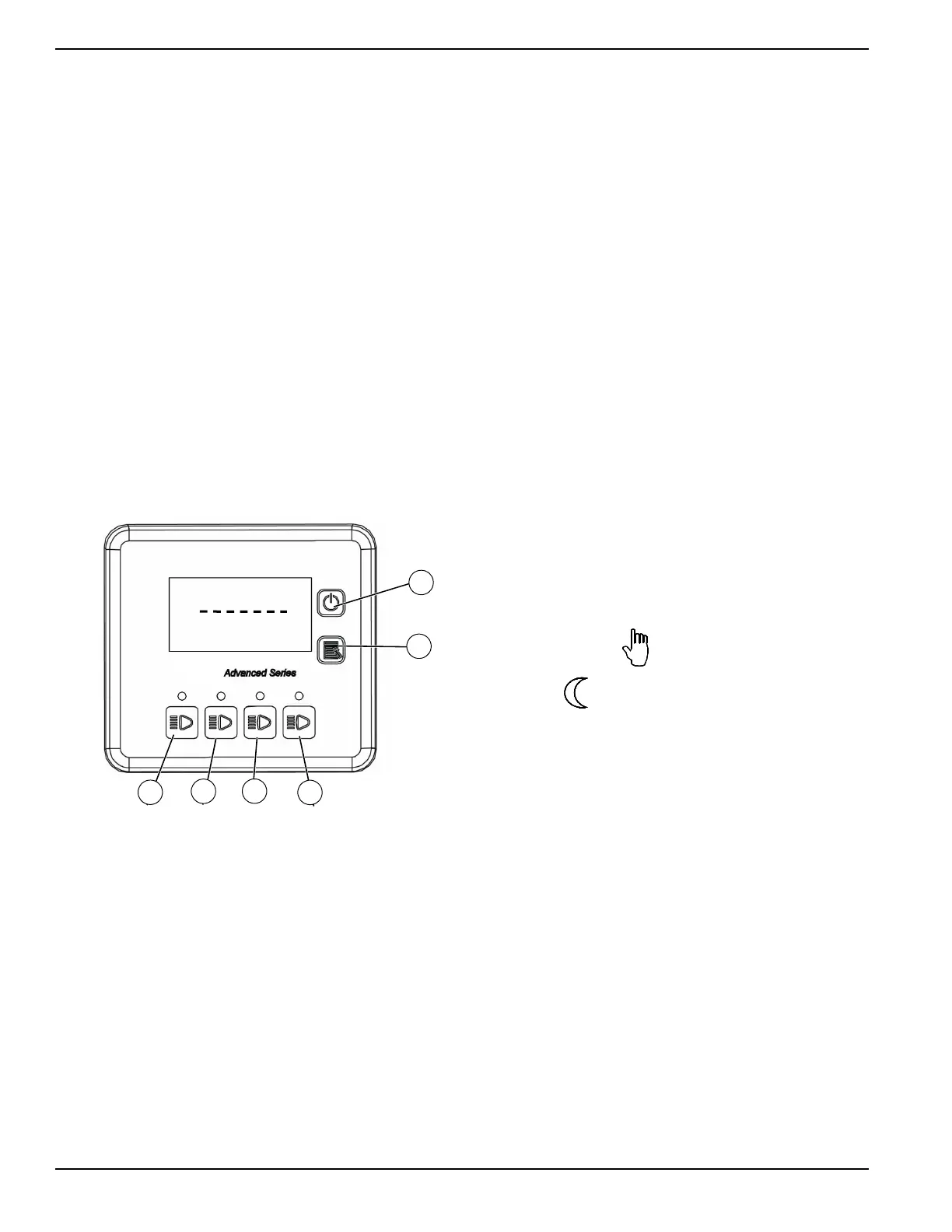
1. See Figure 2-6. Press and hold Lamp 1 On/Off
b
utton (A) until the password screen appears.
2. En
ter the password by pressing controller buttons
in the following sequence:
• Lamp 2 On/Off (B)
• Lamp 3 On/Off (C)
• Lamp 4 On/Off (D)
• Start/Stop (E)
• Manual/Auto (F)
• Start/Stop
(E)
Figure 2-6. Controller Password Screen
Navigating Within the Operator Menu
1. Use Start/Stop button (E) and Manual/Auto button
(F) to scroll through the menu list and highlight the
desired submenu.
2. Pr
ess Lamp 2 On/Off (B) to enter the highlighted
submenu.
3. Use the Star
t/Stop button and Manual/Auto button
to highlight the desired setting.
4. Pr
ess Lamp 2 On/Off to access the highlighted set-
ting.
5. Use the Star
t/Stop button and Manual/Auto button
to adjust the setting.
6. Pr
ess Lamp 2 On/Off to confirm the setting.
7. Use Lam
p 1 On/Off to return to the previous menu.
Setting Light Sensor
This preset automatically turns the unit ON or OFF based
on ambient lighting.
When ambient lighting drops below a user-
pr
ogrammable lux threshold, a delay timer starts. The
delay timer is expressed in seconds and prevents the unit
from switching ON and OFF unintentionally. If after the
delay time has expired the ambient light remains less
than the threshold value, the unit will automatically start.
When the ambient lighting exceeds the light sensor’s lux
threshold value, the unit will shut OFF after the delay
period has expired.
To set the light sensor preset:
NOTE: Se
e Navigating Within the Operator Menu for
information on accessing and adjusting settings.
1. Acce
ss the Operator menu.
2. Acce
ss the Light Sensor menu.
3. With
in the Light Sensor menu, adjust the following:
• Set Enable to Yes.
• Set Threshold to the desired Lux value.
• Set Delay to the desired seconds.
4. Exit the L
ight Sensor and Operator menus.
5. Set the unit to
Automatic mode using the controller
Manual/Auto button.
NOTE: Whe
n Automatic mode is selected, the default
manual mode icon
will be replaced by the light
sensor icon:
.


 To Next Page