EasyManua.ls Logo

Genexis XG Series - User Manual

Genexis XG Series
7 pages
Print Icon
To Next Page IconTo Next Page
Loading...
XGX
XG–Series
Installation Guide
Question and Answer IconNeed help?

Do you have a question about the Genexis XG Series and is the answer not in the manual?

Summary

Button and Port Overview

Reset Button Functionality

Resets the device to factory settings by pressing and holding for 5 seconds.

Device Ports Identification

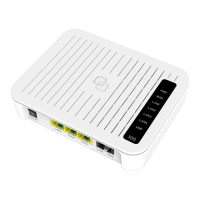
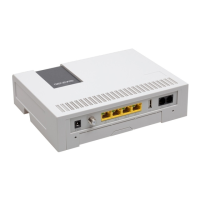
Details the various connection ports including LAN, WAN/SFP, Power, and CATV.

ON;OFF Switch Operation

Controls the power state of the device, switching it ON or OFF.

LED Indicator Status

Power (PWR) LED Status

Indicates system status: Green for OK, Red for boot failure, Off for power off.

WAN LED Status

Shows WAN link status: Green for established, Yellow for 100Mb, Off for no connection.

LAN LED Status

Indicates LAN connection status: Green for 1/10Gb, Yellow for 100Mb, Off for no connection.

Installation Guide Essentials

Box Contents Listing

Lists all items included in the product package for initial setup.

Installation Preparation Steps

Ensures proper placement and power socket availability before installation.

Product Label Location

Informs about the location of the product label on the device.

Setting Up and Troubleshooting

Power Indicator LED Troubleshooting

Addresses problems related to the Power (PWR) LED being off or red.

WAN Indicator LED Troubleshooting

Guides on resolving issues when the WAN LED is off.

Device Reset Procedure

Explains how to reset the device to its factory default settings.

EU Declaration of Conformity

Summary

Button and Port Overview

Reset Button Functionality

Resets the device to factory settings by pressing and holding for 5 seconds.

Device Ports Identification

Details the various connection ports including LAN, WAN/SFP, Power, and CATV.

ON;OFF Switch Operation

Controls the power state of the device, switching it ON or OFF.

LED Indicator Status

Power (PWR) LED Status

Indicates system status: Green for OK, Red for boot failure, Off for power off.

WAN LED Status

Shows WAN link status: Green for established, Yellow for 100Mb, Off for no connection.

LAN LED Status

Indicates LAN connection status: Green for 1/10Gb, Yellow for 100Mb, Off for no connection.

Installation Guide Essentials

Box Contents Listing

Lists all items included in the product package for initial setup.

Installation Preparation Steps

Ensures proper placement and power socket availability before installation.

Product Label Location

Informs about the location of the product label on the device.

Setting Up and Troubleshooting

Power Indicator LED Troubleshooting

Addresses problems related to the Power (PWR) LED being off or red.

WAN Indicator LED Troubleshooting

Guides on resolving issues when the WAN LED is off.

Device Reset Procedure

Explains how to reset the device to its factory default settings.

EU Declaration of Conformity

Genexis XG Series Specifications

General IconGeneral
BrandGenexis
ModelXG Series
CategoryNetwork Router
LanguageEnglish

Related product manuals