Need help?
Do you have a question about the Genexis DRG700 and is the answer not in the manual?
Lists key features like GigabitEthernet, VoIP, Wireless AP, and TV Out.
Covers shared internet, NAT, dynamic/fixed IP, and PPPoE support.
Details standards compliance (802.11b/g/n), speeds, WEP/WPA/WPA2 support.
Describes the 4-port GigabitEthernet switch and DHCP server support.
Mentions easy web-based setup and network diagnostics.
Covers password protection, wireless security, NAT, firewall, and DoS protection.
Lists the items included: unit, PSU, quick guide, CD-ROM.
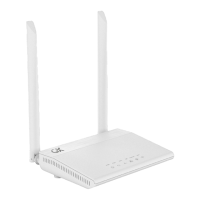
Explains the function of Reset, WPS buttons and status LEDs (Power, WAN, TV).
Describes the ports and connectors on the bottom of the DRG700 unit (PWR, TV, LAN, USB, L1-L2).
Lists prerequisites like internet subscription, network cable, or wireless device.
Step-by-step physical installation instructions, including PSU connection and LED behavior.
Details how to connect a PC to the DRG700 using a LAN cable and check LED indicators.
Guides users to connect a PC to the DRG700 wirelessly using SSID and WPA2 key.
Outlines the setup steps: Internet Access, LAN, Wireless, and Admin password.
Instructions to access the DRG700 web server via HTTP and supported browsers.
Details the default username ('admin') and password ('admin') for accessing the program.
Explains the use of tabs (Info, Status, System, Network) and buttons for navigation and saving.
Displays system-wide information like hardware revision, serial number, and firmware version.
Details physical connections (WAN, LAN, WLAN) and their statistics.
Lists devices using DHCP, their IP addresses, MAC addresses, and lease times.
Shows traffic statistics, routing table, active connections, and listening ports.
Explains using ping and traceroute utilities to troubleshoot connection status.
Allows configuration of the router's hostname for identification.
Instructions to change the default web server login password for security.
Guides on how to restart the DRG700 and reload software with modifications.
Configures WAN status, connection type (DHCP/Static), and interface.
Sets up LAN status, IP address, and Netmask for the local network.
Allows changing SSID, security settings (WEP/WPA/WPA2), channel, and other wireless parameters.
Details wireless security options: Disabled, WEP, WPA-PSK, and WPA2-PSK.
Configures DHCP service for LAN and WiFi interfaces, including IP start and lease times.
 General
| Brand | Genexis |
|---|---|
| Model | DRG700 |
| Category | Network Router |
| Language | English |

 To Next Page