Page 31 of 35
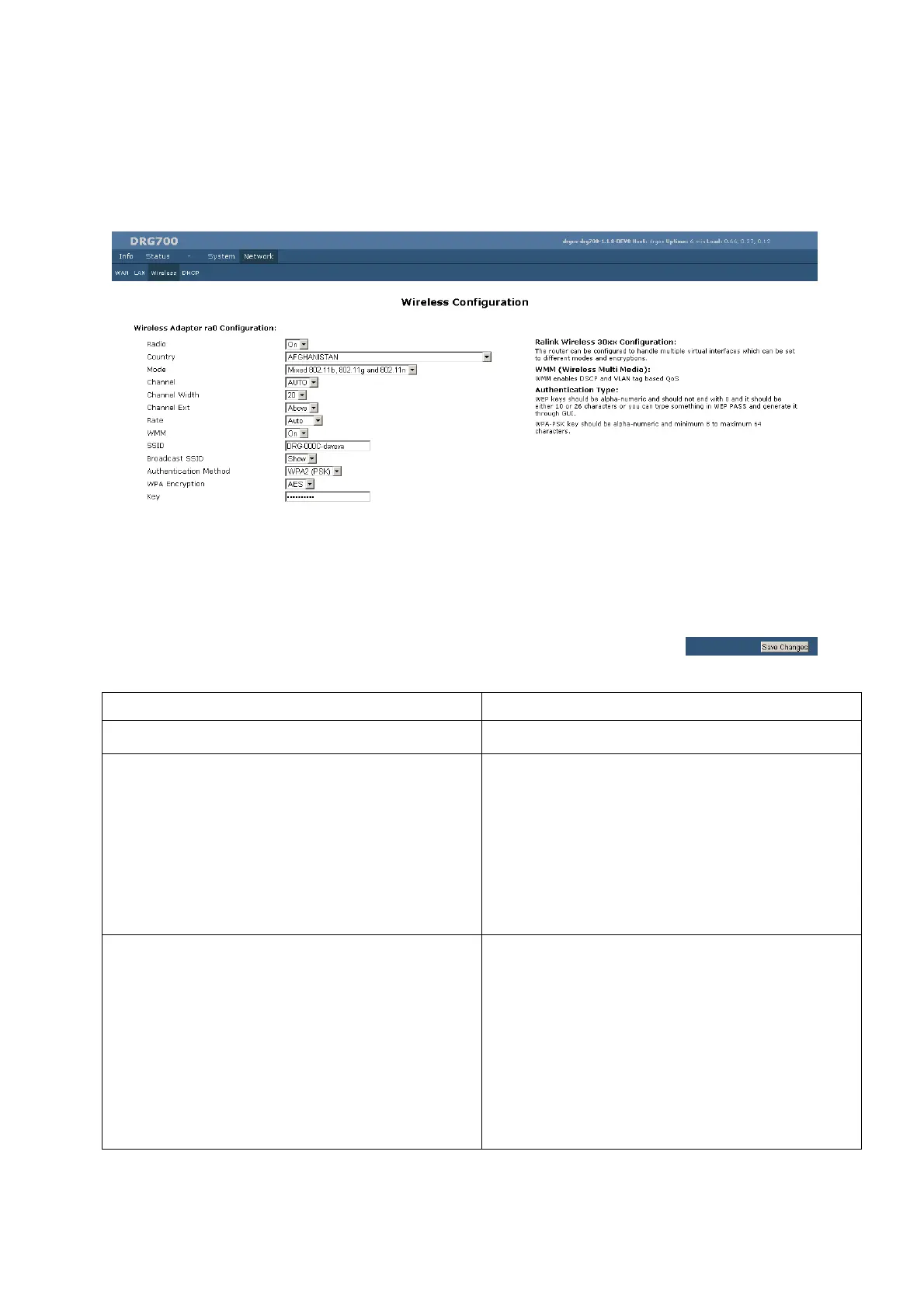
Wireless Configuration
The wireless configuration page allows you to configure the parameters for the wireless network. For
example, you may wish to change the default SSID and password.
Field Description
Radio By default ON, this broadcast
Country Select your country from the drop-down list. This field
displays the country of operation for which the wireless
interface is intended. It may not be legal to operate the
router in another country. If your country is not listed,
please check with your local government agency for more
information on which channels you are allowed to use, and
select a country which allows those channels. (The channel
list changes according to the selected region.)
Mode Mixed 802.11b, 802.11g and 802.11n- This is the default
setting, and should normally be used. All 802.11b, 802.11g
and 802.11n wireless devices can use the wireless network..
802.11g - Only 802.11g devices can use the wireless network
802.11b - Only 802.11b devices can use the wireless
network.
802.11n - Only 802.11n devices can use the wireless
network.


 To Next Page