Operation
06
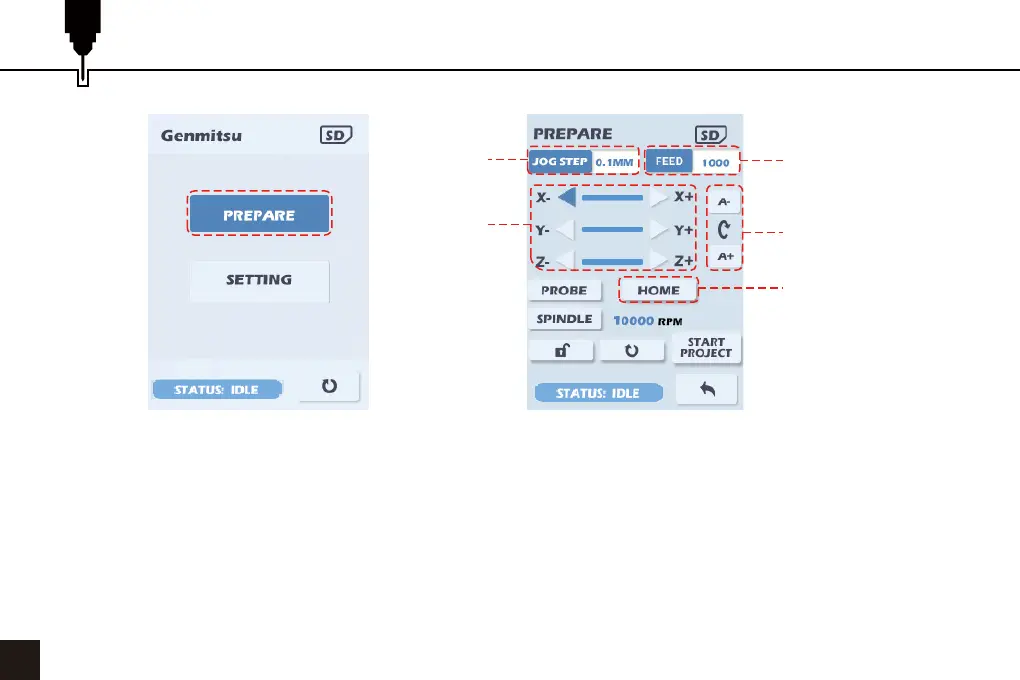
1. Select Prepare and press the dial.
2. Select the JOG STEP value, press the dial to cycle through the jog distances: xC is continuous jogging. The
value is mm for the XYZ axes and degrees for the A axis.
3. Select the FEED value, press to select and then rotate the dial to change the jogging speed: Values are in
mm/min.
4. Move the cursor to the direction arrows of X, Y and Z. Press the dial to move the corresponding axis by the
selected Jog Step, If xC is selected hold down the dial to continue jogging, release to stop.
5. Move the cursor to A- or A+ and press the dial to rotate the A-axis.
6. Move the cursor to HOME and press the dial to perform a Homing Cycle.
1
Jogging
Distance
Jogging Speed
A-axis Rotation
Direction
Home Position
Moving
Direction


 To Next Page