EasyManua.ls Logo

GENUINE Stella - Control Switches; Handlebar Switches (Left & Right); Starting and Neutral Controls

GENUINE Stella
35 pages
Print Icon
To Next Page IconTo Next Page
To Previous Page IconTo Previous Page
Loading...
CONTROL
SWITCHES
:
Control
switches
are
located
on
the left
and
right
hand
sides
of
the
handleoar.
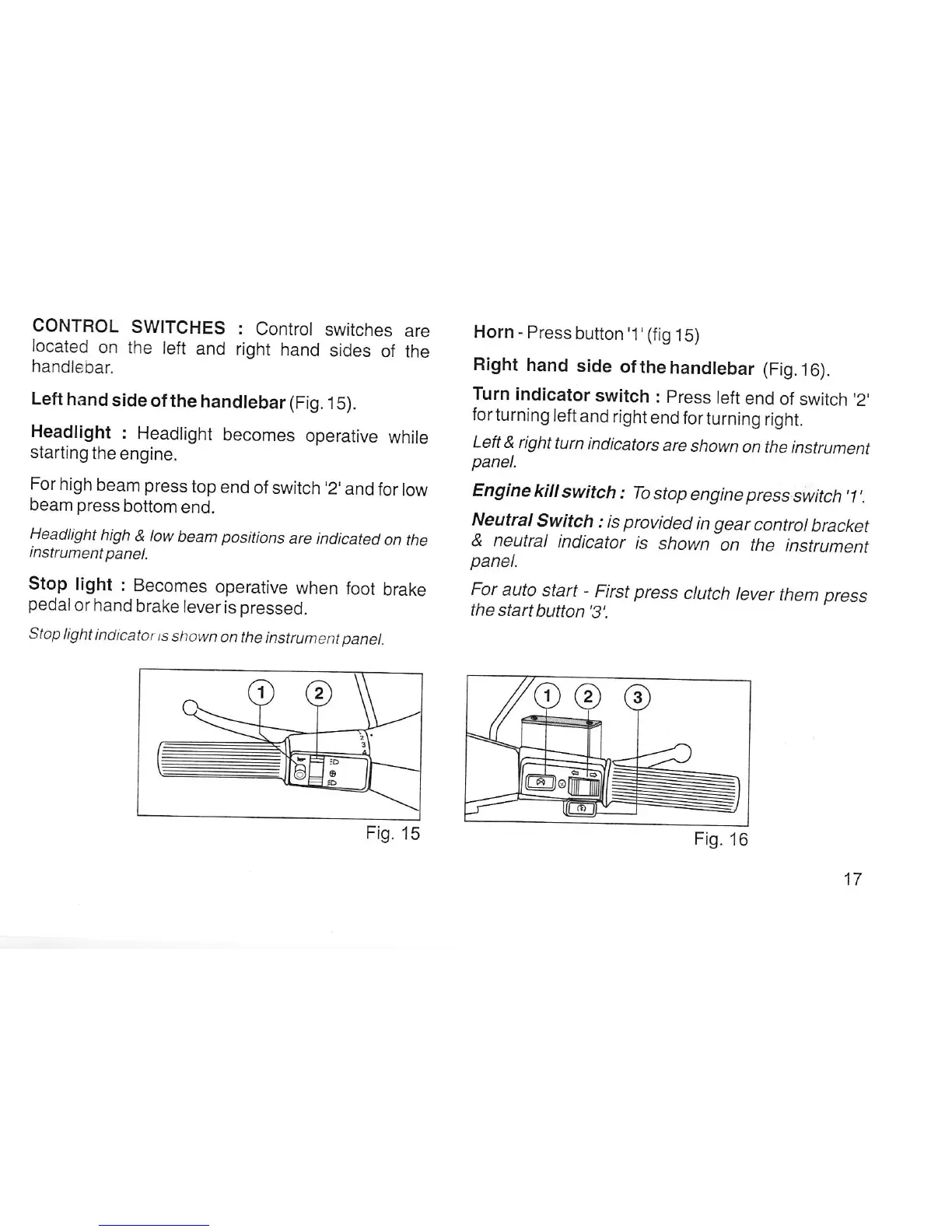
Left
hand
side
of
the
handlebar (Fig.
1
5).
Headlight
:
Headlight
becomes
operative
while
starting
the
engine.
For
high
beam
press
top
end
of switch
,2,
and
for
low
beam
press
bottom
end.
Headlight
high
& low
beam
positions
are
indicated
on the
instrument panet.
Stop
light
: Becomes
operative
when
foot
brake
pedal
or hand
brake
lever
is
pressed.
Stop
light
indicator
ts
shown
on the
instrument panel.
Horn
-
Press
button'1'(fig
1S)
Right
hand
side
ofthehandlebar
(Fig.16).
Turn
indicator
switch
:
press
left
end
of
switch '2'
forturning
left
and right
end
for
turning
right.
Left & right
turn
indicators
are
shown
on the
instrument
panel.
Engine
kill
switch
: To
stop
engine
press
switch'1'.
Neutral
Switch
: is
provided
in
gear
control
bracket
& neutral
indicator
is
shown
on
the
instrument
panel.
For
auto
start
-
First press
clutch
lever
them press
the
start
button'3'.
Fig.
15
Fig.
16
17