P.24
Operation Instructions
Method 2: Bluetooth Pairing
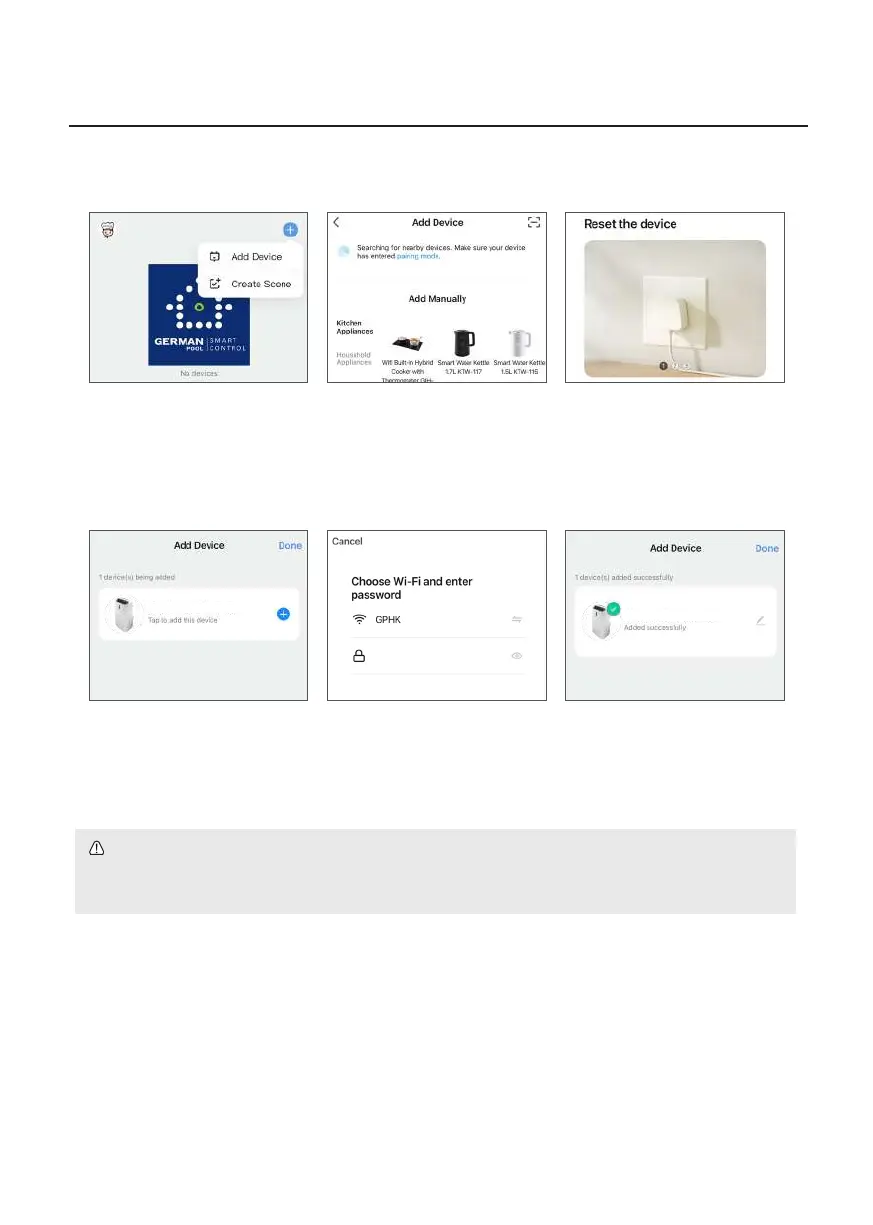
1. Click “+” on the upper right
corner of the APP homepage,
then click “Add Device”.
4. Click “+” on the right of
product name.
2. In the “Add Manually “
column, nd the product
model that needs to be
paired, and click the product
to pair.
5. Select WiFi name and enter
your WiFi password, then
click “Next”.
3. Follow the instructions on the
APP to pair.
6. When pairing is completed,
APP will show “Added
successfully”. Click “Done” to
return to homepage.
WiFi Smart Portable Air Conditioner
WiFi Smart Portable Air Conditioner
WARNING!
If Bluetooth is turned off or App is not permitted to access Bluetooth, the product cannot be paired.
(Note: Even if Bluetooth is turned on, it does not mean the APP is allowed to access your Bluetooth.)


 To Next Page