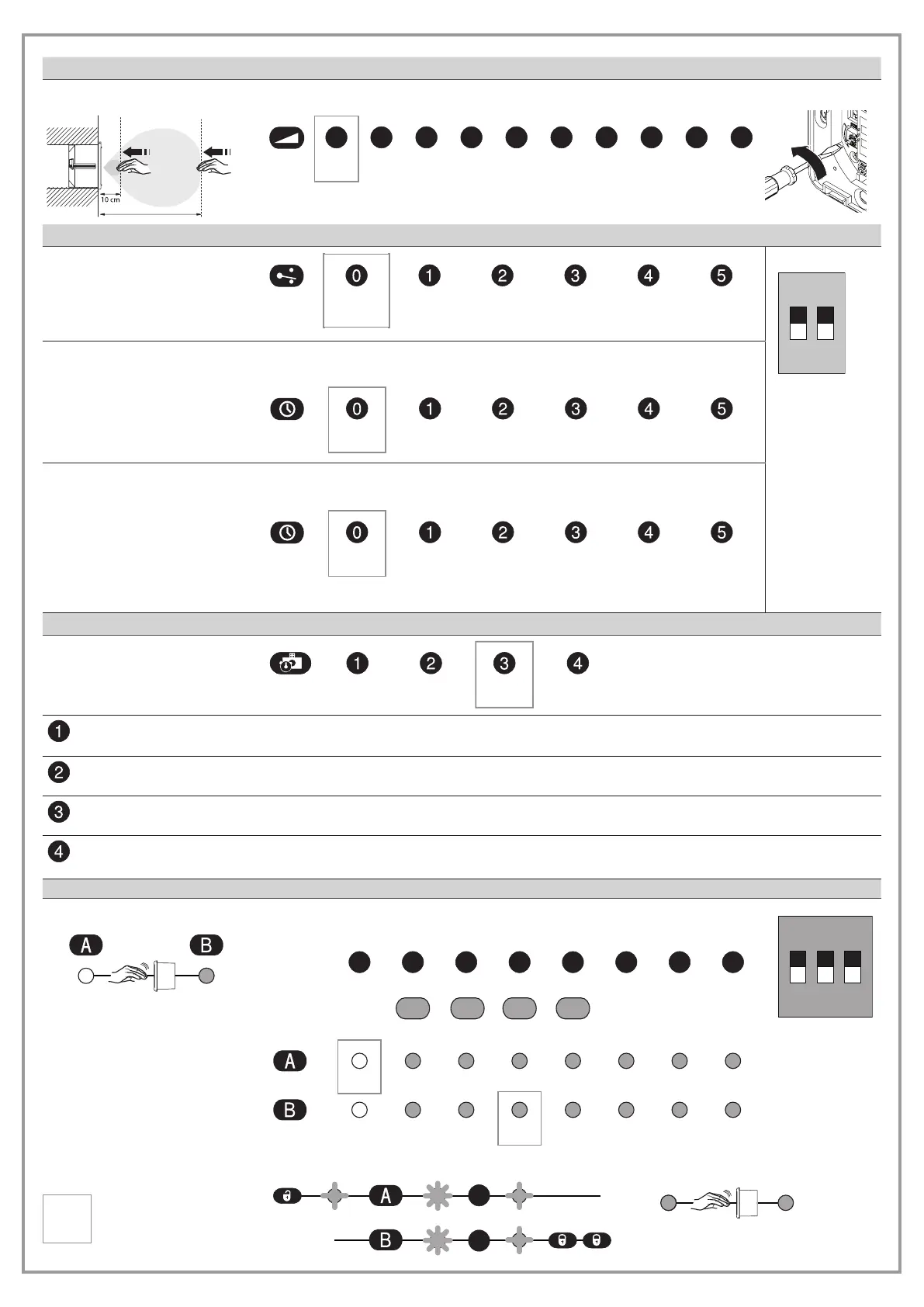
Range
Range
60 cm
To change these settings by remote control, the range must be set to minimum.
10 2 3 4 5 6 7 8 9
small >>>>>>>>large
Output
Output conguration
To change
these settings by
remote control,
the DIP switches
“Output” must
be set to
OFF.
Holding time
If the “output conguration” is set to Pulse (0, 2 or 4), the hold-open time can be adapted
here.
0.5 s
1 s
2 s
3 s 4 s
5 s
Aut. reset
If the “output conguration” is set to Toggle (1, 3 or 5), it can be determined here when the
system unlocks automatically.
No timer
1 min
5 min
15 min 30 min
60 min
5 seconds before the timer expires, the LED ashes and a signal sounds.
Door control
AUTO OPEN
CLOSED RESTROOM
AUTO With the contact closed at the control INPUT, the output OUT switches when a hand moves in front of
the sensor.
OPEN With the contact closed at the control INPUT, the output OUT switches permanently.
CLOSED With the contact closed at the control INPUT, the output OUT does not switch.
RESTROOM With the contact closed at the control INPUT, the output OUT switches when a hand moves in front of
the sensor optimised for a WC circuit.
= Factory setting
Pulse
NO
Toggle
NO
Pulse
NC
Toggle
NC
Pulse
frequency
Toggle
frequency
LED
Colour of LED
tion
O Blue
To change these settings by remote control, the DIP switches
“Colour of LED” must be set to OFF.
Red Green Blue Yellow
RedO Green Blue Yellow Pink TurquoiseWhite
RedO
Green Blue Yellow Pink TurquoiseWhite
1
2
No detection
Detectio
Re
reen
or or or or


 To Next Page