BIOS Setting
29
3.3.1 HDD Configuration
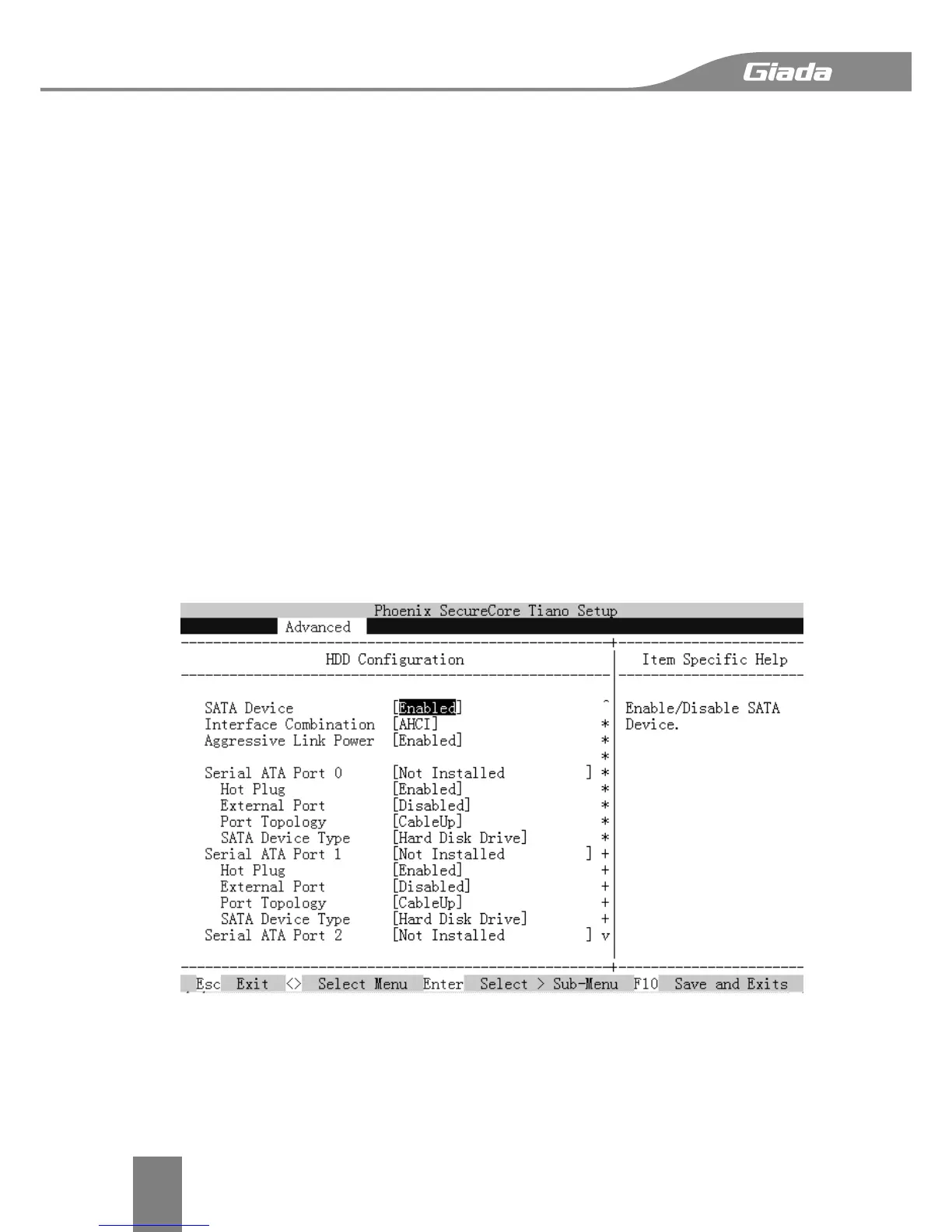
SATA Device
This item Enables or Disables the built-in SATA controllers on the motherboard. The default
setting is [Enabled].
Interface Combination
This item selects the SATA mode for a device installed on a SATA drive. The default setting is
[AHCI].
Aggressive Link Power
This turn on aggressive link power management on all HDD ports. The default setting is
[Enalbed].
Serial ATA Port 0/1/2/3/N
This feature option show the related SATA Port implementation status.
Hot Plug
SATA Hard drive hot plug setting.
Port Topology
Specific topology for SATA 6Gb/s ports. SATA 6Gb/s support is only available on SATA port0/1.
SATA Device Type
This feature configures the selected SATA port to support either a solid-state drive or hard
disk drive. The options are Hard Disk Drive and Solid Sate Drive.


 To Next Page