- 44 -
2-5 BIOS Features
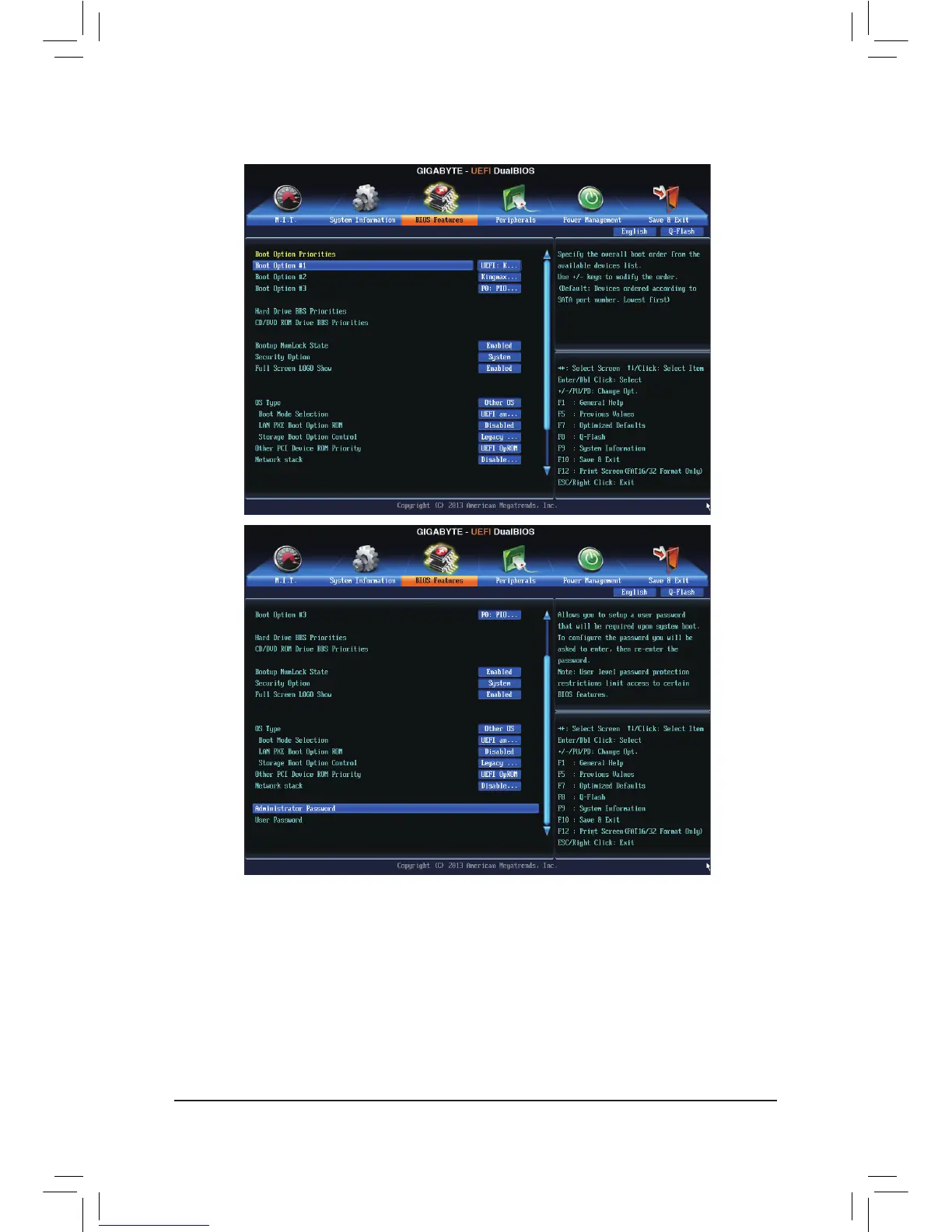
& Boot Option Priorities
Speciestheoverallbootorderfromtheavailabledevices.Forexample,youcansetharddriveasthe
rstpriority(Boot Option #1)andDVDROMdriveasthesecondpriority(Boot Option #2).Thelistonly
displaysthedevicewiththehighestpriorityforaspecictype.Forexample,onlyharddrivedenedasthe
rstpriorityontheHard Drive BBS Priorities submenu will be presented here.
RemovablestoragedevicesthatsupportGPTformatwillbeprexedwith"UEFI:"stringonthebootdevice
list.TobootfromanoperatingsystemthatsupportsGPTpartitioning,selectthedeviceprexedwith"UEFI:"
string.
Or if you want to install an operating system that supports GPT partitioning such as Windows 7 64-bit, select
theopticaldrivethatcontainstheWindows764-bitinstallationdiskandisprexedwith"UEFI:"string.


 To Next Page
 Loading...