EasyManua.ls Logo

Gigaset E370 - Display Icons Guide; Status Bar Icons; Display Key Icons

Gigaset E370
80 pages
Print Icon
To Next Page IconTo Next Page
To Previous Page IconTo Previous Page
Loading...
Template Module, Version 1.2, 11.09.2018,
Display icons
Gigaset E370 / LUG_NF BE-NL en / A31008-M2815-M201-1-3F19 / symbols.fm / 11/23/18
70
Display icons
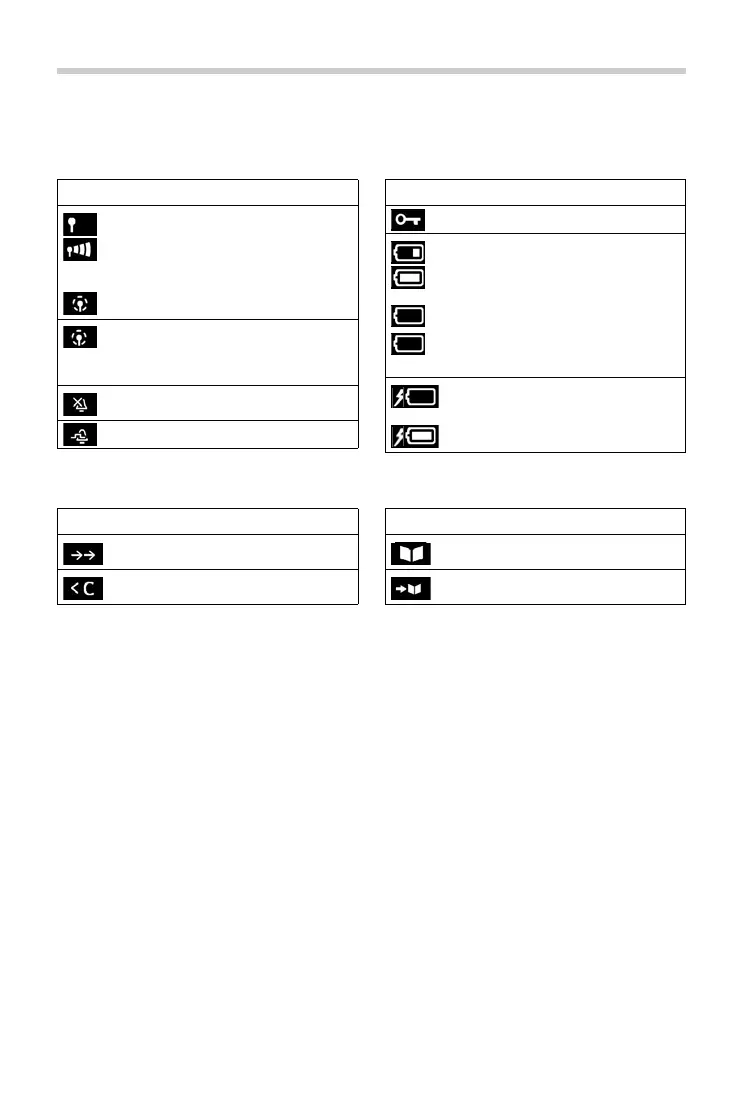
The following icons are displayed depending on the settings and the operating status of your telephone.
Icons in the status bar
Display key icons
Icon Meaning
Signal strength (No Radiation off)
1% -100%
white, if Maximum Range on;
green, if Maximum Range off
Red: no connection to the base station
No Radiation activated:
white, if Maximum Range on;
green, if Maximum Range off
Ringtone switched off
"Beep" ringtone activated
Keypad lock activated
Battery charge status:
White: between 11% and 100%
charged
Red: less than 11% charged
Flashes red: battery almost empty
(approx. 5 minutes of talktime left)
Battery is charging
(current charge status):
0% - 100%
Icon Meaning

Icon Meaning
Last number redial
Delete text
Open the directory
Copy number to the directory
Icon Meaning