Gigaset GL7 / LUG IE-UK_INT en / A31008-N1199-L101-1-7619 / applications.fm / 7/4/22
Template Module, Version 2.1, 11.08.2020 / Template Basiseinstellungen: Version X,X - xx.xx.xxxx
Additional functions (apps)
49
Displaying notes
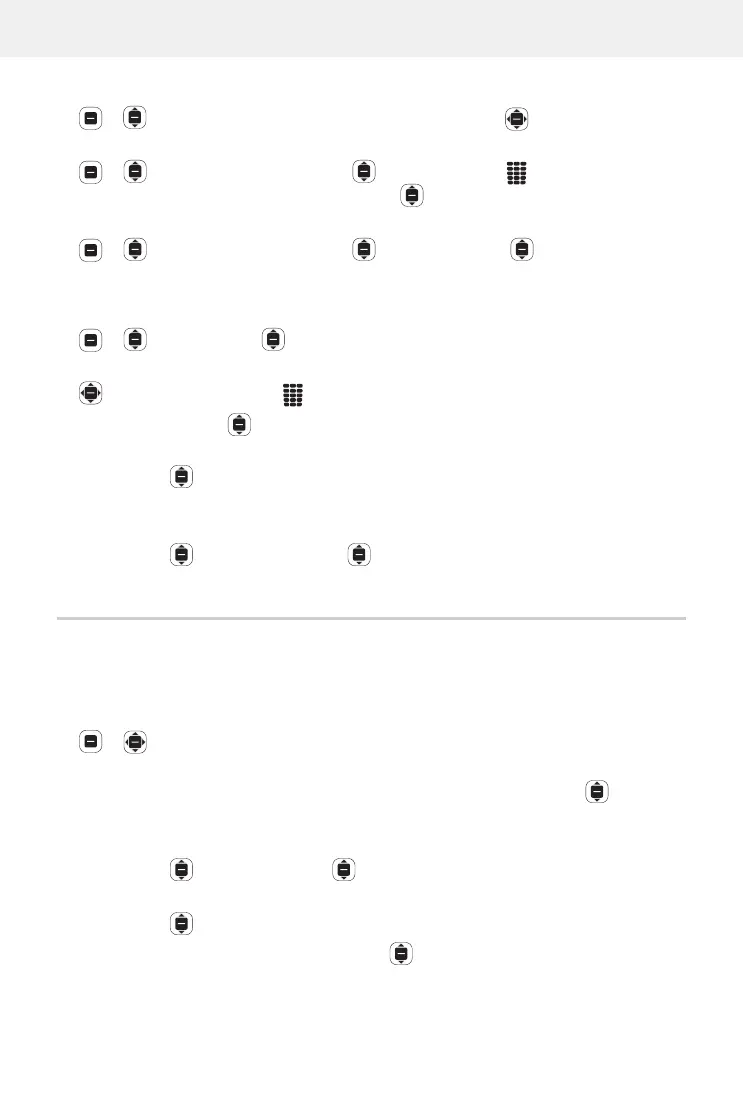
Note OK . . . Existing notes are listed Select a note OK
or: Look for a note
Note OK Options Search OK Enter the search
text . . . The relevant notes are listed
Select a note OK
Sort notes:
Note OK Options Sort by OK Select a sorting
criterion (such as creation date)
OK
Deleting/editing notes
Note OK Select a note OK
Editing:
Position the cursor Change the text Save
Delete:
Options Delete OK Delete
Share:
Options Share OK Select the app you want to use to share the
file
OK
Delete multiple notes:
Options Select Multiple Select the note OK Delete OK
Delete
FM Radio
Use the VHF radio to listen to available VHF radio stations. Because the phone
does not have an integrated antenna, a headphones cable needs to be
plugged in for this function (
p. 5).
FM Radio OK Plug in the headphones cable Turn On
Confirm the volume warning with OK
Stations . . . The frequencies of stations available are listed Select a
station
Adjust the volume:
Options Volume OK Adjust the volume
Switch between headphones and speaker:
Options Switch to speaker / Switch to headphones OK
Start scanning for stations:
Options Scan Stations OK
Turn off the VHF radio:
Turn Off Unplug the headphone cable



 To Next Page