Page 8 MDE-4327B Encore® Canopy Light Kit (M03225K001) Installation Instructions · October 2015
Installing Encore Canopy Light Kit
Attaching Light Conduit Assemblies
The light conduit assemblies are made up of following components:
• Conduit that contains the wiring
• Unilet and bracket
To mount and connect light conduit assemblies, proceed as follows:
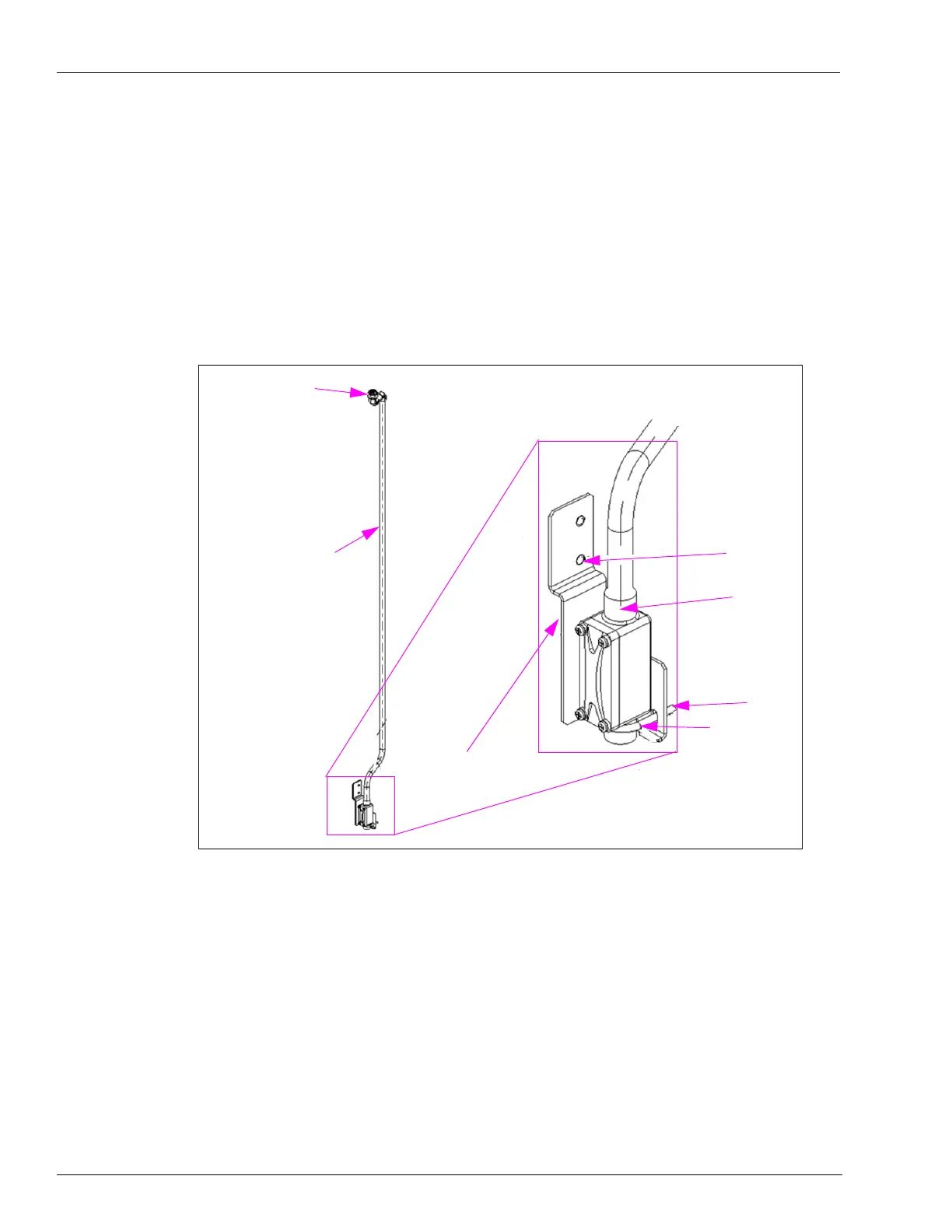
1 Attach the bracket to the channel using the Encore canopy light bracket and PEM
®
stud as
shown in Figure 2.
Figure 2: Mounting Unilet
Encore Canopy Light
Conduit Bracket
(M14407A001)
Encore Canopy Light
Conduit Assembly
Locking Nuts
U-bolt
PEM Stud
Nut
Unilet
2 Attach the Unilet to the bracket using a 1/4-20 X 1.5 U-bolt and 1/4-20 hexagonal flanged nut.
3 Assemble the 1/2 X 90 Short Conduit M X F Elbow (K42448) to the Unilet top opening.
4 Assemble large conduit to Unilet prior to installation of the unit.


 To Next Page