7.10 USB Port
【Function introduction】
USB works in store (MASS) or synchronization (HID) mode. In MASS mode, SD card can be
read by PC. In HID mode, you can sample real-time case by synchro analyse software.
7.11 SD Card
【Function introduction】
SD card is used to store case and upgrade process. In the process of use, SD card may appear
some problems, for those, there are different prompts to instruct users to operation.
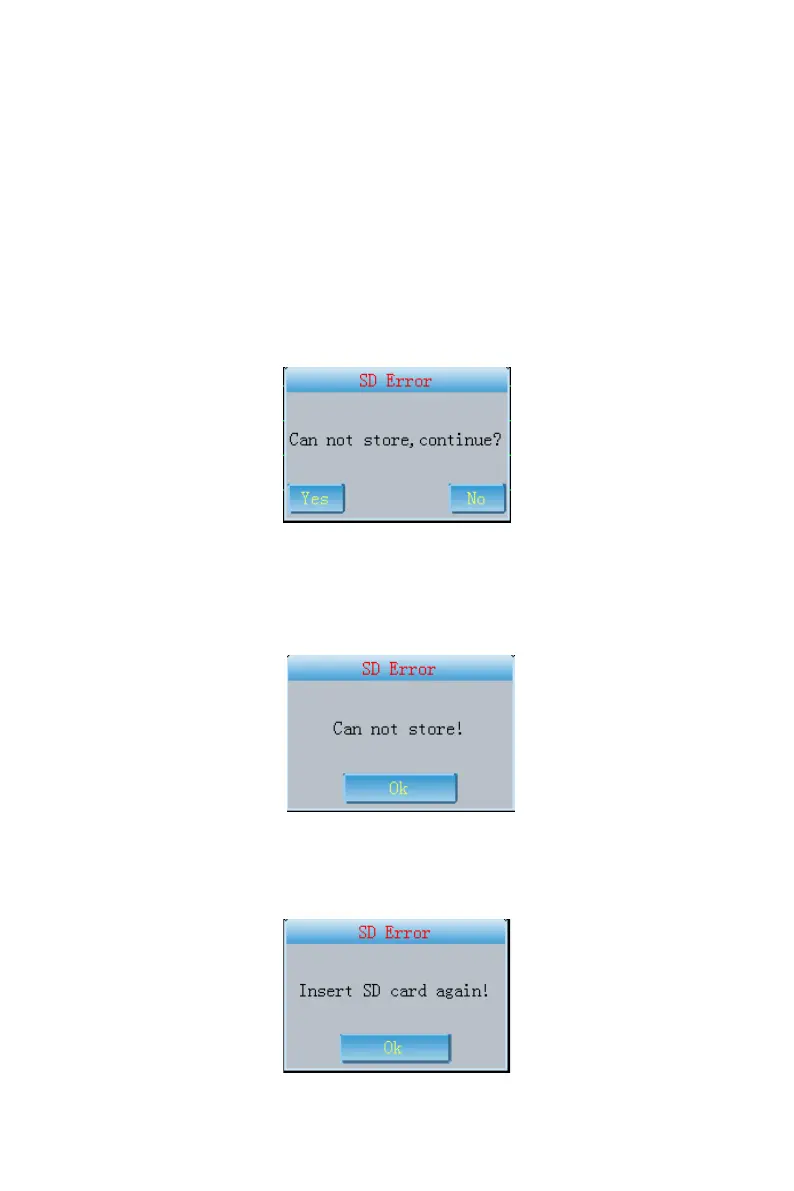
(1) when the case is being printed in the 1x12、1x12+1、2x6、2x6+1、3x4 mode, if there is no SD
card, the dialog box as Fig.7-29 will appear to prompt users the case can't be stored if print
continues.
Fig. 7-29
Click "Yes", print will continue but the case will not be stored. Click "No", print will be canceled,
you can insert SD card then continue to print.
(2) If you select "Only store" mode, when there is no SD card or SD card operating error, the
prompt as Fig.7-30 will appear to prompt users that store is disabled because of SD card error..
Fig. 7-30
Here click "OK" and insert SD card again, then continue to store case.
(3) when system enters Archive Management, the prompt as Fig.7-31 appears, please insert SD
card again.
Fig. 7-31



 To Next Page