17
Press timer button to enter timer setting, and the timing time will be displayed in indoor unit for
15 seconds.
Timer ON: When reaching the setting time, AC will turn on automatically and the icon will
disappear in remote controller.
Timer OFF: When reaching the setting time, AC will turn OFF automatically and the icon will
disappear in remote controller.
The timer setting will not change the AC current operation mode. Suppose AC is off now, it will
not start up firstly after setting the “timer off” function. And when reaching the setting time, the
timer icon will disappear and the AC running mode has not been changed.
3.3.9 Sleep function
⚫ The sleep function is available in cooling mode and heating mode.
⚫ Sleep function takes priority over TURBO functions.
⚫ The operating time for sleep function is 8 hours.
⚫ As long as AC receives the signal of sleep function, it will enter sleep function. If receiving a
signal without sleep function (including mode and power on and off), AC will exit sleep
operation function. Starting the shutdown will also cancel the sleep operation function
(determined by the remote control).
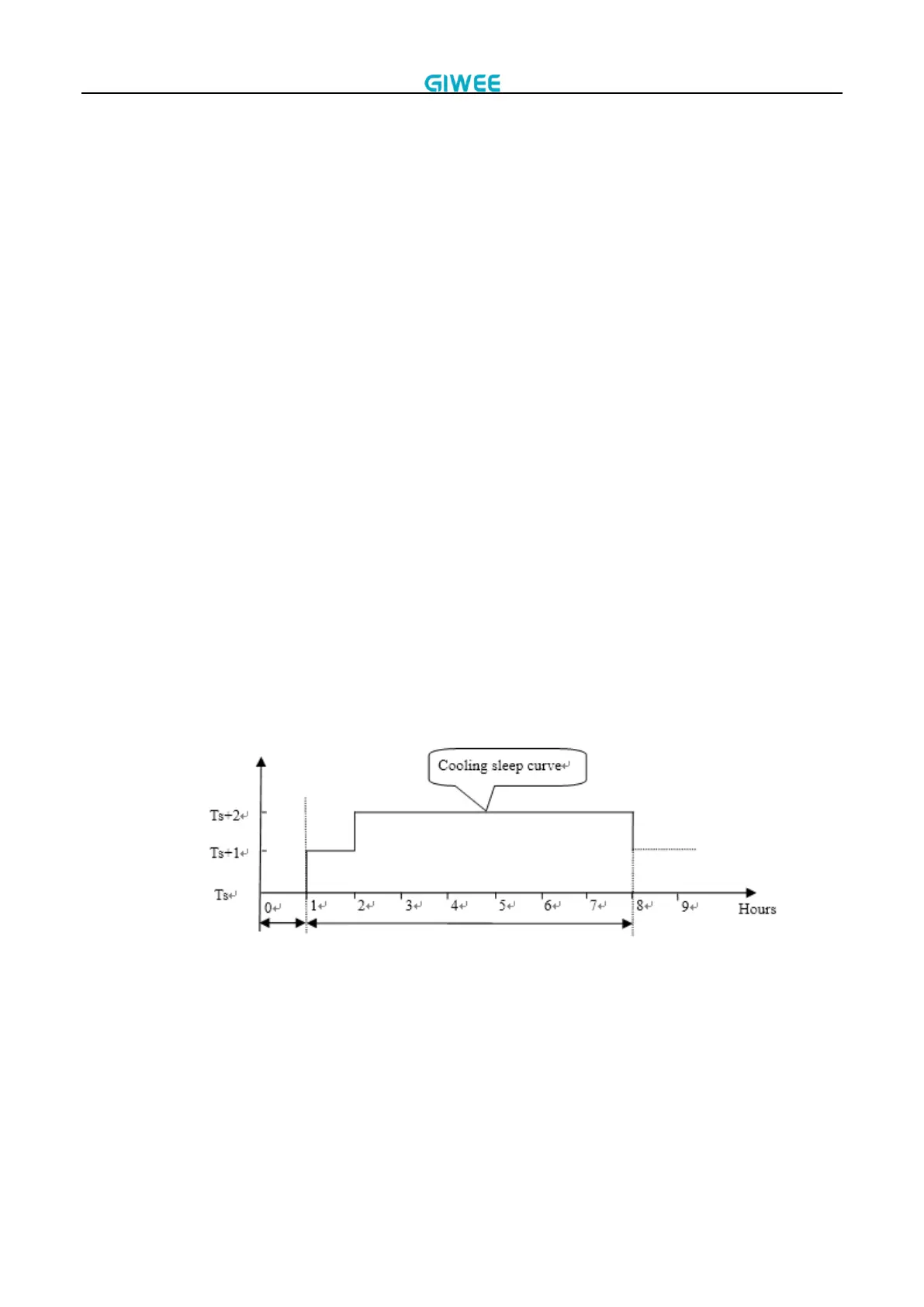
⚫ The operational process for sleep mode is as follows:
In cooling mode, the temperature rises 1°C (to not higher than 32C) every hour. After 2
hours, the temperature stops rising. The fan speed changes to slim fan speed automatically
and the fan speed can be changed by remote controller. After 8 hours, it exits sleep function
and the setting temperature will decrease 1°C automatically.
In heating mode, the temperature decreases 1°C (to not lower than 16°C) every hour. After 2
hours, the temperature stops decreasing. The fan speed changes to slim fan speed
automatically and the fan speed can be changed by remote controller. Anti-cold wind
function takes priority. After 8 hours, it exits sleep function and the setting temperature will
rise 1°C automatically.


 To Next Page