Displays, Controls, and Indicators GlideScope
®
System
page 16 User’s Manual
Monitor Front Panel
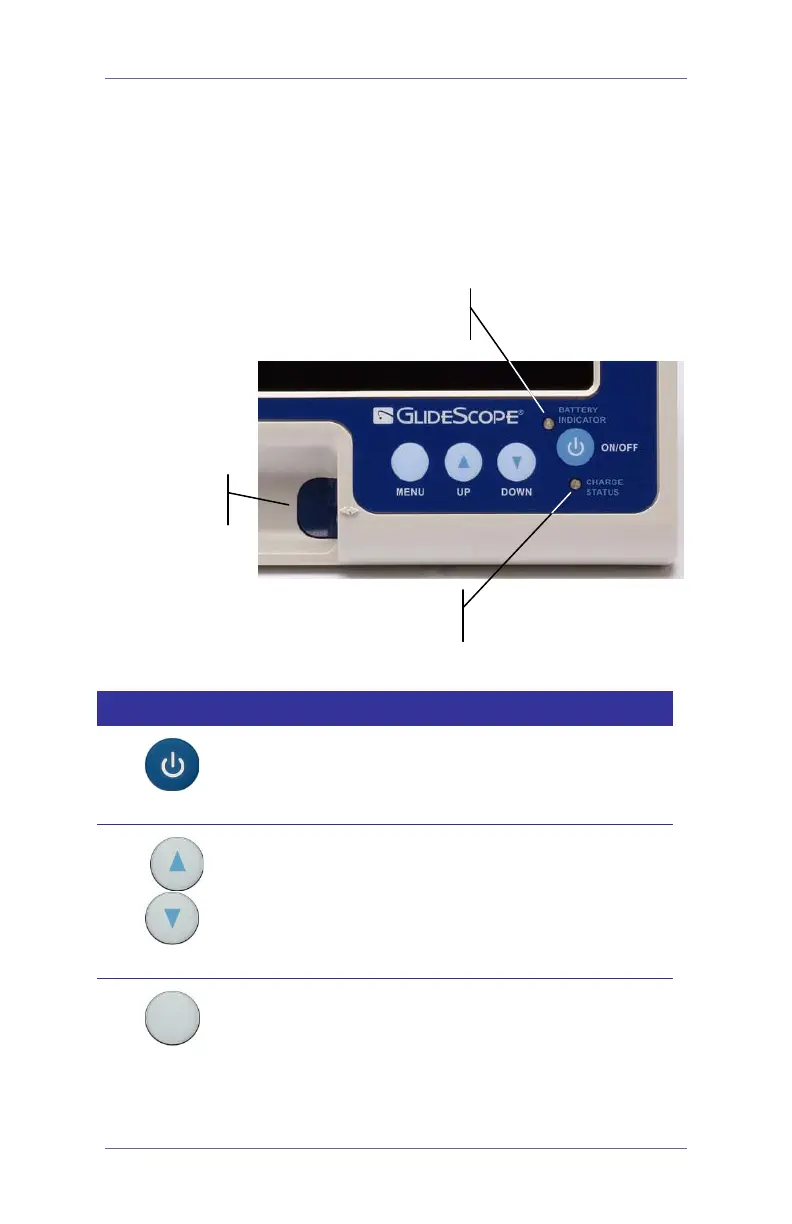
The GlideScope video monitor front panel (Figure 7) contains the
video cable connector, two battery status LEDs, and four buttons:
MENU, UP, DOWN, and ON/OFF. Button functions are described
in the table below.
Figure 7. GlideScope video monitor front panel.
Monitor front panel buttons.
Button Function
ON/OFF
Press to turn the GlideScope System
ON/OFF.
UP DOWN
Press to increase/decrease monitor setting
values.
MENU
Press the
MENU button repeatedly to make
selections from the displayed list of options. A
menu item is selected (active) when
highlighted in yellow. Display settings include:
connector
status LED
status LED



 To Next Page