Global Link Ultra E Lock Instructions
March 2019 Page 2
Locking and Unlocking
The lock supports both keyless and keyed operation.
Important: It is recommended to lock the deadbolt during transportation for added security.
Using the Keypad
To lock the door:
1. Press any key to wake up the keypad.
2. Press and hold the 1-2 key and the 3-4 key at the same time. Two descending beeps
indicate success.
To unlock the door:
1. Press any key to wake the keypad.
2. Enter the factory default code (printed on a label affixed to the inside handle of the lock)
or the current customer code. Two ascending beeps indicate success.
Notes: If 4 quick beeps sound, the code was incorrect; enter the correct code. If an
incorrect code is entered twice, the keypad goes to sleep; wake the keypad to try again.
Using the Deadbolt Lever
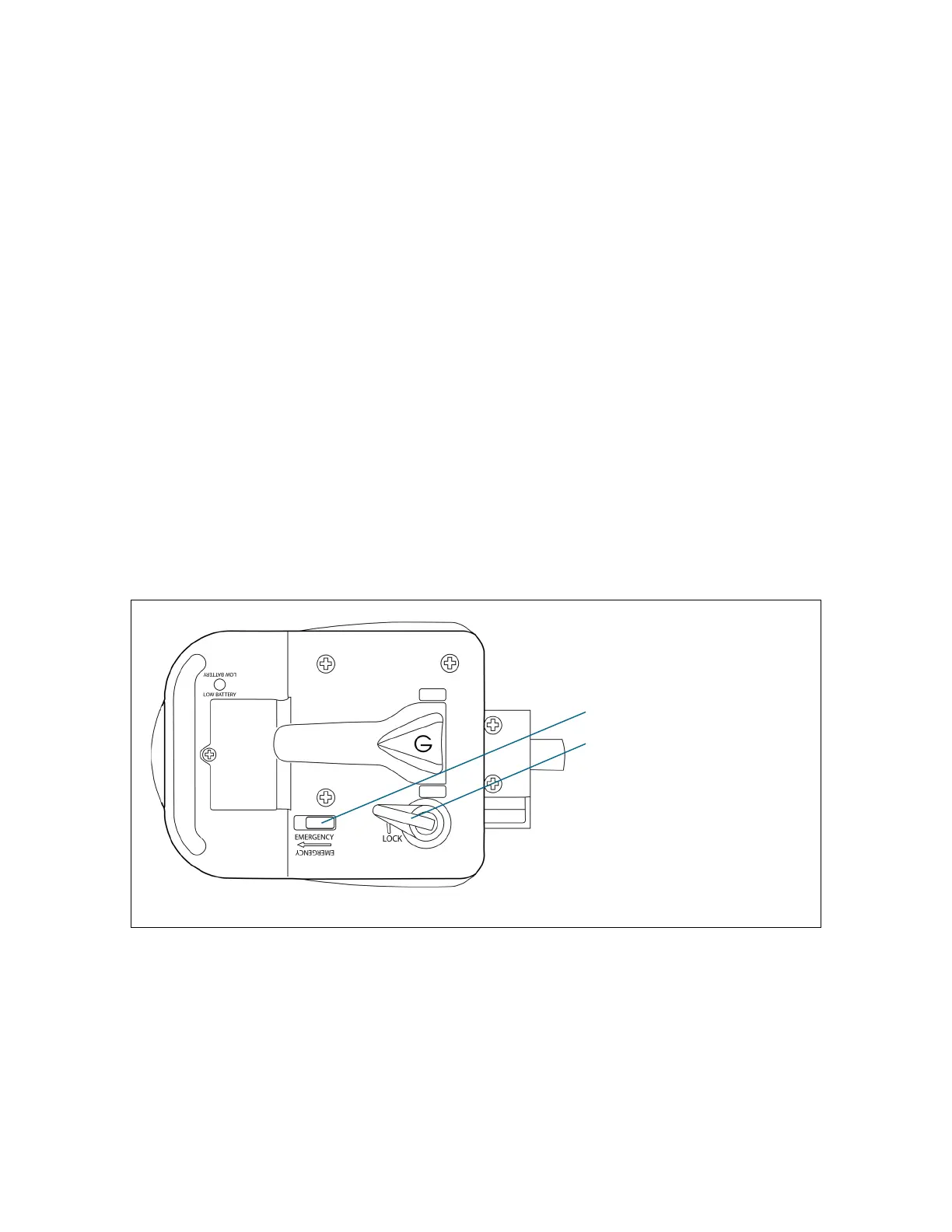
Use the red deadbolt lever to lock and unlock the door from the inside (as shown).
Note: For exit in the event the deadbolt lever fails, slide and hold the safety release button and
open the door.
Figure 2: Using the Deadbolt Lever
Safety release button
Deadbolt lever (in locked position)


 To Next Page