Global Link Ultra E Lock Instructions
March 2019 Page 4
Changing the Battery
The lock is powered by a single Type 123 lithium battery and indicates low battery power by:
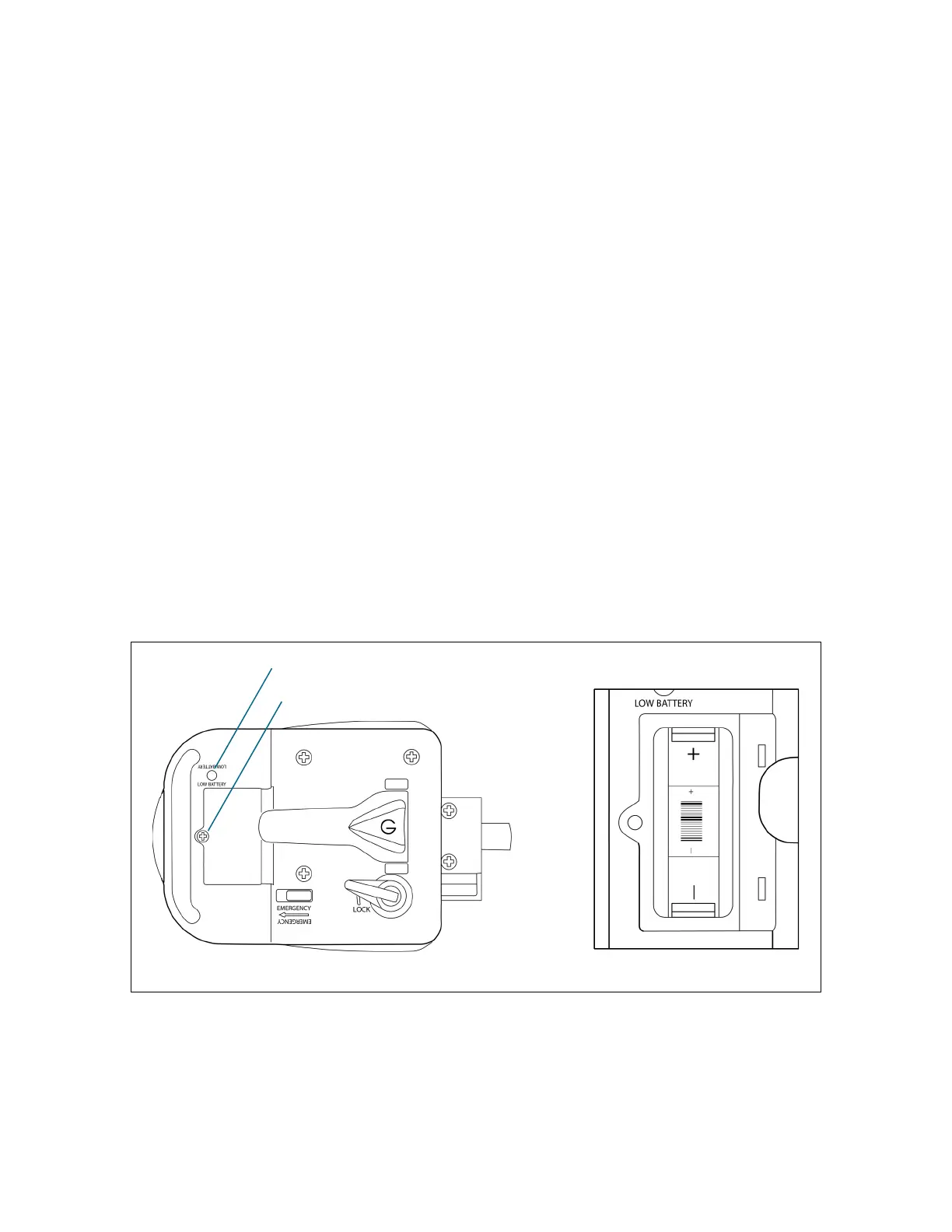
a flashing LED on the inside of the lock when the keypad is activated
4 quick, descending beeps and a flashing keypad light any time a key is pressed
If the batteries die with the deadbolt in the locked position, the deadbolt remains locked. The
customer key can be used to unlock the door.
It is recommended that the battery be removed if the lock will be stored or will not be used for an
extended period of time.
Important: Before installing the battery for a new lock, record the factory default code, which is
printed on a label affixed to the inside handle of the lock. The factory default code is needed for
keyless entry before a customer code has been added and to program / reprogram the customer
code.
To change the battery
1. Use a #2 Phillips screwdriver to loosen the captive battery compartment screw on the
interior of the lock. Do not completely remove the screw.
2. Lift off the battery compartment cover.
3. Remove the old battery from the battery holder.
Note: Dispose of the old battery according to local regulations.
4. Insert a new battery in the correct orientation (shown on the battery holder).
5. Insert the battery door tabs in the slots on the battery compartment and swing the door
closed. Tighten the screw to secure the battery door.
Figure 7: Changing the Battery
Battery compartment screw
Low battery LED


 To Next Page