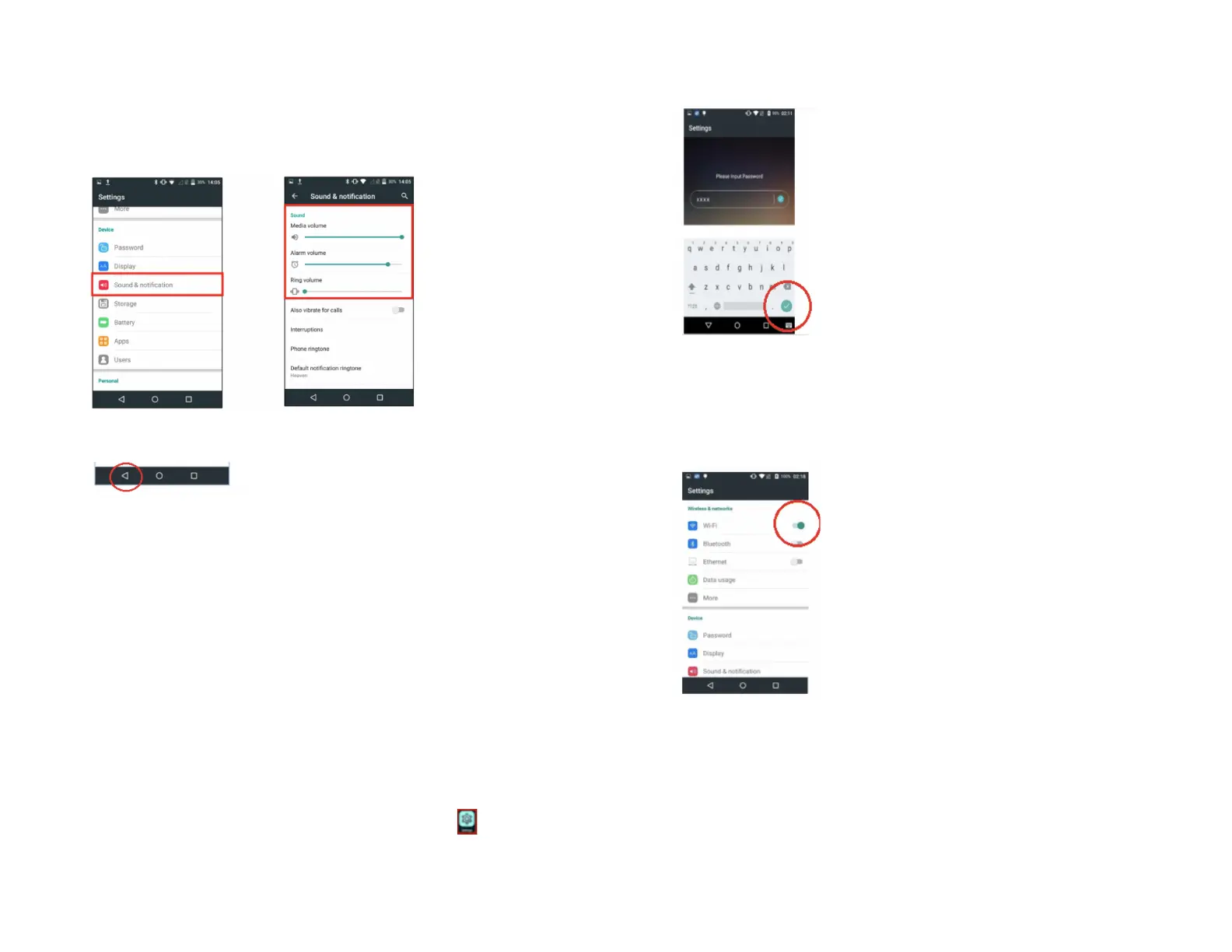
4. Tap OK.
5. Scroll down to Sound & Notification.
6. The Sound menu will appear.
7. Tap the Back icon to return to the Android Home screen.
8. Tap the Portico Canada icon to return to the Main Menu screen.
Network communication
The PAX A920 terminal can support WiFi and 4G communications. You
can select any of these communication modes to use as your primary
communication method. The following instructions will help you setup
your device.
For a WiFi Set-Up
1. At the Android Home screen, tap the Settings icon.
2. Key in your Password.
3. Tap the green checkmark button.
4. Tap OK.
5. Tap WiFi from the Wireless & Networks menu to turn the WiFi option
on/off.
6. To see the available WiFi networks, turn on the WiFi option. Only local
WiFi networks that have the SSID broadcast option enabled will be
displayed.


 To Next Page