
 Need help?
Do you have a question about the globalpayments A920 and is the answer not in the manual?
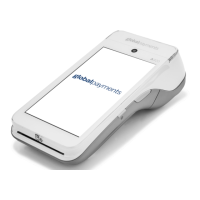
Describes the terminal as an electronic point-of-sale device for processing transactions.
Warning against using the terminal near water or in flammable environments.
Instructions for inspecting the shipping carton and its contents for damage.
Steps to turn off the device using the power button and selecting options.
Instructions to show battery percentage on the status bar via Settings.
Lists and identifies the 10 hardware components of the PAX A920 terminal.
Lists and briefly describes key functions available in the FUNC menu, including Settings, Reports, History, and more.
Instructions for changing the default user password on the terminal.
Steps to password protect specific transaction types for security.
Guide to setting up Clerk/Server IDs and enabling the prompt.
Steps to change the terminal's display and printing language to English or French.
Two methods to adjust the terminal's volume: using the volume button or via Settings.
Instructions for setting up a WiFi connection on the terminal.
Steps for processing a contactless payment by tapping the card.
Instructions to enable or change tip settings, including input mode.
Steps to process a standard sale transaction, including amount and invoice entry.
Steps to authorize an amount for a pre-auth transaction.
Steps to credit a cardholder by processing a return transaction.
Steps to void a transaction before it is settled.
Procedure to perform a settlement and close the terminal batch.
Options to reprint the last transaction or search for specific transactions.
Steps to enable demo mode for familiarization and staff training.
Steps to generate Default, Current, and History reports.
Details on printing Tip reports and various EMV reports.
Steps to enable semi-integration between the terminal and an ECR system.
Instructions to enable or disable the key beep sound through terminal settings.
Guidelines for placing the terminal and required environmental conditions.
Detailed steps for changing the thermal paper roll in the printer.
Information on approved paper size, diameter, and storage recommendations.
Solutions for paper jams and blank receipts.
Troubleshooting steps when the card reader fails to read cards.
Steps to resolve issues when the terminal does not power on or function correctly.
Safe procedures for cleaning the terminal, including unplugging power.
Details on memory, processor, card reader, display, printer, and camera specs.
Information on connectivity options, communication parts, battery, and physical dimensions.
Information on how to contact Global Payments Customer Care for service and support.
Guidelines for returning defective terminals for service or replacement.
 System Memory
| RAM | 1 GB |
|---|---|
| Flash memory | 8 GB |
| Micro SD Card support | up to 32 GB |
 Processor
| processor type | AMR Cortex A7 |
|---|---|
| processor speed | 1.1GHz |
| processor cores | 4 core |
Card Reader| magnetic card reader lifespan | 500K lifespan |
|---|---|
| smart card reader standard | EMV Level 1 |
| contactless reader standard | EMV Level 1 compliant |
 Display
| display size | 5 inches |
|---|---|
| display resolution | 720 x 1280 |
| display type | IPS Touchscreen |
 Camera
| front camera resolution | 0.3 MP |
|---|---|
| rear camera resolution | 5 MP |
| rear camera focus type | Auto focus |
 Battery
| battery voltage | 3.7V |
|---|---|
| battery capacity | 5250 mAh |
| battery type | Li-Ion |
 Weight and Dimensions
| length | 6.92 inches |
|---|---|
| width | 3.07 inches |
| height | 2.24 inches |
| weight | 11.3 oz |

 To Next Page