0020127401_00 - 06/11 - Glow-worm
HOW TO USE YOUR APPLIANCE
- 10 -
HOW TO USE YOUR APPLIANCE
8 Overview
8.1 Display Description
TheUserControlpanelconsistsofthree
pushbuttons,aresetbuttonanddisplay,
whichwillindicatewithsymbolsthestatus
oftheboiler.
8.2 Switching On and Off
Switching on
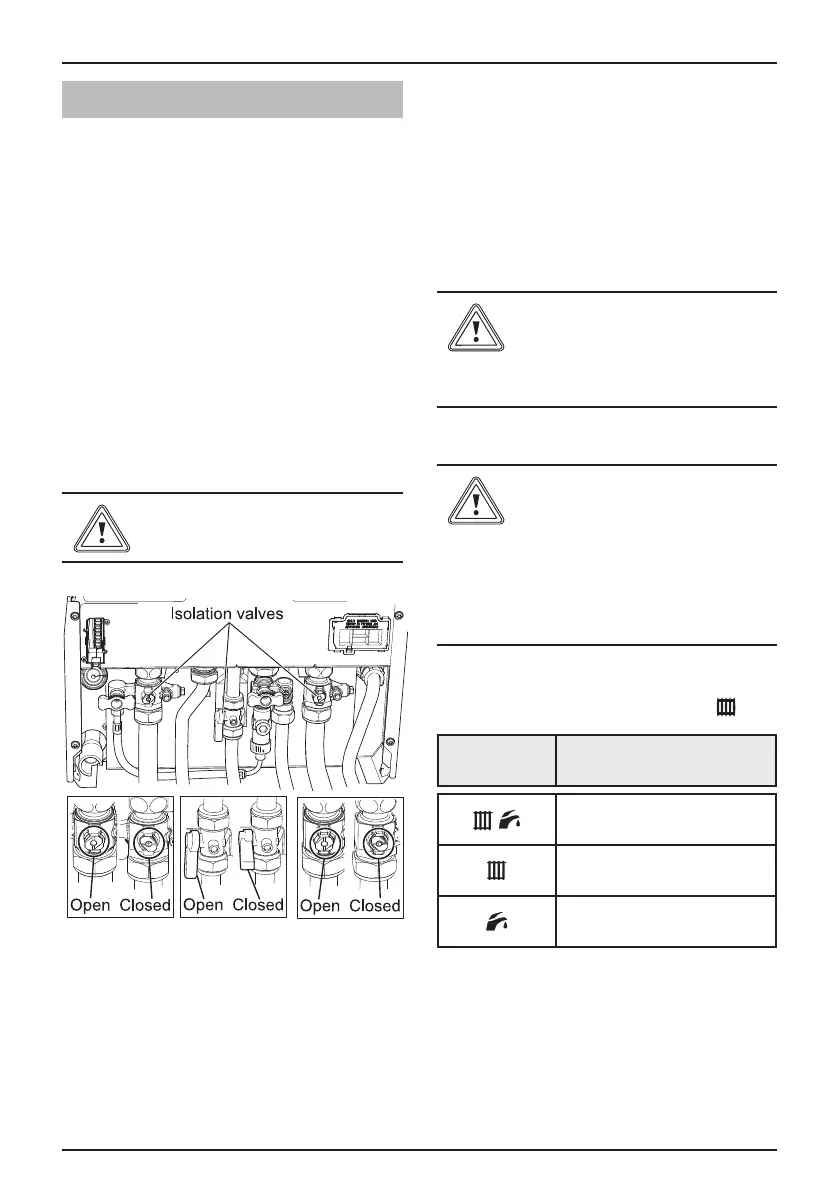
- Checkthatthewaterandgasisolating
valvesontheapplianceareopenand
thewaterowsfreelyfromthehot
watertaps,closethetaps.
Do not operate without water
• Makesurethat:
- Theappliancehaselectricalpowerand
thereisnodemandfromanyexternal
controls.
- Thedigitaldisplaywillindicatethe
systempressure,whichshouldreadat
least0.7bar(recommended1.0bar).If
thepressureisless,connectthelling
loopandpressuriseasdescribedinthe
FillingLoopsection9.2.
Switching Off
• Switchofftheelectricalsupply.
- Theapplianceandthedisplaywillshut
down.
If you intend to leave
your property empty for a
prolonged period, refer to
the Appliance Safety Devices
section.
8.3 User Controls
If you are in any doubt about
the boiler being lled with
water contact your installer
or Glow-worm's own service
organisation using the
telephone number shown in
the chapter " Contact your
after-sales organisation".
• Pressandholdthe"MODE"button
for2secondstoenterCentralHeating
function,indicatedbyaashing
.
Symbol Mode
Heating+domestichotwater
Heatingonly
Domestichotwateronly
• After5secondsofinactivitythe
displaywillresettoindicatethewater
temperature.
• ToselecttheCentralHeating
temperature(38-82
o
C)pressthe"+or
-"selectorbuttons.




 To Next Page