4
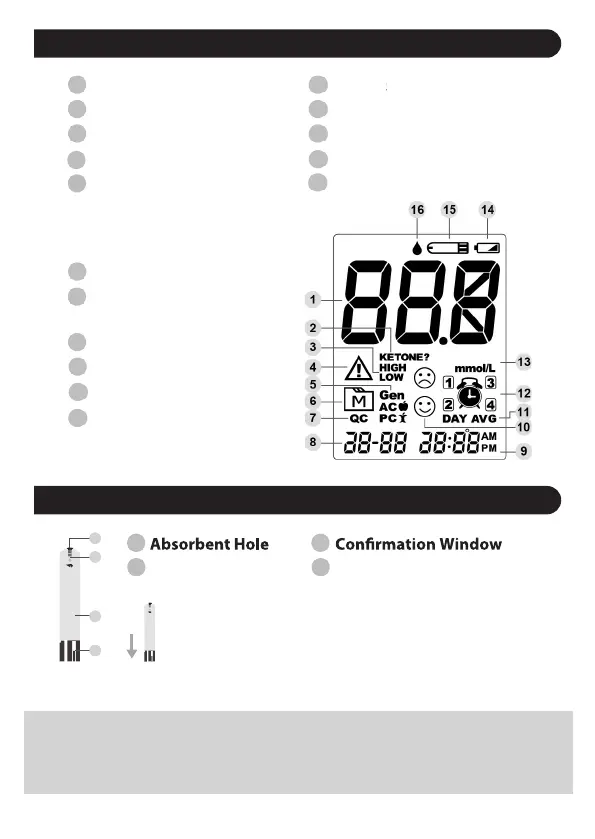
Display Screen
1
2
3
5
6
7
8
9
4
Test Result Alar ymbol
Measurement Unit
Ketone Warning
High/Low Indicator
Error Message
Low Battery Symbol
Test Strip Symbol
Measuring Mode
AC – before meal
PC – after meal
Gen – any time of day
Blood Drop Symbol
Memory Mode
Control Solution Mode
Date
Time
Face Symbol
Day Average
Test Strip Handle Contact Bars
10
11
12
13
14
1 2
3 4
15
16
Test Strip
ATTENTION:
The front side of the test strip should face up when
inserting the test strip into the meter.
Test results might be wrong if the contact bars are not
fully inserted into the test strip slot.
NOTE:
• The GlucoCheck EVOLVE meter should only be used with GlucoCheck Test
Strips. Using other test strips with this meter will produce inaccurate results.
QC-control solution test
(day-month)
1
2
3
4


 To Next Page