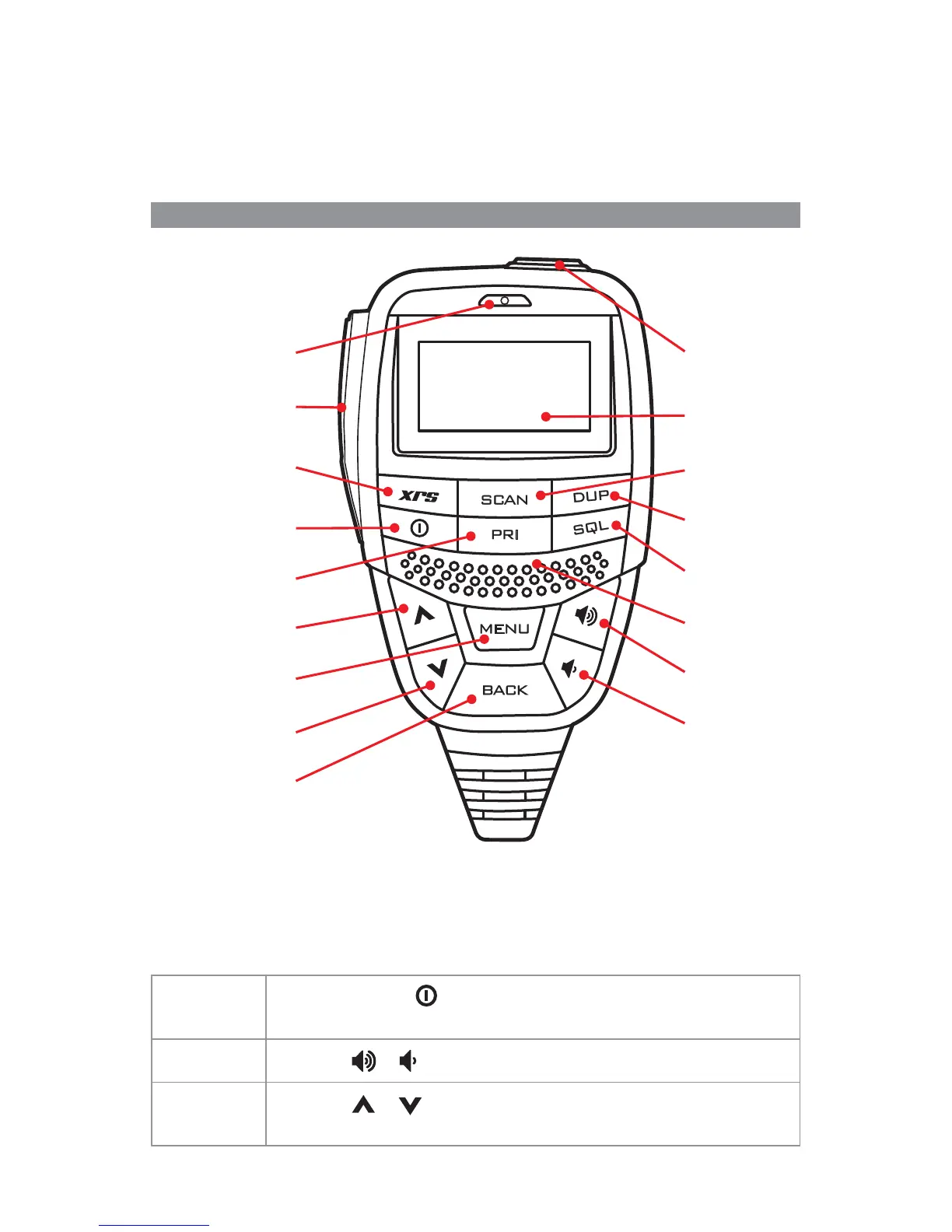
Microphone
Push to talk
Programmable
(XRS) function key
Power
Priority
Channel/Up
Menu/Enter
Channel/Down
Back
Programmable
(Top) key
OLED display
Scan
Duplex
Squelch
Speaker
Volume +
Volume -
2
Telemetry Channels
ACMA regulations have allocated channels 22 and 23 for telemetry only applications
and have prohibited the transmission of speech on these channels. Consequently your
radio has a transmit-inhibit applied to channels 22 and 23. Currently transmissions on
channels 61, 62 and 63 are also inhibited and these channels are reserved for future use.
GENERAL OPERATION
Controls
Summary of basic controls
For a detailed description please refer to the full instruction manual available from the
GME website.
Receiving
Power:
Press and hold the
key to turn the radio on or o .
Volume:
Press the
or keys to adjust the volume.
Selecting
Channels:
Press the
or keys to select a channel.



 To Next Page