Need help?
Do you have a question about the GME XRS-370C and is the answer not in the manual?
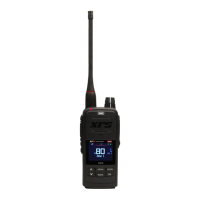
Details the GME XRS-370C's capabilities, advanced features, and design.
Information on companion apps for radio configuration and location sharing.
Identifies front/rear panel connectors and controller microphone functions.
Covers power, auto power-down, volume, and channel selection.
How to adjust squelch, signal meter, and display brightness.
Procedures for transmitting, time-out timer, and busy lockout.
Explains voice scrambler, beep tone volume, and dynamic volume control.
Active speaker, microphone gain, and squelch tail adjustments.
Roger beep tone and repeater/duplex operation modes.
Details Open Scan, Priority Scan, and Network Scan operations.
Programming scan memories and using the auto skip feature.
Using CTCSS/DCS for selective muting and silent channel operation.
Setting up and making SelCalls, including identification and naming.
Performing group calls and managing call acknowledgements.
Guide to accessing the menu, context menus, and options.
Creating, naming, and managing receive-only channels in zones.
Customizing buttons and assigning various radio functions.
Utilizing Location Services, Voice Playback, and Active Mute.
Mounting the cradle, fitting the radio, and power connection guidance.
Includes frequency tables, specifications, and wiring diagrams.
 General
| Channels | 80 |
|---|---|
| Bluetooth | Yes |
| Scan Function | Yes |
| Waterproof | IP67 |
| Display | LCD |
| Operating Voltage | 7.4V |


 To Next Page