
 Need help?
Do you have a question about the GME XRS-660 and is the answer not in the manual?
Essential safety precautions for operating the radio transmitter.
Overview of the XRS-660's features and advancements.
List of items included with the radio package.
Details on transmit power, duplex, VOX, and receive channel configurations.
Explanation of DSP, ASM, DVC, scrambler, CTCSS, and DCS features.
Using the XRS Connect app for customization, Bluetooth pairing.
Feature for sharing and displaying GPS locations between radios.
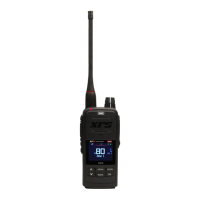
Identification and function of the radio's physical buttons and components.
Explanation of icons and indicators shown on the LCD screen.
Instructions for handling and charging the radio's Li-ion battery pack.
Methods for extending battery life, including power saving modes and backlight.
Basic operations for turning the radio on/off, adjusting volume, and changing channels.
Adjusting squelch sensitivity and understanding the signal meter display.
Step-by-step guide for transmitting, including PTT and microphone usage.
Setting transmit power, time-out timers, and busy lockout functions.
Using voice scrambler and adjusting beep tone volume.
Automatic adjustment of received audio volume for consistent output.
Adjusting microphone sensitivity and selecting active speakers.
Understanding and using repeater stations and duplex mode for extended range.
Storing and recalling priority channels for quick access.
Configuring Open, Priority, Network scans and programming scan memories.
Using Dual Watch and Triple Watch to monitor multiple channels.
How to initiate and operate the Open Scan mode.
How to initiate and operate the Priority Scan mode.
Utilizing Net-Scan for group communication in congested environments.
Choosing CTCSS or DCS and understanding tone set compatibility.
Enabling and disabling silent mode for CTCSS/DCS channels.
System for calling individual radios using unique SelCall numbers.
Managing SelCall IDs and using quiet mode to filter calls.
Procedures for initiating and responding to SelCalls.
Functionality for simultaneously calling multiple radios within a group.
Programming, sending, and receiving group calls, including acknowledgements.
How to access and navigate the radio's menu and context menus.
Reference table for menu options and detailed radio settings configuration.
Configuring scan modes and adjusting display settings.
Managing GPS, Voice Playback, CrewTalk, and receive-only channel zones.
Setting core radio functions like quiet mode and scan.
Assigning functions to the radio's dedicated programmable buttons.
Customizing received audio characteristics with a four-band graphic equalizer.
Selecting scan memories and configuring Net-Scan subtone.
Adjusting beep volume, display brightness, and dim timeout settings.
Enabling/disabling Bluetooth and pairing with accessories.
Detailed procedures for initiating, resending, and saving SelCalls.
Procedures for adding or editing SelCall contacts in memory.
How the radio acquires satellite data for location services.
Configuring location transmission, timeouts, and display.
Managing data transmission rates and viewing GPS coordinates.
Enabling, playing back, and clearing recorded voice transmissions.
Setting up and managing the Active Mute feature for call handling.
Enabling CrewTalk and configuring group numbers for group communication.
Managing zones, selecting, and naming custom receive-only channel groups.
Procedures for adding new channels or modifying existing ones within zones.
List of CTCSS tone frequencies for radio programming.
Table detailing Digital Coded Squelch (DCS) codes.
Table of operating frequencies for UHF CB channels.
General, transmitter, and receiver technical specifications.
Physical dimensions, weight, temperature, and ingress protection ratings.
Details on consumer rights and warranty against defects.
Conditions not covered by warranty and specific warranty durations.

 To Next Page
 General










