Doc 0428820 rev. B
Page 10 of 15
Not subject to issue control when printed
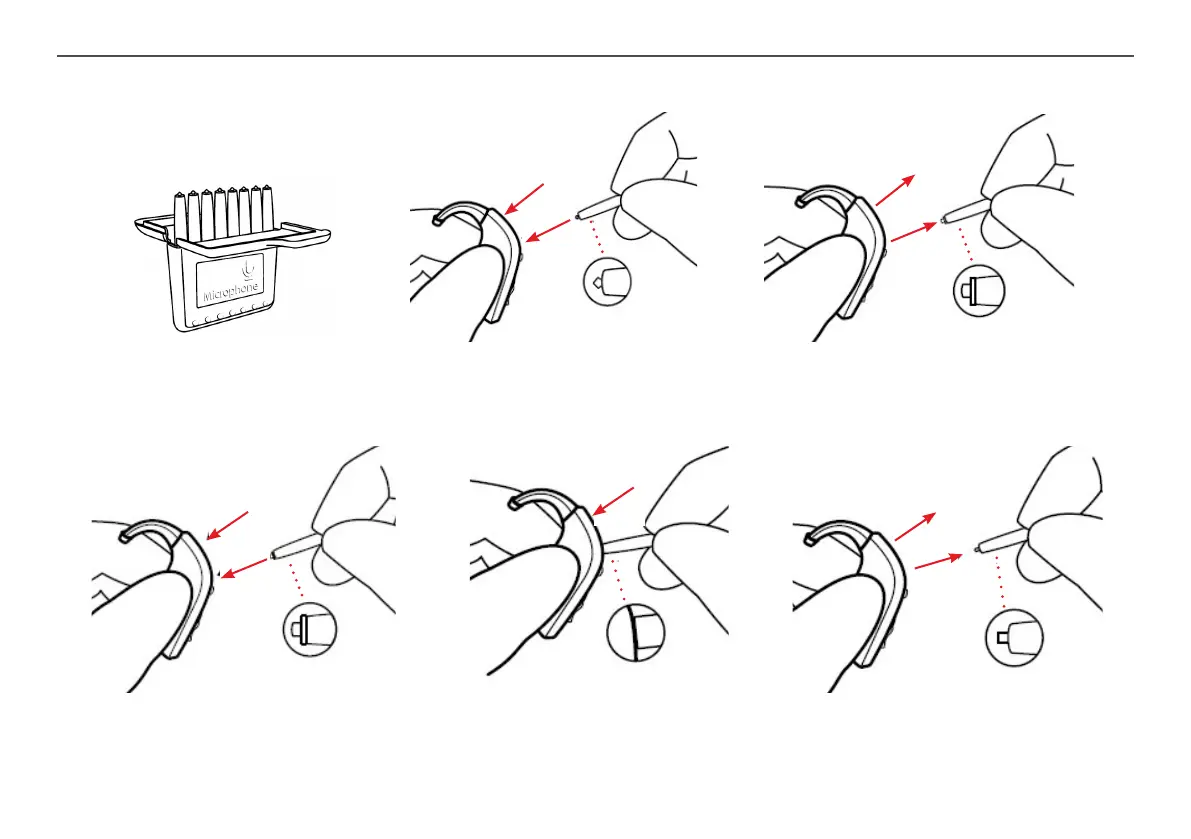
Replacing Mic Filter
FILTER,MIC,CASE,8PCS
The mic lter tool has two functions:
A removal tip to take out the used
lter, and a repl tip with a new lter
Open the lter box and take out one of the tools. Insert the removal tip into the used mic lter
and then pull the tool straight out. It is important to pull it straight and not on an angle
Insert the other end of the tool (the end with
the replacement lter) into the mic opening
Gently press the repl lter straight into
the mic opening until the outer ring is
ush with the back of the hearing aid
Pull the tool straight out – the new mic lter
should remain in place


 To Next Page