Doc 0428820 rev. B
Page 5 of 15
Not subject to issue control when printed
Part No Description
21396100 HOOK ASM,LARGE,CAM (no hook lter)
21396200 HOOK ASM,MEDIUM,CAM (no hook lter)
21396300 HOOK ASM,SMALL,CAM (no hook lter)
21521100 METAL HOOK,ASM,LARGE,CAM (no hook lter)
21978800 HOOK,LARGE,C70R,W/FLTR
21978900 HOOK,MEDIUM,C70R,W/FLTR
22316300 HOOK,SMALL,C70R,W/FLTR
22259300 FILTER,HOOK,CAM,4PCS (C70R)
16342400 PIN,0.60X8.20 (TOP HSG,BAT end)
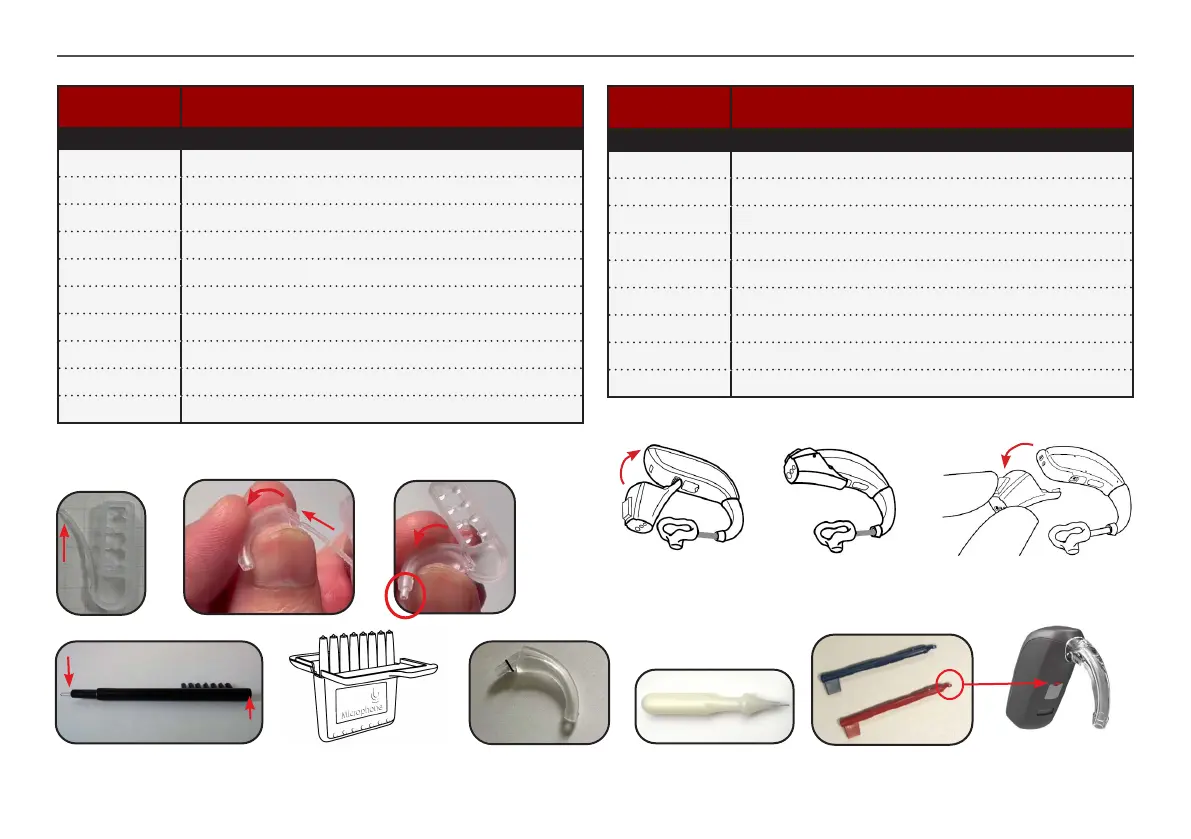
15502500 PIN REMOVAL TOOL. PACKED
Cleaning brush, black
17435000
Magnet
Cleaning
loop
Part List
Part No Description
22215600 KIT,CLR MARKERS,C80R HP
22215000 KIT,PLASTIC HOOKS,CLR MKR,C80R
21978700 KIT,HOOKS,CLR MARKERS,C70R
20420900 COLOR MARKER,CRHI,MLD,RED
20420901 COLOR MARKER,CRHI,MLD,BLU
22035700 FILTER,MIC,CASE,8PCS
17294600 AUTOPHONE MAGNETS
17435000 GENERIC BRUSH, BLK
21520400 DAI SHOE,ASM,C80R,PKG
PIN REMOVAL TOOL
15502500
HOOK ASM
(C80R is shown)
FILTER,MIC,CASE,8PCS
22035700
Colour markers
To connect the audio adapt:
Attach the audio adapt to the contact points
in the HI and click it in place as shown
To remove the audio adapt:
Press the release button and
remove the audio adapt
Colour mrk location
C70R: Remove the hook lter by pushing the tip of the lter tool into
the hook and slide it all the way through until the hook lter falls out


 To Next Page