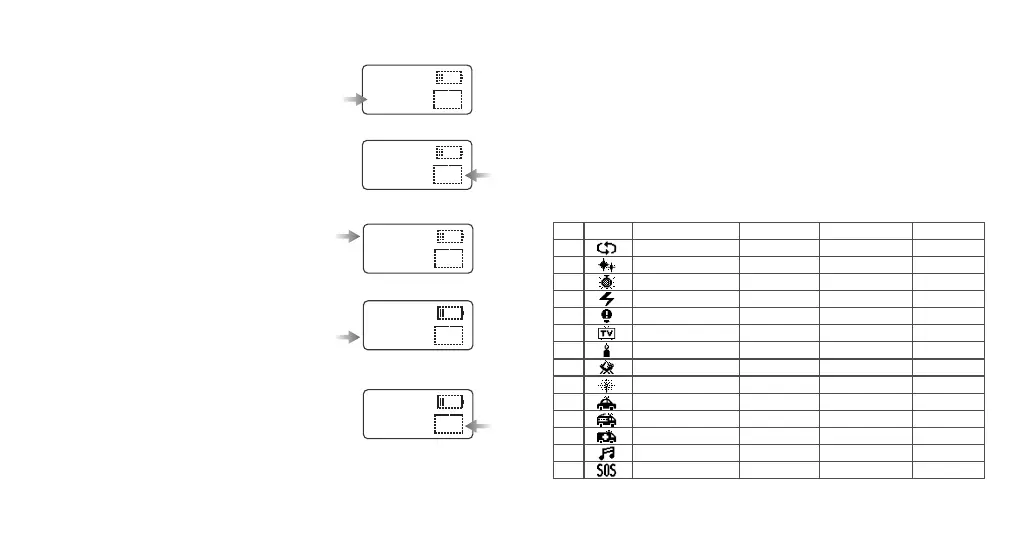
4. FX Situational Special Effects Mode(39 kinds)
4.1 Turn the FN multifunctional select dial to choose different special
effects modes from 1 to 14. And the modes will display circularly by
turning the select dial.
4.2 After choosing the current mode, press down the FN multifunctional
select dial fromⅠ, Ⅱ and Ⅲ. And the modes will display circularly when
keeping pressing the FN multifunctional select dial.
4.3 Adjust light brightness: turn the light brightness select dial to adjust
from 0 to 100%.
4.4 There’re 39 kinds of situational special effects mode which are divided
into 14 categories for your choice.
No.
Display
Situation
DisplayⅠ DisplayⅡ DisplayⅢ
1
2
3
4
5
6
7
8
9
10
11
12
13
14
Colorful lights recycle
Flash
Laser colorful lights
Lightning
Broken bulb
TV
Candle
Fire
Firework
Police car
Fire truck
Ambulance
Music
SOS
Slow speed
Flash
Birthday party
Discontinuous
Discontinuous
Slow speed
Discontinuous
Firewood
Brief
Strong flash
Strong flash
Strong flash
Music I
Medium speed
Press conference
KTV
Frequent
Frequent
Medium speed
Frequent
Campfire
Continuous
Frequent flash
Frequent flash
Frequent flash
Music II
Quick speed
Paparazzi
Disco
Sustainable
Sustainable
Quick speed
Sustainable
Fire hazard
Show
Quick flash
Quick flash
Quick flash
- 22 -- 21 -
CCT
>8500K 100
CCT
>2500K 0
S:50
>H:360
100
>S:100
H:360
100
>S:100
H:360
100
2. Bicolor Mode
2.1 Color temperature adjustment: turn the
FN multifunctional select dial leftwards or
rightwards to adjust the color temperature
from 2500K to 8500K.
2.2 Light brightness adjustment: turn the
light brightness select dial from 0 to 100%.
3. Colorful Mode
3.1 Adjust hue H: press the FN multifunction
select dial and H is selected. Turn the FN
multifunctional select dial leftwards or
rightwards to adjust the hue from 0 to 360°.
3.2 Adjust saturation S: press the FN
multifunction select dial and S is selected.
Turn the FN multifunctional select dial
leftwards or rightwards to adjust the
saturation from 0 to 100.
3.3 Adjust light brightness: turn the light
brightness select dial to adjust the
brightness from 0~100%.



 To Next Page