EN
REMOTE CONTROL BUTTONS
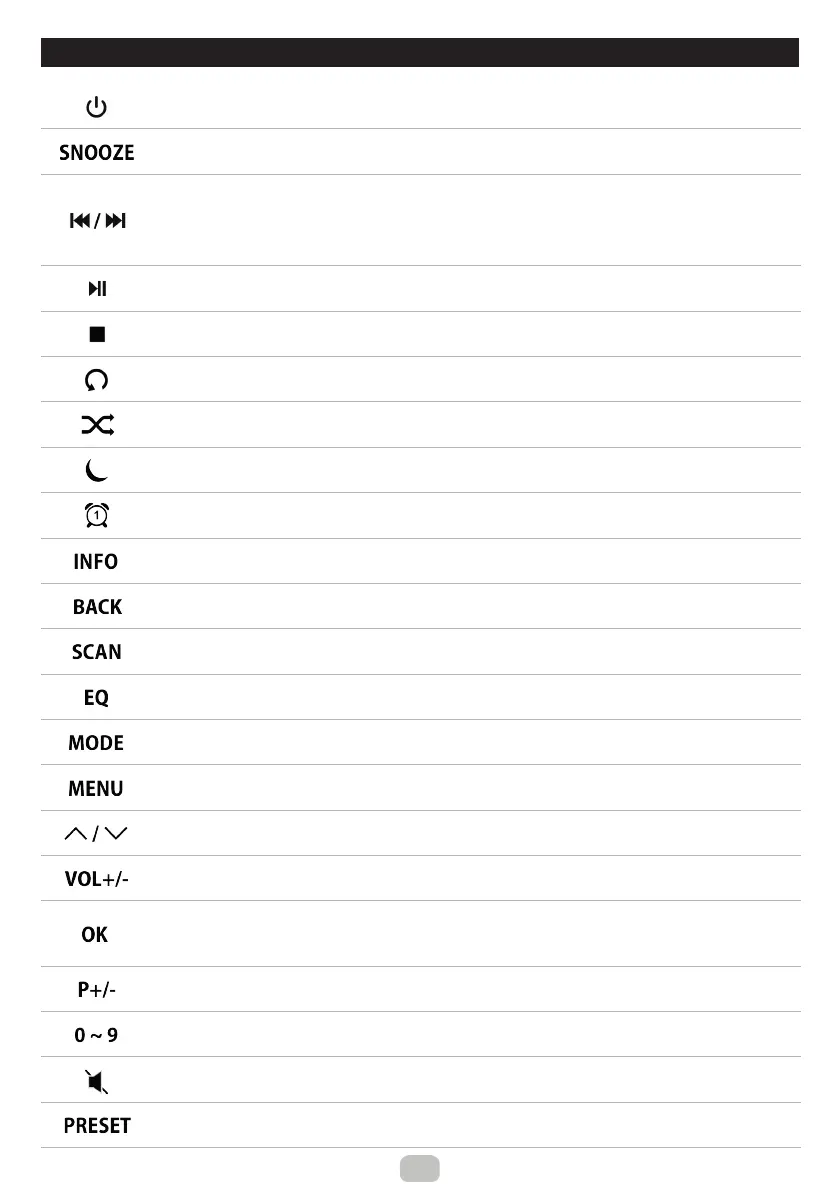
Power on/o
Alarm O
Press repeatedly to set the snooze period
FM: Press repeatedly to set desired station/frequency
Press and hold to search for the previous/next station
DAB: Press to skip to the previous/next station
USB/BT: Press to skip to the previous/next track
USB/BT: Start/Pause playback
USB/BT: Stop playback
USB: Repeat playback
USB: Random playback
Press repeatedly to set the sleep timer
Alarm1/Alarm2 setting
Standby mode: Activation/deactivation of the Alarm 1/Alarm 2
Press repeatedly to view information about the currently playing content
Step back
DAB: Press to view the Station list
FM: Press to search for the next station
DAB: Press to start a full scan
Select equalizer preset
Mode selection
Open menu
Move up/down
FM: Press repeatedly to set desired station/frequency
Increase/Decrease volume
Step forward/Step back in the menu
Conrm entry
FM: Press to search for the next station
DAB : Press to view the picture or information in the full-screen size
Up/down preset selection
Press to select a preset 1-9 directly
Press and hold to store a radio station to the presets 1-9 directly
Mute, unmute
Press and hold to store a radio station to the presets
Press to select a preset


 To Next Page