GL102B USER’S GUIDE GOLANDERUSA.COM
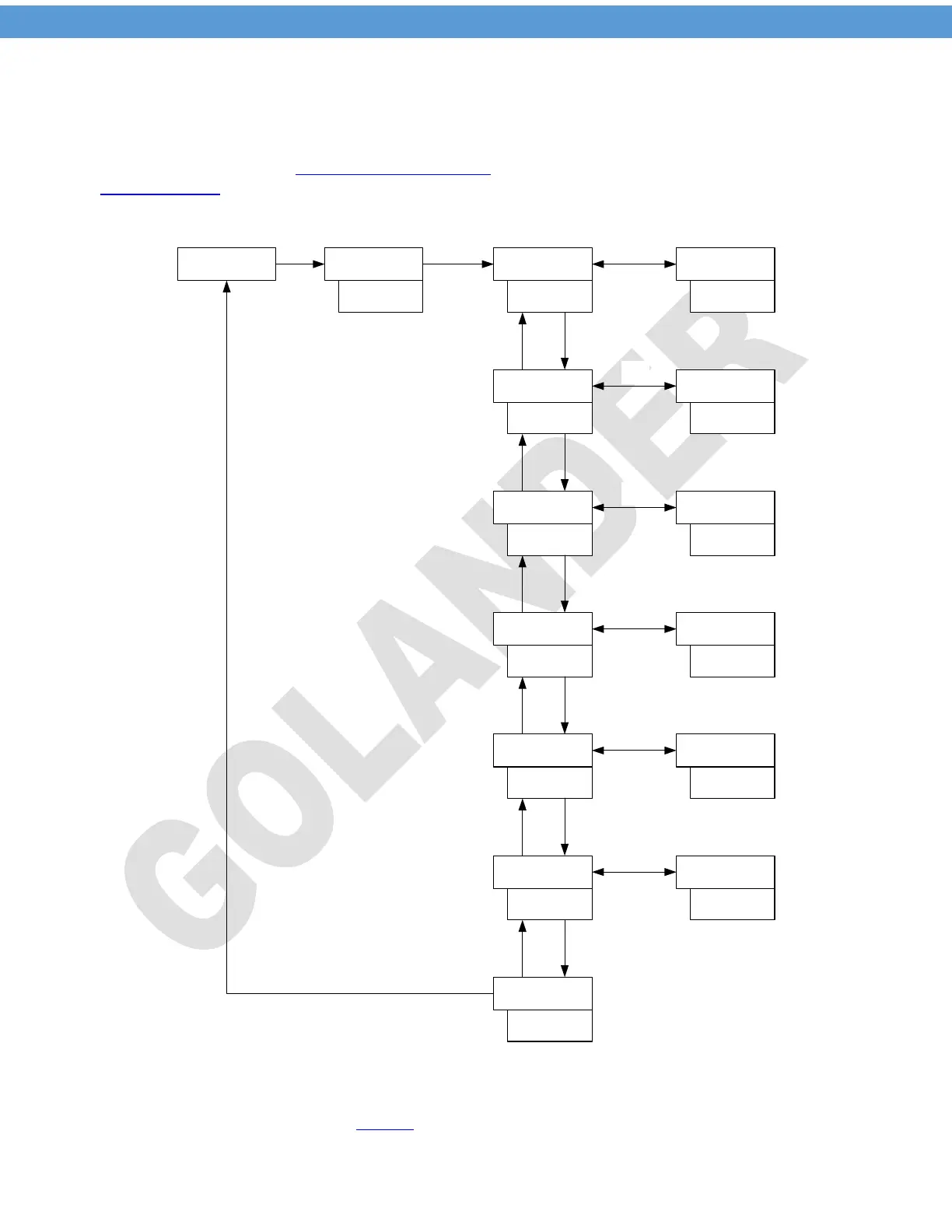
To access the 0089 menu, press and hold the SET key, the display will show 0000, use the UP/DOWN
key to change the value to 0089. Press SET key, the display will change to be Inty. Press UP/DOWN key
to change the display to other parameters, or press SET key again to modify the value for Inty, then press
SET key to confirm the change. When changing the value, user can use the > key to shift the digit. Use the
same operation to access the SV and alarm parameters (input passcode 0001 after pressing the SET key)
and PID parameters (input passcode 0036 after pressing the SET key) menu.
PASS75 INTY
SET
SET
Λ V
Enter 0089
Inty
SET
SET
0089
KOuty
Outy
SET
Hy
Outy
2
Λ V
Hy
SET
Psb
Hy
3
Λ V
PSB
SET
rd
Psb
0
Λ V
rd
SET
Corf
rd
0
Λ V
Corf
SET
End
Corf
1
Λ V
End
Inty
Figure 3. Initial function parameters setup
Note 1. The default setting for the input probe type is K type thermocouple. If not, please change the Inty to
the one of the input type shown in the Table 2
.
4


 To Next Page