LiteRider PTC_GP162_Owner’s Manual Rev C_022114
VI. COMFORT SETTINGS
Arm Width Adjustment
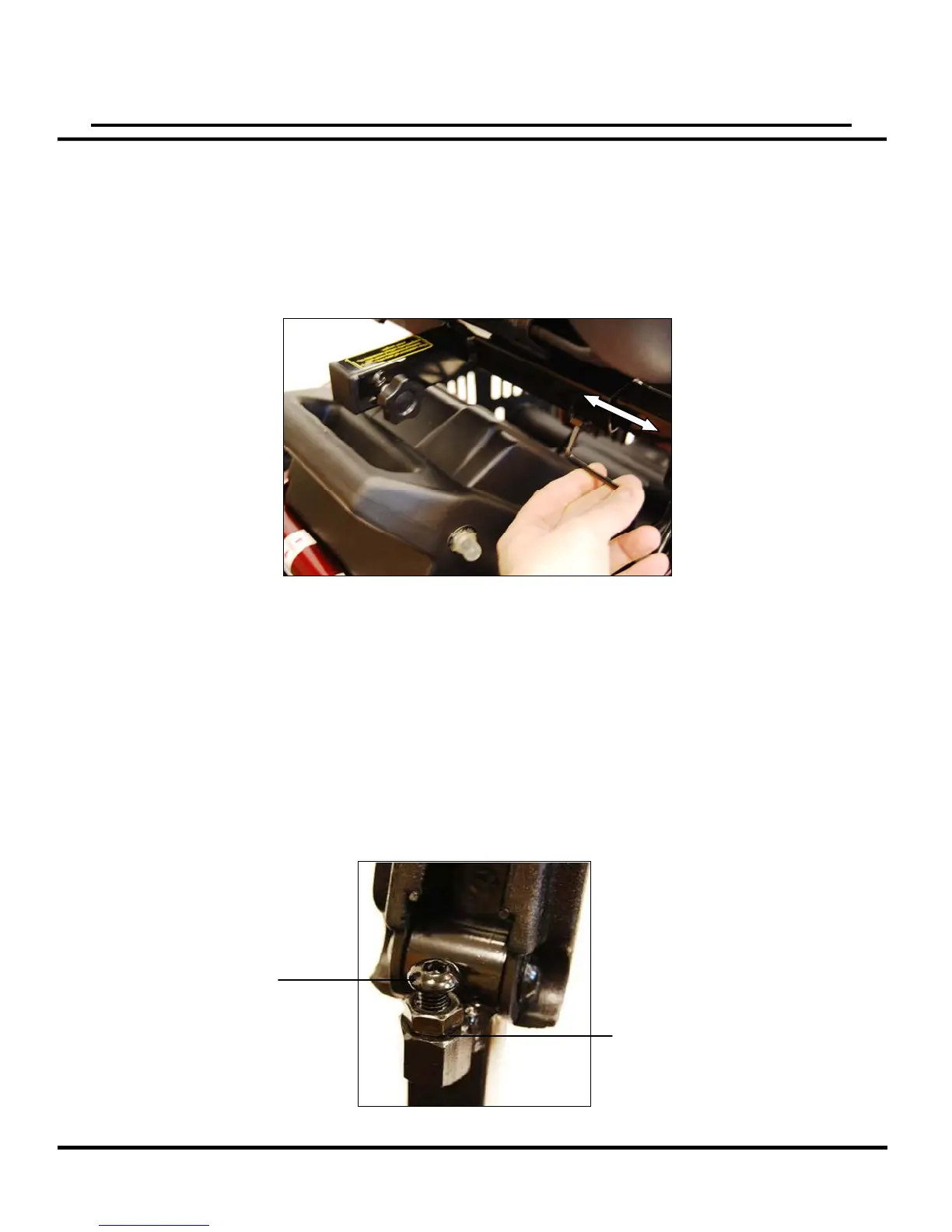
1. Loosen the adjustment screw at the rear of the seat with a 4mm Allen wrench.
See figure 9.
2. Slide the arm in or out to the desired width.
3. Tighten the adjustment screw to secure the arm.
4. Repeat steps 1-3 to adjust the opposite arm.
Note: The backrest can be folded down to minimize chair height during transport.
Armrest Angle Adjustment
1. Lift armrest up. See figure 10.
2. Turn jam nut counter-clockwise to loosen.
3. Turn the adjustment bolt using a 5mm Allen wrench to raise or lower the armrest-
angle. Turning the bolt counter-clockwise will raise the angle. Turning the bolt clockwise
will lower the angle. Turn until desired angle is reached.
4. Re-tighten jam nut by turning clockwise.
5. Repeat steps 1-4 on the opposite armrest.
18
Figure 1
Figure
Adjustment Bolt
(5mm Allen)
Jam Nut
(14mm)



 To Next Page